 PH
PH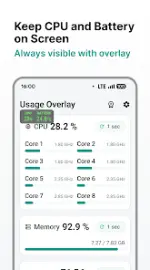

Usage Overlay: Floating System Monitor
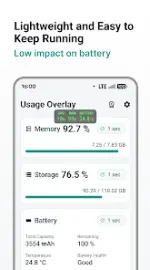
Usage Overlay is a real-time system monitoring tool that functions via a floating overlay, allowing for data tracking while using other applications or games. It provides metrics for CPU, memory, storage, and battery health.Technical Specifications
| Category | Details |
|---|---|
| Android Version | 8.0 and up |
| Supported Architectures | armeabi-v7a, arm64-v8a |
| Required Permissions | System Overlay (Draw over other apps) |
| Storage Support | Internal storage only (External not supported) |
Core Features
- Floating Monitor: Real-time system data overlay compatible with games and apps.
- CPU Tracking: Usage estimates based on current vs. maximum frequency.
- Memory & Storage: Displays usage as a percentage.
- Battery Analytics: Tracks total/remaining capacity, temperature, health, current, voltage, charging/discharging power, and drain rate.
- UI Customization: Adjustable overlay position, size, and selectable data fields.
- System Integration: Supports auto-start on boot.
Pro Version Features
- Update Intervals: Adjustable data refresh frequency.
- UI Personalization: Custom overlay color schemes.
- Ad-Free: Removal of advertisements.
Mod Information (TRUMods)
- Pro/ρáíd features unlocked.
- Optimization: Useless files and debug codes removed.
- Premium status active.
Version History
| Version | Changes |
|---|---|
| 0.1.5 | Fixed application crash. |
| 0.1.4 | Fixed application crash. |
| 0.1.3 | Fixed application crash. |
| 0.1.2 | Fixed launch failure on Android 8. |
| 0.1.1 | Improved battery data retrieval; fixed billing screen crash; minor bug fixes. |
| 0.1.0 | Initial Beta release. |