 PH
PH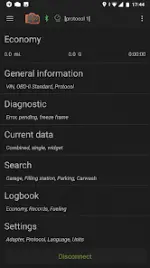
inCarDoc Pro - OBD2 Car Scanner & Diagnostics
inCarDoc Pro is a comprehensive diagnostic tool designed to read real-time and stored parameters from the ECU of OBD-II compliant vehicles. It functions as a fault code scanner, monitor, and digital logbook.General Information
| Category | Details |
|---|---|
| Version | 8.0.1 (Build 15274) |
| Requirements | Android 6.0+ |
| Hardware | ELM327 or compatible OBD2 scanner |
| Connectivity | Bluetooth, WiFi, Kiwi 3 (BLE), V-Gate iCar 3 (BLE), Veepeak (BLE), Carista, Vinli |
| Modes | OBD-II, GPS-only (Speed, Altitude), Demo mode |
Core Functionality
- Car Diagnostics: Reads Check Engine (MIL) state, freeze frame data, and clears Diagnostic Trouble Codes (DTC). Supports Engine and Emission systems as per OBD-II standards.
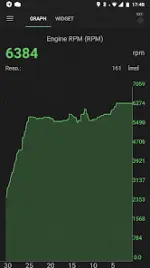
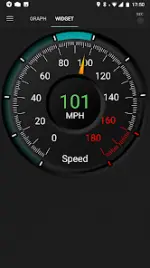
- Real-time Monitoring: Tracks PIDs such as speed, RPM, coolant temperature, pressure, and O2 sensors. Data is presented via analog/digital widgets and charts.
- Economizer (Trip Computer): Tracks instant and average MPG/fuel consumption. Requires MAF or MAP+IAT+RPM support. Users can input Engine displacement and volumetric efficiency for precise calculations.
- Console Mode: Supports direct sending of OBD2 and ELM327 commands for advanced users.
- Logbook: Records fueling, service history, and maintenance notes.
Pro Version Features
- Ad-Free Experience: No advertisements.
- Enhanced Recording: Background parameter recording and real-time trace viewing.
- Advanced Display: Support for multiple parameters and GPS traces.
- Extended Widgets: Dedicated overlays for fuel economy and acceleration data that can be displayed over other applications.
- Customization: Supports custom configurations for non-standard protocols and parameters.
App Permissions
| Permission | Purpose |
|---|---|
| Device & App History | Self-identification when running in background. |
| Location | GPS speed, altitude, and position for fueling/service logs. |
| Photos/Media/Files | Storage and retrieval of Logbook and Debug data. |
| Bluetooth/Internet | Scanner communication and server-side data synchronization. |
| Drawing Over Apps | Presentation of economy data over other active screens. |
Technical Notes & Compatibility
- Conflict Warning: Avoid running multiple OBD-II applications simultaneously to prevent connection interference with the ELM327 adapter.
- Hardware Compatibility: Some low-cost ELM327 v2.1 clones may exhibit stability issues.
- Feature Availability: Scanned parameters are dependent on the specific vehicle make, model, and year.
What's New
- Improved performance and system stability.
- Added user car synchronization support.
- Resolved various bugs and crash instances.