 PH
PH
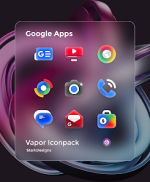
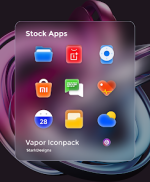
Vapor Icon Pack - Modern Icons v1.7.9 [Patched]
Vapor Icon Pack is a collection of handcrafted vector icons featuring smooth gradients and a modern, futuristic aesthetic. The pack is designed for high-resolution displays and optimized for AMOLED screens, balancing material design principles with a vibrant color palette.Technical Specifications
| Detail | Specification |
| Version | 1.7.9 [Patched] |
| Android Requirement | 5.0 and up |
| Icon Resolution | 256x256px (Ultra-sharp) |
| Total Icons | 3225+ |
| Dashboard | Candybar |
Core Features
- Iconography: Over 1000+ handcrafted vector icons with 52 new additions in the current update.
- Wallpaper & Customization: Includes 50+ cloud-based wallpapers and 5 KLWP presets combining icons, widgets, and wallpapers.
- Dynamic Support: Support for Dynamic Calendars (Google and Samsung) and custom folder icons.
- Search & Preview: Built-in icon search functionality within the dashboard.
Updates and Requests
- Update Frequency: Guaranteed updates twice per week.
- Standard Requests: Up to 10 free icon requests per update.
- Premium Requests: Priority theming available via premium icon request tier.
- Support: 5+ years of planned updates and support for unthemed icons.
Compatibility
A custom launcher is required for full functionality unless the stock launcher natively supports icon packs.| Category | Supported Launchers |
| Popular | Nova, Lawnchair, Smart Launcher, Niagara, Action, ABC |
| Others | ADW, Apex, Atom, Aviate, Holo, Lucid, M, Mini, Next, Nougat, Solo, V, ZenUI, Zero |
Installation Instructions
- Install a compatible custom launcher.
- Open the Vapor Icon Pack dashboard.
- Navigate to the Apply section.
- Select the desired launcher to apply the icons.
What's New (v1.7.9)
- 52 new icons themed.
- Total icon count exceeds 3225.
- First weekly update live.
- Enhanced premium icon request processing.