 PH
PH

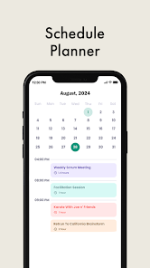
Calendar App: Schedule Planner & Event Management
A comprehensive scheduling utility designed for managing tasks, to-do lists, and events with integrated call-tracking functionality. The application supports synchronization with external calendars and provides multiple visualization modes for personal, family, and professional use.Technical Specifications
| Category | Details |
| OS Requirement | Android 8.0 and up |
| Version Info | Pro Features Unlocked |
| Architecture | arm64-v8a, armeabi-v7a |
| Localization | Multi-language support (AF, AR, DE, EN, ES, FR, HI, IT, JA, KO, RU, ZH, etc.) |
| Mod Features | Debug info removed; Premium features enabled |
Core Functionality
- Instant Event Management: Post-call interface displays latest calendar entries alongside call details for immediate scheduling or event modification.
- Multi-View Support: Toggle between daily, 3-day, weekly, monthly, and yearly agenda perspectives.
- Task Management: Integrated "MinimaList" to-do lists and checklists with completion tracking.
- Synchronization: Compatible with Google Calendar, Teamup, and iCalendar formats for collaborative scheduling.
- Customization: Support for light/dark themes, adjustable color schemes, and multiple weekly layout options.
Feature Set
| Feature | Description |
| Location Integration | Select and embed map coordinates directly into digital calendar entries. |
| Notification System | Customizable reminders with user-defined delivery timing and recurrence intervals. |
| Categorization | Tag entries using "Hashtag Expert" categories (e.g., Gym, Anniversary, Out of Office). |
| Global Holidays | Import national holiday data for selected countries. |
| Collaboration | Share calendars, invite participants to meetings, and manage shared family schedules. |
| Widgets | Home screen widgets for viewing and editing tasks and schedules (TimeTree/Fantastical style). |
| Data Security | Built-in backup and restore functionality for user data and configurations. |
Navigation and Workflow
- Entry Creation: Tap any date to input events, start/finish times, locations, and category tags.
- Advanced Options: Access recurrence settings and detailed notes within the extended entry menu.
- Main Menu: Centralized hub for view customization, task list creation, and meeting management.
- Settings: Configuration panel for global application themes and UI adjustments.