 PH
PH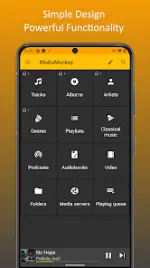
MediaMonkey v2.1.2.1304 [Pro] [Mod]
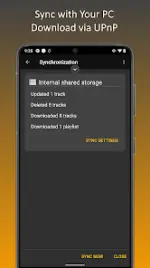
MediaMonkey is a professional-grade media manager and player designed to handle large music and video collections. It facilitates advanced synchronization between Android devices and MediaMonkey for Windows, ensuring metadata, play history, and library structure remain consistent across platforms.Core Feature Set
| Category | Features & Capabilities |
| Library Management | Manage Music, Classical, Audiobooks, Podcasts, and Video. Navigate by Artist, Album, Composer, Genre, or Playlist. Supports multi-attribute tagging (e.g., Genre=Rock;Alternative) and manual metadata/artwork editing. |
| Synchronization | Sync tracks, videos, playlists, ratings, lyrics, and play history with MediaMonkey for Windows. Supports USB (unrestricted) and Wi-Fi synchronization. |
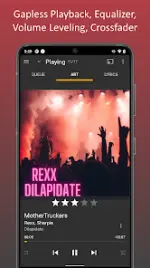
| Playback & Audio | 5-band equalizer, Replay Gain (volume leveling), and Sleep timer. Supports bookmarking for long-form content (Audiobooks/Video). |
| Connectivity | Cast to Google Chromecast or UPnP/DLNA devices. Access and download media from UPnP/DLNA servers. Android Auto integration included. |
| Playlist Controls | Hierarchical playlist support. Tools for adding, removing, and re-ordering tracks with full synchronization to desktop. |
| Customization | Home screen and lock screen widgets, custom themes, and the ability to set tracks as ringtones. |
Technical Specifications & Permissions
The application utilizes specific permissions to facilitate advanced media management and network functionality:- Network & Connectivity:
ACCESS_WIFI_STATE,CHANGE_WIFI_MULTICAST_STATE, andINTERNETare utilized for Wi-Fi Sync, UPnP, and Casting. - System Integration:
WRITE_EXTERNAL_STORAGEfor media directory management;WRITE_SETTINGSfor ringtone and alarm configuration;INSTALL_SHORTCUTfor playlist icons. - Performance:
WAKE_LOCKandREQUEST_IGNORE_BATTERY_OPTIMIZATIONSprevent process termination during extended sync operations. - Specialized:
CAMERAfor QR code configuration of MediaMonkey Servers;REQUEST_DELETE_PACKAGESfor managing scrobbling clients.
Version History & Changelog
Build 1304 (Current)
- Mod Features: Pro and Add-on features unlocked; Unwanted Permissions, Receivers, Providers, and Services disabled/removed; Debug code and Analytics/Crashlytics stripped.
Build 1290
- Sync Improvements: Added VPN connection support. Fixed issues with incomplete Autoplaylists and playlist hierarchy updates. Improved error handling.
- Misc: Enhanced artwork lookup and general stability.
Build 1285
- UI/UX: Improved menus and playlist editing interface. Implementation of adaptive backgrounds for Albums.
- Compatibility: Added support for 16 KB page size.
- Bug Fixes: Resolved UPnP casting issues (track skipping on Wiim/Marantz), fixed "Missing codec" errors, and corrected volume leveling for quiet tracks. Fixed an issue where tracks updated unnecessarily during sync.
Data Handling & Security
MediaMonkey operates on a local-first data model. Media files and metadata are transmitted directly between the Android device and the user's private Windows server or casting hardware via encrypted transit. No media data, play history, or file metadata is shared with Ventis Media, Inc. Third-party scrobbling (Last.fm) and metadata lookups are opt-in features.Download