 PH
PH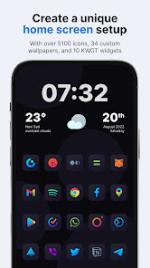
Nova Dark Icon Pack v7.2.4
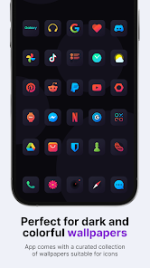
Nova Dark is a comprehensive personalization suite featuring vibrant gradient glyphs set against dark, rounded square backgrounds. It is designed to provide a unified aesthetic for both the home screen and app drawer.Technical Specifications
| Feature | Details |
| Version | v7.2.4 [Patched] |
| Android Requirement | 8.0 and up |
| Icon Resolution | 192 x 192 px |
| Total Icons | 6,485 |
| Wallpapers | 34 Custom (Integrated) |
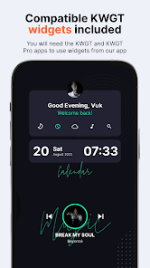
| Widgets | 10 KWGT Widgets (Requires KWGT and KWGT Pro) |
| Update Frequency | Bi-weekly |
Key Features
- Icon Masking: Supports masking for unthemed icons to maintain visual consistency.
- Dynamic Calendar: Support for dynamic calendar icons.
- Manual Assets: Includes specialized folder and miscellaneous icons for manual application.
- Alternative Glyphs: Multiple alternate icon designs for popular applications.
- Request System: Integrated Free and Premium icon request tools.
- Mod Features: Patched version with Premium access and functional icon requests.
Launcher Compatibility
| Application Method | Supported Launchers |
| Direct Support | Action, ADW, ADW ex, Apex, Go, Google Now, Holo, Holo ICS, Lawnchair, LG Home, LineageOS, Lucid, Nova, Niagara, Pixel, Posidon, Smart, Smart Pro, Solo, Square Home, TSF. |
| System Support | Samsung OneUI (via Theme Park), OnePlus, Oppo Color OS, Nothing Launcher. |
| Manual Support | Most other launchers via internal launcher settings. |
Icon Request Procedure
- Access the Request card within the application.
- Select the desired apps for theming.
- Use the Floating Send button and select Gmail as the client (to ensure the required ZIP file remains attached).
- Do not modify the generated ZIP file, subject line, or email body to ensure request validity.
Recent Updates (v7.2.4)
- Added 10 new icons.