 PH
PH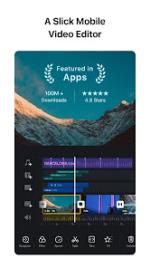
VN Video Editor: Technical Overview and Features
VN is a multi-track video editing application designed for both mobile and desktop environments. It supports non-destructive editing and provides a suite of professional tools without watermarking.System Specifications & Build Info
| Category | Details |
| OS Requirement | Android 7.0 and up |
| Architecture | arm64-v8a, armeabi-v7a |
| Supported Languages | en, en-AU, en-CA, en-GB, en-IN, en-SS, en-XC |
| Version Highlights | AIKit Support (Background Generating), Bugfixes |
| Mod Status | Pro Features Unlocked, Debug Info Removed |
Key Feature Modules
1. Timeline & Precision Editing
- Multi-track Timeline: Support for picture-in-picture (PiP), photos, stickers, and text layers.
- Rough Cut Interface: PC-track design with precision adjustments down to 0.05 seconds.
- Clip Management: Drag-and-drop reordering and swipe-to-delete functionality.
- Draft System: Supports undo/redo and non-destructive editing to preserve original assets.
2. Advanced Video Processing
- Speed Curve: Variable playback speed control (Time Remapping) with 6 presets.
- Keyframe Animation: 19 built-in animation effects with customizable curves.
- Intelligent Cutout: AI-driven background removal.
- Freeze Frame: Generates a static image from a video frame within 1.5 seconds.
- Reverse & Zoom: Specialized playback modes and cinematic zoom effects.
3. Audio & Text Tools
- Music Beats: Manual and automatic beat-marking for rhythmic editing.
- Voice-over: High-quality in-app recording.
- Auto-Captioning: One-click audio-to-subtitle conversion.
- Text-to-Speech: AI-generated voice-overs with multiple voice profiles.
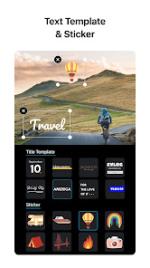
- Rich Text: Customizable fonts, styles, colors, spacing, and pre-designed templates.
4. Effects & Color Grading
- LUT Support: Import external
.cubefiles for cinematic color grading. - Transitions: Adjustable timing and speed for blur, overlay, and motion transitions.
- Filters: Integrated library of cinematic presets.
5. Workflow & Export
- Material Import: Supports bulk import via Zip files, Wi-Fi, and AirDrop for music, fonts, and stickers.
- Collaboration: Cross-platform project transfer between mobile and desktop (AirDrop/iCloud).
- Security: "Protection Mode" allows setting expiration dates and passwords for drafts.
- HDR Support: Editing and sharing of Dolby Vision HDR (iPhone 12 and newer).
- Export Settings:
- Resolution: Up to 4K
- Frame Rate: Up to 60 FPS
- Bitrate: Fully customizable