 PH
PH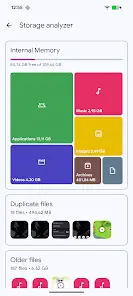
Application Overview
Solid Explorer is a dual-pane file manager inspired by traditional file commander applications, designed for Android and Chromebook environments with support for mouse and keyboard input.Technical Specifications
| Category | Details |
| Version | v3.4.3 |
| Android OS | 6.0+ |
| Interface | Dual-pane layout, indexed search with filters |
| Architecture | Main storage, SD card, USB OTG, Root access |
Core Functionality
- File Organization: Automatic categorization into collections (Downloads, Recent, Photos, Videos, Music, Documents, Apps).
- Remote & Cloud Management: Support for Google Drive, OneDrive, Dropbox, Box, Owncloud, SugarSync, MediaFire, Yandex, and Mega (requires add-on).
- Network Protocols: FTP, SFTP, SMB (Samba), and WebDav.
- Security: AES encryption with secure folder integration; supports password and fingerprint authentication.
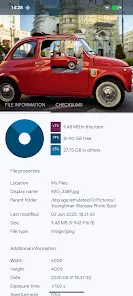
- Storage Analysis: Folder properties provide space usage percentages and identify large files via size filters.
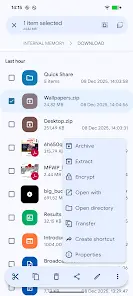
- Utilities: Batch renaming with patterns, FTP Server for PC access, and internal viewers for images, music, and text.
- Archive Support: ZIP, 7ZIP, RAR, and TAR.
Version History & Modification Log
| Type | Details |
| v3.4.3 Changes | General crash fixes. |
| Modification | Full/ρáíd features unlocked; no additional key required. |
| Privacy/Optimization | Removed unwanted Permissions, Receivers, Providers, and Services. Disabled Analytics, Crashlytics, Firebase, and startup triggers. |
| Ad Removal | Permissions, links, and layouts removed; methods nullified. |
| Security/Debug | Debug code removed; premium features enabled. |