 PH
PH

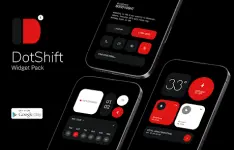
DotShift Widgets for KWGT
DotShift is a collection of minimal, dot-matrix inspired widgets for KWGT, utilizing design elements from the Nothing aesthetic. It features clean layouts, dot-based graphics, and modern typography suitable for various home screen setups.App Specifications
| Category | Specification |
| Current Version | v1.1.2 [Patched] |
| Android Requirement | 5.0 and up |
| Total Widgets | 94 high-quality unique designs |
| Architecture | Universal |
| Languages | Multi-language support |
| Dependencies | KWGT PRO App and Pro Key (Required) |
Installation Requirements & Recommendations
- KWGT Framework: KWGT PRO application (not the free version).
- Launcher: A custom launcher, such as Nova Launcher, is recommended for optimal widget placement and scaling.
- Scaling: Use the scaling options within the KWGT "Layer" settings to adjust the widget size if it does not fit the grid correctly.
Installation Steps
- Install DotShift Widgets and the KWGT PRO application.
- Perform a long tap on the home screen and select the Widget menu.
- Add a KWGT Widget container to the screen.
- Tap the empty widget and select DotShift Widgets For KWGT.
- Choose the preferred design from the list.
Package & Mod Information
| Feature | Details |
| Status | ρáíd / Patched / Premium |
| Root Requirement | No root required |
| Security | Original package signature changed |
| Bypass | No Lucky Patcher or Modded Google Play required |
Changelog (v1.1.2)
- Added 7 new widgets.
- Total widget count increased to 94.