PH
PH
Root Checker Advanced Premium v2.1.2
Category: You do not have permission to view the full content of this post. Log in or register now., You do not have permission to view the full content of this post. Log in or register now.
Author: You do not have permission to view the full content of this post. Log in or register now.
Added: 30-10-2016, 09:04 AM
Current version: 2.1.2

ATTENTION: THIS APP WILL NOT ROOT YOUR PHONE, IT JUST HELPS YOU TO CHECK ROOT STATUS OF YOUR You do not have permission to view the full content of this post. Log in or register now. DEVICE!
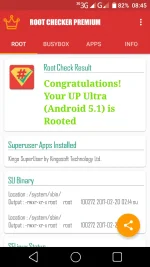
Root Checker Advanced gives you an easy way to know if you have SuperUser (or check ROOT access) in your Android Device. Also, you can Check Busybox installation in your system. It shows you the system paths for both Superuser and busybox binaries.
Root Checker Advanced give you an easy explanation of what is Root and what is Busybox.
The app has been updated with Material design and supports Android 7 (Nougat), Marshmallow, Lollipop, Icecream Sandwich, Jellybean, Gingerbread and even froyo
If you have any doubts regarding root like What is Root? What is BusyBox? How to root my phone? All the questions will be answered in the application. Also, if you have any question's that you want to know but are not there in Info, It's very easy, download the application, go to Info Screen, Scroll down to the bottom and select the yellow FAQ You do not have permission to view the full content of this post. Log in or register now., now you send us a question regarding Root and we'll answer it within 2 days.
DO YOU WANT MORE INFORMATION ABOUT ROOT AND BUSYBOX IN YOUR PHONE?
ρáíd version features:
-More Root Information
-More Busybox Information
-Better experience
-Find the best root You do not have permission to view the full content of this post. Log in or register now.
-Daily Premium Updates
-No Ads
HOW CAN I ROOT MY ANDROID PHONE?
If you are finding how to root your phone, try to search in Google or XDA-Developers forum, there are lots of useful guides to root your Android phone.
The model that you need to follow to find a good guide is something like that:
"How to Root" + Phone Name
For example, if I have a Samsung Galaxy Mini, you will search --> How to Root Galaxy Mini, and if you don't find it I can add more information ---> How to Root Galaxy Mini S5570I.
Easy, right?
What is New:
- Big Update, App now In Material Design Goodness
- You do not have permission to view the full content of this post. Log in or register now. Root and Busybox detection
- Support for Android Nougat and Marshmallow added
- More FAQs added
You do not have permission to view the full content of this post. Log in or register now.