PH
PH
You do not have permission to view the full content of this post. Log in or register now.
What is Revo Uninstaller Pro Final?
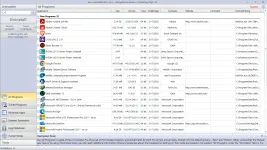
Revo Uninstaller Pro Final is a powerful uninstaller tool designed to completely remove unwanted programs and their leftover files from your Windows PC. Unlike the standard Windows uninstaller, Revo Uninstaller scans for and deletes registry entries, program files, and folders that other tools often leave behind. It also includes a suite of cleaning and optimization tools to help you maintain your system’s performance.You do not have permission to view the full content of this post. Log in or register now.
Key Features of Revo Uninstaller Pro Final
Advanced Uninstallation
- Complete Software Removal: Ensures all traces of uninstalled programs are deleted.
- Stubborn Program Removal: Uninstall programs that are difficult to remove with standard tools.
- Batch Uninstall: Remove multiple programs at once for faster cleanup.
System Optimization Tools
- Auto Start Manager: Disable programs that start automatically with Windows to speed up boot time.
- Junk Files Cleaner: Find and remove unnecessary files to free up disk space.
- Browsers History Cleaner: Erase browsing history and temporary internet files from popular browsers.
- Office History Cleaner: Remove recently used file history from MS Office applications.
- Windows History Cleaner: Delete usage tracks and temporary files saved by Windows.
Security Tools
- Unrecoverable Delete Tool: Permanently erase files and folders to prevent recovery.
- Evidence Remover: Securely wipe already deleted data to ensure it’s unrecoverable.
Additional Features
- Windows Tools Manager: Access useful system tools bundled with Windows.
- Portable Version: Use Revo Uninstaller on multiple devices without installation.
- Customizable Interface: Tailor the software to suit your preferences.
Why Choose Revo Uninstaller Pro Final for Windows?
- Thorough Uninstallation: Removes all traces of uninstalled programs, including registry entries and leftover files.
- System Optimization: Improves performance by cleaning junk files and managing startup programs.
- Enhanced Security: Permanently deletes sensitive files to protect your privacy.
- User-Friendly: Intuitive interface and easy-to-use tools make it accessible for all users.
Portable Revo Uninstaller Pro
The Portable Revo Uninstaller Pro offers unmatched convenience for users on the go. It allows you to uninstall programs, clean junk files, and optimize system performance without installation. Perfect for multiple devices, it ensures complete software removal and enhanced privacy wherever you work. A must-have tool for maintaining a clean and efficient PC!How to Use Revo Uninstaller Pro Final
- Download and Install: Download Revo Uninstaller Pro Final from the official website and install it on your Windows PC.
- Uninstall Programs: Select the program you want to remove and let Revo Uninstaller scan for leftover files and registry entries.
- Clean Junk Files: Use the Junk Files Cleaner to free up disk space.
- Optimize Startup: Disable unnecessary startup programs with the Auto Start Manager.
- Secure Deletion: Use the Unrecoverable Delete Tool or Evidence Remover to permanently erase sensitive files.
- Explore Additional Tools: Utilize the Browsers History Cleaner, Office History Cleaner, and Windows Tools Manager for further optimization.
Revo Uninstaller Pro Final vs. Other Uninstallers
While there are many uninstaller tools available, Revo Uninstaller Pro Final stands out for its:- Comprehensive Removal: Ensures no leftover files or registry entries remain after uninstallation.
- Advanced Cleaning Tools: Includes tools for system optimization and privacy protection.
- Ease of Use: Simple interface and powerful features make it accessible for all users.
- Portability: Use the portable version on multiple devices without installation.
You know the drill.....................