 PH
PH- Duration & Warranty (months)
- 12
- Price in ₱
- 500
- Payment method
- Gcash
Sidify Spotify Music Converter Review – Key Features & How-To
What Makes Sidify Stand Out?
What Makes Sidify Stand Out?
 Download Spotify Music & Playlist
- Works with Spotify Free & Premium – Convert Spotify songs, playlists, podcasts, audiobooks, etc. Free users get ad-free high-quality audio; Premium users keep music after subscription ends
- Multiple Formats – Output to MP3, AAC, WAV, FLAC, AIFF, ALAC for any device
- Original Quality – Preserves Spotify's sound quality, up to 320 kbps MP3
- Keeps Metadata & Lyrics – Retains ID3 tags; exports lyrics as text/LRC
- Fast Conversion – Up to 10x speed with batch processing
- Transfer to Apple Music – One-click sync to Apple Music
- Built-in Tools – Format converter, CD burner, tag editor, audio editor, Audible converter
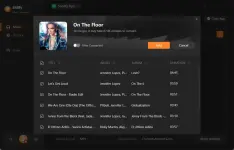
- Add Music – Open Sidify, click "+", paste Spotify URL, select tracks, click Add
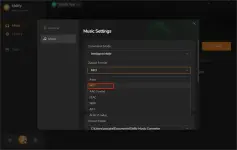
- Set Output – Click Settings icon, choose MP3 format and output folder
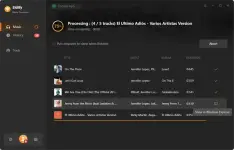
- Convert – Click Convert to download to your computer (find files in History tab)
