 PH
PH
Nice Mind Map - Mind mapping v11.4.0 b141 [Premium]
Nice Mind Map is a productivity suite integrating mind mapping, task management, and document creation. It utilizes graphic and textual representation to organize thoughts, link keywords with visual anchors, and facilitate brainstorming.Technical Specifications
| Category | Details |
| Version | v11.4.0 b141 (Premium) |
| Required OS | Android 6.0+ |
| Architecture | arm7 + arm64 |
| File Size | 19.7 MB |
| SHA-256 | 42d06ef94171d7ad0c978c8e4f68c969da4514c3190f34543954c2b10fcdc05d |
Core Functionality
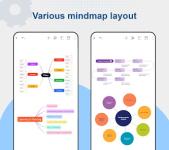
- Mind Mapping: Multiple layouts including multi-layered tree, fish-bone, and table styles. Supports floating topics and sub-subject editing.
- TODO List: Integrated task management with calendar reminders, priority markers, progress tracking, and multi-selection support.
- Quick Doc: Light documentation tool for rapid note-taking and structured summaries.
- Input & Conversion: Supports Text Scan, PDF Scan, and LaTeX input.
- PC Version: Cross-platform availability to synchronize workflows between mobile and desktop.
Key Features
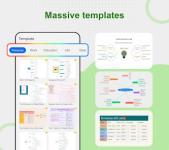
- Customization: Variety of themes, styles, and templates (Personal, Work, Education, Life). Supports font color changes and appearance modifications.
- Rich Media: Integration of images (with cropping tool), Emojis, audio, hyperlinks, and attachments.
- Organizational Tools: Outline mode, multi-sheet support, folder management, and node serial numbering.
- Advanced Editing: Find & Replace, copy/paste mind nodes, and boundary/callout additions.
- Presentation & Export: Includes a dedicated Presentation Mode. Export formats include PNG, PDF, OPML, and Markdown.
- Cloud Integration: Sync support for Google Drive and OneDrive.
- System Features: Dark mode support and localization for 9 languages.
Use Cases
- Business: Meeting shorthand, project planning, presentations, and qualitative analysis.
- Education: Course notes, lesson preparation, and semester planning.
- Personal: Goal setting, shopping lists, resumes, and inspiration gathering.
Version History
v11.3 Update Log:- Introduced AI feature entry point on the homepage.
- Added list view for file management.
- Enabled multi-selection for Todo items.
- Optimized Todo editing interface UI.
- General bug fixes and UX improvements.