 PH
PH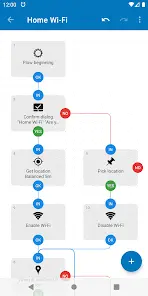
Application Overview
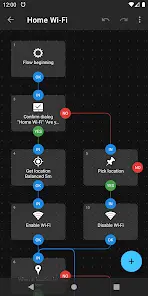
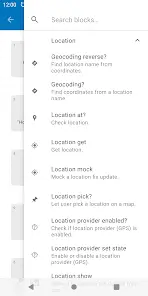
Automate is an Android automation application that enables the execution of complex tasks through a flowchart-based interface. Users can construct automation routines by connecting blocks, utilizing predefined options, or implementing custom E×ρréššions, variables, and functions. The application includes over 400 building blocks for granular control over system features and supports community-shared automation "flows."Technical Specifications
| Detail | Information |
| Minimum Android Version | 4.0+ |
| Architecture | Universal |
| Size | 10.8 MB |
| SHA-256 | 4a0ff51cbbda18e21e101e4d6cb39be58a9b62466eebb054a6ed2c866b201196 |
Core Functionality
- Triggers and Conditions: Supports execution based on geofencing, calendar events, active applications, network connectivity, battery status, physical activity, and time-based scheduling.
- Manual Control: Initiates tasks via home screen widgets, shortcuts, Quick Settings tiles, notification actions, floating buttons, hardware/media buttons, and NFC tag scanning.
- File Management: Supports CRUD operations on local, SD card, and USB storage; zip extraction/compression; and processing of text, CSV, and XML documents.
- Communications: Manages SMS, MMS, e-mail, and Gmail; handles call screening; features a built-in web server for HTTP request processing.
- Media and Imaging: Provides camera control, screen capture, audio/video recording, OCR, barcode scanning, QR generation, and bulk image processing (JPEG/PNG).
- System Configuration: Modifies system settings, including audio, brightness, DND, network (3G/4G/5G), Wi-Fi, hotspot, airplane mode, and power management.
- Integration: Supports Locale/Tasker plug-in API; manages app activities/services, broadcasts, content providers, shell command execution, and UI interaction simulation.
- Backups: Facilitates file and application backups to removable storage or remote services (Google Drive, OneDrive, FTP, HTTP).
Required Permissions
- Accessibility API: Required for UI interaction, intercepting key presses, screenshots, toast message reading, foreground app detection, and fingerprint gesture capture.
- Device Administrator: Required for monitoring failed login attempts and engaging screen locks.
Recent Changelog
- Added Bigint value type support.
- Added
bigintandruntimefunctions. - Added Content write block.
- Updated Content query and Database query blocks with Column result type input arguments.
- Renamed Content copy block to Content read.
- Fixed Contact query block to correctly handle empty Query values.
Version Information
- Version: 1.51.0 (Build 261)
- Status: Unlocked/Premium features enabled