 PH
PHPushBack09
Established
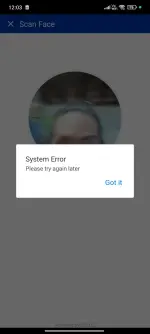
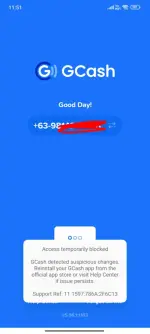
Gcash New System Update bug
"Access Temporarily Blocked"
1st step.
go to phone setting>app setting hanapin si gcash,iforce stop, clear data at uninstall.
2nd step.
reinstall gcash using official app store.
3rd step(important).
Open gcash app then may makikita ka mag auto-update na notif ng features ng gcash medjo mabilis lng matapos yun kaya dpt bago matapos macancel mo siya pra di magtuloy.
4th step.
start to log in your gcash account and the error prompt while face verification should fix.
5th(optional).
if kada open ng gcash app nag autodownload padin ng features gawin mo lng to.
pumunta sa phone setting > app setting hanapin si google playstore iforce stop at idisable.
"Access Temporarily Blocked"
1st step.
go to phone setting>app setting hanapin si gcash,iforce stop, clear data at uninstall.
2nd step.
reinstall gcash using official app store.
3rd step(important).
Open gcash app then may makikita ka mag auto-update na notif ng features ng gcash medjo mabilis lng matapos yun kaya dpt bago matapos macancel mo siya pra di magtuloy.
4th step.
start to log in your gcash account and the error prompt while face verification should fix.
5th(optional).
if kada open ng gcash app nag autodownload padin ng features gawin mo lng to.
pumunta sa phone setting > app setting hanapin si google playstore iforce stop at idisable.