PH
PHBoss Namek
Forum Veteran
 Gusto mo ba mag screen record ng ONLINE WEBINARS o meetings pero ayaw mong malaman nila na nagre-record ka?
O baka naman…
Naghahanap ka ng screen recorder para sa Zoom, Google Meet, Teams, online classes, webinars, o gameplay na high quality at walang lag?
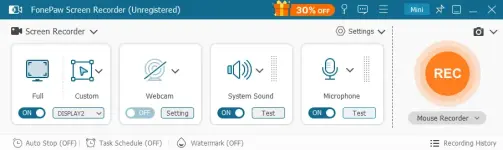
Maraming gumagamit ngayon ng FonePaw Screen Recorder dahil isa ito sa pinaka madaling gamitin at lightweight screen recording tool para sa PC.
 Pero eto ang problem ng karamihan ng users…
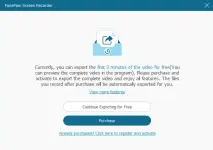
Kapag ginamit mo ang FREE version, hanggang 3 minutes lang ang pwede mong i-export sa video.
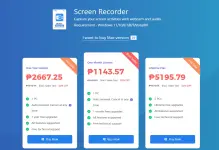
Kaya napipilitan ang ibang users na mag subscribe sa kanilang plan na umaabot ng ₱1000+ per month o higit pa para sa lifetime license para lang ma-save ang buong recording.
 Kaya ko ito shinare dahil may nalaman akong paraan para ma-solve ito.
May paraan para ma-save o ma-extract ang buong video recordings kahit mahaba ang meeting nang hindi mo na kailangang mag avail ng kanilang monthly subscription.
Kaya hindi mo na kailangang gumastos ng mahal para lang ma-save ang mahahabang recordings ng meetings, webinars, o tutorials.
 BAKIT MARAMING GUMAGAMIT NG FONEPAW?
 Record screen video without watermark Record computer system sound Record microphone / voice Record webcam habang nagre-record HD recording up to 1080p 60fps Lightweight – walang lag
 EXTRA FEATURES
• Video trimming & editing tools
• Compress video recordings
• Merge multiple clips
• Convert videos to different formats
• Record specific application window only
 Perfect ito para sa:
 Remote workers
 Content creators
 Gamers
 Students
 Teachers / educators
You can download the FonePaw first here
You do not have permission to view the full content of this post. Log in or register now.
 Kung gusto mong malaman kung paano ma-save ang full recordings nang hindi na nag-aavail ng subscription…
Comment “INTERESTED” sa baba