 PH
PH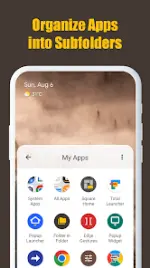

Technical Overview: Folder in Folder (Premium)
Folder in Folder provides an advanced organizational framework for Android devices, extending the capabilities of native launchers. While standard interfaces often restrict home screen layouts to a single layer of grouping, this utility enables a multi-level nested hierarchy.The application addresses the limitations of standard icon management by allowing users to embed folders within other folders, facilitating a highly structured interface for managing extensive application libraries.
Key Functionalities
- Nested Folders: Establish a sophisticated organizational structure by placing subfolders within primary directories.
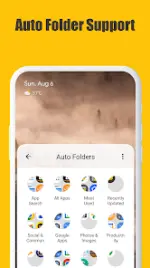
- Smart Auto-Categorization: The system automatically organizes installed applications to minimize manual sorting requirements.
- Custom Widgets: Integrated folder widgets allow for direct application launching from the home screen while maintaining the nested configuration.
- Enhanced Scaling: Support for extra-large icon configurations and specific widget scaling within the settings menu.
Technical Specifications
| Attribute | Details |
| Version | v1.5.1 (Build 10501) |
| Status | Premium Unlocked |
| Compatibility | Android 8.0 and above |
| Target API | Android 16 |
| Architecture | Universal |
| File Size | 4.1 MB |
| SHA-256 | c5a49ad25e3e5b323f510bd330ec0b95d67be4fadb2962ee7c725a01dd6b3462 |
Recent Updates & Changelog
- Expanded Localization: Added support for multiple additional languages.
- New Widget Dimensions: Introduced 4x4, 5x5, 1x5, and 5x1 grid options.
- UI Enhancements: Added "Extra large" icon size options for both main settings and specific widget configurations.
- Optimization: Resolved known stability issues and refined general performance.
Modification Details
- Feature Set: Premium features enabled.
- Configuration: Cleaned resources and optimized manifest for faster deployment.
Download