 PH
PH
MX Player Media Suite
MX Player is a high-performance media solution for Android, engineered to optimize playback through sophisticated decoding methods. By integrating both video and music functionality, the application leverages hardware acceleration to ensure seamless performance across an extensive range of file formats.Core Technical Features
- Advanced HW+ Decoding: Employs an HW+ decoder to significantly expand hardware acceleration capabilities.
- Multi-Core Optimization: As a pioneer in multi-core decoding for mobile environments, internal testing demonstrates performance gains of up to 70% compared to single-core alternatives.
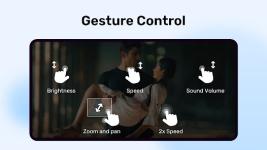
- Intuitive Gesture Controls:
- Pinch to Zoom: Easily adjust viewports.
- Zoom and Pan: Precise control over frame positioning.
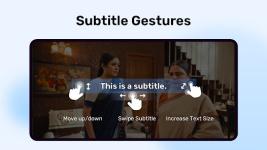
- Subtitle Navigation: Advanced gestures for scrolling, synchronization, and text positioning.
Subtitle Compatibility
The player maintains industry-leading compatibility with various subtitle formats, supporting full styling and advanced tags:| Category | Supported Formats |
| Integrated Tracks | DVD, DVB, SSA/ASS (SubStation Alpha) |
| External Files | SAMI (.smi), SubRip (.srt), MicroDVD (.sub), VobSub (.sub/.idx) |
| Additional Formats | SubViewer2.0, MPL2, TMPlayer, Teletext, PJS, WebVTT |
Security and Accessibility
- Privacy Folder: Provides an encrypted environment for secure video storage and content management.
- Kids Lock: Restricts access to system functions and prevents accidental outgoing calls during media playback, ensuring a controlled environment for younger users.
Version Enhancements
- Performance Optimization: Refined codebase for a smoother, faster, and more reliable user experience.
- Stability: Comprehensive bug fixes and background process optimizations.
Modification Details
| Feature Category | Description |
| Subscription Status | Gold and Silver Packs unlocked; Online features accessible to all users. |
| Privacy & Sync | Enhanced AV sync for Bluetooth; Privacy Folder functionality enabled. |
| UI/UX Refinement | Codec selection dialogs and volume warnings (100%+) disabled. |
| Optimized Layout | Online-related layouts removed in offline mode; User account sections disabled. |
| Playback Control | New "Slide" option for speed playing overlay; Multi-mod compatibility via shareduserid removal. |
Download