 PH
PH
Any.do: All-in-One Planner & To-do List
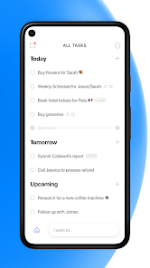
Any.do is a comprehensive productivity suite designed for individuals, families, and teams to streamline task management. By integrating a professional-grade to-do list, calendar, reminders, and daily planner into a single interface, it provides a seamless workflow for balancing personal life and professional commitments. Recognized as an "Editor's Choice" by Google, it remains a premier solution for centralized organization.Core Functionalities
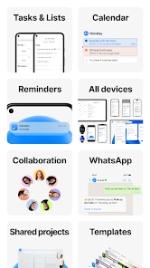
- Advanced Calendar & Daily Planner: Maintain full visibility of your schedule with a versatile calendar widget supporting daily, 3-day, weekly, and agenda views.
- Seamless Synchronization: Keep tasks, notes, and reminders in sync across all platforms, including mobile, desktop, and Wear OS.
- Smart Reminders: Utilize one-time, recurring, and location-based reminders to ensure no deadline is missed.
- Collaborative Workspace: Share lists, assign tasks, and coordinate with colleagues or family members in real-time.
- Life Organizer: Functions as a notepad, project management board, and checklist provider for complex project tracking.
Integration Ecosystem
Any.do connects with industry-standard tools to create a centralized productivity hub:| Category | Supported Integrations |
| Calendars | Google Calendar, Outlook, Office 365, Exchange |
| Communication | Slack, Gmail, WhatsApp |
| Project Management | Trello, Asana, Jira, Monday.com |
| Productivity Tools | Evernote, OneNote, Google Tasks, Todoist |
| Automation & Voice | Zapier, Google Assistant, Amazon Alexa |
Technical Specifications & Version Details
| Feature | Details |
| Version | v5.18.16.8 |
| Status | Premium / ρáíd Features Unlocked |
| Architecture | Universal |
| Optimizations | Analytics/Crashlytics Disabled, Debug Code Removed |
| Interface | Redesigned Calendar UI |
What's New
- Workspace Integration: Assigned workspace tasks are now visible directly within the integrated calendar.
- Status Updates: Capability to mark workspace tasks as completed directly from the "My Day" view.
- Hardware Support: Full support for external keyboards when utilizing Android tablets.
- Enhanced Navigation: Overhauled calendar design for improved aesthetics and user navigation.
Modification Features
- Premium Unlocked: Access to all ρáíd features and subscription-based tools.
- Privacy Enhanced: Analytics, Crashlytics, and Firebase tracking disabled.
- System Cleanup: Unwanted Permissions, Receivers, Providers, and Services removed from the manifest.
- Ad-Free Experience: All advertisement links, layouts, and invocation methods nullified and removed.
Download