 PH
PH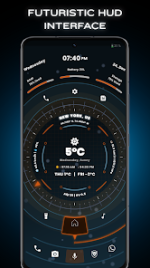
Future X-OS: Sci-Fi Launcher & Productivity Interface
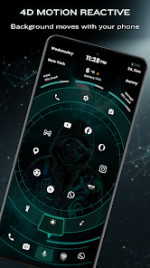
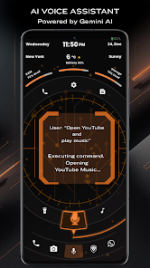
Future X-OS is a high-performance productivity interface designed for Android 8.0 and above. Inspired by futuristic AI aesthetics, the application functions as both a standalone launcher and a secondary sidebar utility. It seamlessly integrates immersive 4D screen effects with a comprehensive suite of customization tools, offering a minimalist, häçker-inspired layout.The interface features a Jarvis-style assistant, dynamic spot notifications, and an integrated folder widget system. To ensure seamless operation, the software utilizes Accessibility Service permissions for global actions, including double-tap screen locking, notification management, and screen captures.
Technical Specifications
| Category | Details |
| App Name | Orbit Launcher AI, 3D & Sci-Fi |
| Version | v7.7 [Pro] |
| Architecture | armeabi-v7a, arm64-v8a |
| Android Req. | 8.0 and up |
| Mod Status | Premium Unlocked |
Key Features
- Advanced Shortcuts: Optimized for high-speed app access and productivity-focused navigation.
- Aesthetic Presets: Wide selection of professional themes ranging from Sci-Fi to häçker-style interfaces.
- Immersive Experience: 4D screen effects combined with standby functionality for a cohesive OS feel.
- Third-Party Support: Full compatibility with external icon packs and deep theme customization.
- Utility Integration: Sidebar accessibility featuring real-time notification management and system shortcuts.
Modification (Mod) Details
This iteration has been professionally optimized to remove bloat and unlock the full potential of the software:- Pro Unlocked: All premium features and ρáíd themes are accessible by default.
- Clean Build: Redundant files, debug codes, and tracking metrics have been fully removed.
- Performance: Immersive mode integrated for a distraction-free experience and better resource management.
- Architecture Optimized: Specific enhancements for
armeabi-v7aandarm64-v8adevices.
Installation Notes
- Ensure "Unknown Sources" is enabled in your device security settings.
- Install the provided APK.
- Grant Accessibility Service permissions when prompted to enable double-tap lock and gesture features.
- Apply preferred icon packs via the internal theme engine.
Download