 PH
PHs†éál this look 
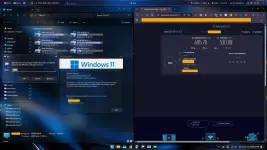
Non-resource intensive Windows 11 customization
Follow the next steps below to completely mimick this theme.
==================================
FIRST THINGS BEFORE PERFORMING THESE CHANGES!
Create a restore point before performing changes, so you can rollback if modifications caused major crashes.
==================================
Windhawk (For general modifications on Windows Explorer)
Download Windhawk [You do not have permission to view the full content of this post. Log in or register now.]
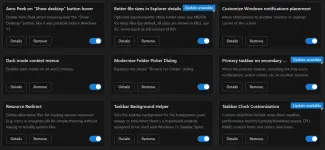
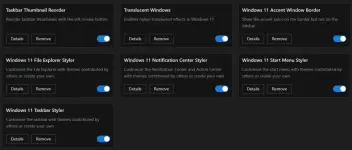
Upon installing, launch the program and install these mods inside Windhawk: (You can disable other extra mods if you don't feel like having it)
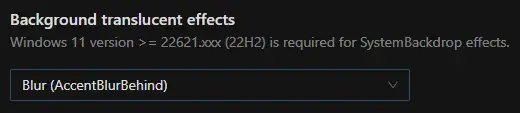
For Translucent Windows, select the following translucent style to retain transparency even other windows were not focused/selected:
My advise when enabling translucent mod: Some programs doesn't like to have their entire window to be translucent and might cause crashes or other visual issues. You can exclude them on enforcing it by adding them to exclusion list: Translucent Windows>Advanced>Custom process exclusion list

Windows 11 Taskbar Styler Theme:

Windows 11 Start Menu Styler Theme:

Windows 11 Notification Styler Theme:

==================================
YASB (Yet Another Status Bar)
Download this specific version to avoid getting error on the config files included for this theme to work: [You do not have permission to view the full content of this post. Log in or register now.]
To exactly mimic this theme:

Get these config files:
You do not have permission to view the full content of this post. Log in or register now.
You do not have permission to view the full content of this post. Log in or register now.
And, to have that active sound equalizer on YASB, you will also going to need this: You do not have permission to view the full content of this post. Log in or register now.
You might also need to install fonts if requested by the program.
==================================
FancyWM
This will enforce window auto-resize, advanced window controls such as hotkeys for minimize, maximize, rearrange windows, etc.)
Download via Microsoft Store or [You do not have permission to view the full content of this post. Log in or register now.]
==================================
Got questions? Leave a comment below and I will try to help you on it.
==================================
Check my other postings on my profile for more!
Non-resource intensive Windows 11 customization
Follow the next steps below to completely mimick this theme.
==================================
FIRST THINGS BEFORE PERFORMING THESE CHANGES!
Create a restore point before performing changes, so you can rollback if modifications caused major crashes.
==================================
Windhawk (For general modifications on Windows Explorer)
Download Windhawk [You do not have permission to view the full content of this post. Log in or register now.]
Upon installing, launch the program and install these mods inside Windhawk: (You can disable other extra mods if you don't feel like having it)
For Translucent Windows, select the following translucent style to retain transparency even other windows were not focused/selected:
My advise when enabling translucent mod: Some programs doesn't like to have their entire window to be translucent and might cause crashes or other visual issues. You can exclude them on enforcing it by adding them to exclusion list: Translucent Windows>Advanced>Custom process exclusion list
Windows 11 Taskbar Styler Theme:
Windows 11 Start Menu Styler Theme:
Windows 11 Notification Styler Theme:
==================================
YASB (Yet Another Status Bar)
Download this specific version to avoid getting error on the config files included for this theme to work: [You do not have permission to view the full content of this post. Log in or register now.]
To exactly mimic this theme:
Get these config files:
You do not have permission to view the full content of this post. Log in or register now.
You do not have permission to view the full content of this post. Log in or register now.
And, to have that active sound equalizer on YASB, you will also going to need this: You do not have permission to view the full content of this post. Log in or register now.
You might also need to install fonts if requested by the program.
==================================
FancyWM
This will enforce window auto-resize, advanced window controls such as hotkeys for minimize, maximize, rearrange windows, etc.)
Download via Microsoft Store or [You do not have permission to view the full content of this post. Log in or register now.]
==================================
Got questions? Leave a comment below and I will try to help you on it.
==================================
Check my other postings on my profile for more!