✅ Tested Quillbot para sa mahilig sumabit, latest trick

alist1986

Forum Guru
1771071288084.webp

Quillbot Unlocker: Ultimate QuillBot Premium Unlocker - All features, no limits
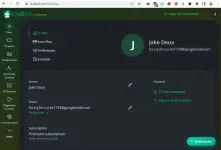
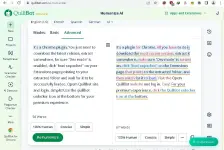
It's a Chrome plugin. You just need to download the latest release, extract somewhere, be sure "Dev mode" is enabled, click "load unpacked" on your Extensions page pointing to your extracted folder and wait for it to be successfully loaded. Opem Quillbot site and login. simple! Use the quillbot unlocker icon at the bottom for your premium experience.
Spoiler contents are visible only to Established Members.
(note: nawala na yung github channel kaya punta kayo sa post#24 for the download link c/o MSol2021)
or download it here:
Spoiler contents are visible only to Established Members.
Be sure to read all information regarding its features and usage. For iproblems, message You do not have permission to view the full content of this post. Log in or register now. at github "issues" section. I'll also respond if I can be of help. This is a running dev (not like the abandoned tool by (You do not have permission to view the full content of this post. Log in or register now.).
Good Luck.
============================================================
 
Pang-masa yan he he. Hanapin ko rin kung may Grammarly or DeepL na fully unlocked para partners sila. Nakita ko lang yang sa Quillbot ng mag-search sa tools noong dev. Luma na unlocker ko. Marami siyang forks na working a[[s na mas effective kaysa sa original.
 
Hanapin ko rin kung may Grammarly or DeepL na fully unlocked para partners sila.
Looking forward to your finds and posts po. Also collecting various useful tools to add in my arsenal so I can give better solutions...
Nakita ko lang yang sa Quillbot ng mag-search sa tools noong dev.
Meron din yung gumamit ng Tampermonkey na nakita ko to unlock Quillbot's Premium features.
 
May TTS din yan: You do not have permission to view the full content of this post. Log in or register now.
Yup. Okay siya pang basic use. Like proofread or quick listen, goods na siya. Pero ramdam ko pa rin yung AI vibe nya, parang medyo flat at kulang sa emotion lalo na pag mahaba yung text. Kung icocompare mo sa iba like ElevenLabs or even Microsoft/Google voices, mas lamang pa rin sila sa pagiging realistic at smooth. Mas malinaw pacing at mas hindi nakakapagod pakinggan pag long content. Kung pang casual lang or school works, ma eerekomenda ko QuillBot. For content creation, narration, or seryosong audio output, mas may mas solid na options out there.
 
Yup. Okay siya pang basic use. Like proofread or quick listen, goods na siya. Pero ramdam ko pa rin yung AI vibe nya, parang medyo flat at kulang sa emotion lalo na pag mahaba yung text. Kung icocompare mo sa iba like ElevenLabs or even Microsoft/Google voices, mas lamang pa rin sila sa pagiging realistic at smooth. Mas malinaw pacing at mas hindi nakakapagod pakinggan pag long content. Kung pang casual lang or school works, ma eerekomenda ko QuillBot. For content creation, narration, or seryosong audio output, mas may mas solid na options out there.
Pang neutral reading by default, pero pwede rin mag-add ng prosodies sa "tone" box for experimental E×ρréššions/emotions. Pag ayaw nila yung voices ng TTS dyan, puter.js will be the site to help kasama na yung mga sinabi mo. Unlimited use pero may daily rate limits. May video generation din dyan and anything AI related. Good alternative for premium quickie options. Happy na sila. Yang dalawa, side by side is good enough for occasional content creation sa "easy mode".... Pag may tiyaga, may nilaga, he he!

Ang target ko, mabawasan yung pasabit sa grammarly at quillbot, since both have the same function kahit supported lang nya ang Chrome Desktop. Ang possible option ay ito, sa nabasa ko:
Here's what you can do instead:
  1. Use a Desktop Browser via Remote Access:
    • Install You do not have permission to view the full content of this post. Log in or register now. on both your phone and a PC.
    • Access a full desktop browser remotely and install the extension there.
  2. Try Using a Different Browser with Extension Support:
    • Kiwi Browser or Yandex Browser (both Android-compatible) support some Chrome extensions.
    • Install one of them via the Play Store on your DeX environment and search for LazyApply in the Chrome Web Store.
  3. Alternative Workaround:
    • If LazyApply has a web version or manual upload option, you can try using it directly from a browser without an extension.
 
Para doon sa mga content creators . The best option para i-partner sa mga sinabi ko is this:
1. Use capcut 1.5 for basic full features for free - except the AI HD features. No need to login.
2. Sa AI stuffs, use the free credits for Capcut online.
3. Upscale for free online.
Note: Lahat ng enhancement dyan is just using ffmpeg with some using mild AI plugins. For best video enhancement, find apps using Real_ESRGAN.
Pwede rin gawin offline but depends on your hardware. Using ffmpeg solely for denoising, cleaning, upscaling and re-encoding vam be dome with cpu and gpu. Upgrading from 1080p to 4k will be easier/shorter than starting with 240p -success rates and rendering time depend always on hardware. To avoid command scripts using ffmpeg, best option is to use the free Handbrake. The sequence is different than ffmpeg - upscale, denoise and sharpen, then encode last.
Using my 940mx graphic card, the entire video enhancing of a 5-minute 1080p video varies from 20 - 60 minutes whether I use ffmpeg or handbrake. Medyo matagal sa Da Vinci dahil tadtad ng AI effects yon, pero mataas ang quality. (For the basic steps, I use AI to guide me and modify in-between by pre-processing 5 - 10 second clips.)
 
Pang neutral reading by default, pero pwede rin mag-add ng prosodies sa "tone" box for experimental E×ρréššions/emotions. Pag ayaw nila yung voices ng TTS dyan, puter.js will be the site to help kasama na yung mga sinabi mo. Unlimited use pero may daily rate limits. May video generation din dyan and anything AI related. Good alternative for premium quickie options. Happy na sila. Yang dalawa, side by side is good enough for occasional content creation sa "easy mode".... Pag may tiyaga, may nilaga, he he!

Ang target ko, mabawasan yung pasabit sa grammarly at quillbot, since both have the same function kahit supported lang nya ang Chrome Desktop. Ang possible option ay ito, sa nabasa ko:
Para doon sa mga content creators . The best option para i-partner sa mga sinabi ko is this:
1. Use capcut 1.5 for basic full features for free - except the AI HD features. No need to login.
2. Sa AI stuffs, use the free credits for Capcut online.
3. Upscale for free online.


Note: Lahat ng enhancement dyan is just using ffmpeg with some using mild AI plugins. For best video enhancement, find apps using Real_ESRGAN.
Pwede rin gawin offline but depends on your hardware. Using ffmpeg solely for denoising, cleaning, upscaling and re-encoding vam be dome with cpu and gpu. Upgrading from 1080p to 4k will be easier/shorter than starting with 240p -success rates and rendering time depend always on hardware. To avoid command scripts using ffmpeg, best option is to use the free Handbrake. The sequence is different than ffmpeg - upscale, denoise and sharpen, then encode last.
Using my 940mx graphic card, the entire video enhancing of a 5-minute 1080p video varies from 20 - 60 minutes whether I use ffmpeg or handbrake. Medyo matagal sa Da Vinci dahil tadtad ng AI effects yon, pero mataas ang quality. (For the basic steps, I use AI to guide me and modify in-between by pre-processing 5 - 10 second clips.)
Thanks po for the tips. AND Solid advices and goals po 👍 These deserve their own threads... Very informative - especially about the workarounds... Good stuff here! 🙌
 
Thanks po for the tips. AND Solid advices and goals po 👍 These deserve their own threads... Very informative - especially about the workarounds... Good stuff here! 🙌
Masakit sa ulo gumawa ng threads na ganyan. May mga old and better threads na siguro yan he he.
Usually, kung bubusisiin mo yung apps and providers, malalaman nyo rin yung mga detalye ng kanilang actual service para maka-isip ng paraan na i-duplicate on your own. Karamihan sa AI nag-umpisa sa open-source. Sa apps naman, alamin mo lang yung changelogs nila para makita yung pagkakaiba ng old and new; kung ano yung inalis, ni-retain, kailan nag-add ng improvements, ano yung available online at offline, etc. at ano yung free at hindi. Yang Capcut, walang unlocker, kaya maghahanap ka ng fix or a reliable alternative.
Nataon lang na kasama sa trabaho ko na magnakaw ng technology legally (he he) sa past career ko kaya medyo madali for apps and software.

For example: Yang Quillbot ay gumagamit ng "linguistic pattern analysis" using their own custom trained AI models, say sa paraphrasing. Pwede nyong i-duplicate yan by uploading your file sa top providers ng OpenAI, Claude, Gemini, Grok... using these prompts na nanggaling din sa iisang AI, he he:

1. Fluency Mode
Focus: Fixing grammar and making the text sound natural with minimal changes to meaning.

Prompt: "Act as a native-speaker editor. Rewrite the following text to ensure it is grammatically perfect and flows naturally. Do not change the core meaning or use overly complex synonyms; focus solely on fluency and readability."

2. Humanize Mode
Focus: Removing "robotic" patterns and adding a personal, authentic touch.

Prompt: "Rewrite this text to sound like it was written by a real person, not an AI. Use contractions (like 'don't' instead of 'do not'), vary the sentence lengths significantly, and use a more conversational rhythm. Avoid predictable AI transition words like 'Moreover' or 'Furthermore'."

3. Simple / Layman's Mode
Focus: Breaking down complex ideas into easy-to-understand language.

Prompt: "Act as a teacher explaining a concept to a high school student. Paraphrase the following text using plain language and everyday vocabulary. Break down long, complex sentences into shorter, digestible ones while keeping the essential message intact."

4. Academic Mode
Focus: Using scholarly language and formal objective tones for research or essays.

Prompt: "Transform the following text into a scholarly, academic format. Use precise technical terminology, maintain an objective third-person perspective, and ensure the tone is rigorous and authoritative. Focus on intellectual clarity over conversational ease."

5. Creative Mode
Focus: Taking big risks with wording to create a unique and E×ρréššive version.

Prompt: "Rewrite the following text with maximum creativity and flair. Feel free to use metaphors, vivid adjectives, and inventive sentence structures to make the message more memorable and E×ρréššive, even if it slightly changes the original tone."

6. Expand & Shorten Modes
Focus: Specifically hitting word count targets or focusing on conciseness.
  • Expand: "Paraphrase the following text to be more detailed and elaborate. Add necessary explanations, examples, or descriptive depth to lengthen the content without adding false information."
  • Shorten: "Rewrite this text to be as concise as possible. Strip away filler, redundant adjectives, and unnecessary transitions to convey the same meaning in significantly fewer words."
Or medyo Customized ng kaunti:
1. The "Formal & Academic" Mode
Use this for essays, research papers, or professional reports where you need to sound authoritative and objective.

Prompt: "Act as a professional academic editor. Rewrite the following text to enhance its formal tone. Remove all contractions, replace informal vocabulary with precise academic synonyms, and improve the logical flow between sentences. Ensure the tone remains objective and scholarly."

2. The "Shorten & Concise" Mode
Perfect for when you are over a word count or your writing feels "wordy."

Prompt: "Act as a minimalist editor. Your goal is to reduce the word count of the following text by at least 20% without losing the core meaning. Eliminate redundant adjectives, convert passive voice to active voice, and remove filler phrases (e.g., 'it is important to note that')."

3. The "Creative & Fluent" Mode
Use this to make your writing sound more natural, rhythmic, and engaging.

Prompt: "Act as a creative copywriter. Rephrase the following text to be more engaging and fluid. Use varied sentence structures and more descriptive imagery. The goal is to make the writing sound more 'human' and less like a textbook, while maintaining perfect grammatical accuracy."

4. The "Business Professional" Mode
Best for emails, LinkedIn posts, or internal memos.

Prompt: "Act as a corporate communications expert. Rewrite the following text for a professional business environment. Ensure the tone is confident, polite, and direct. Focus on clarity and 'call to action' language where appropriate."
 

About this Thread

  • 44
    Replies
  • 612
    Views
  • 17
    Participants
Last reply from:
goldentarsier

Trending Topics

Online now

Members online
1,122
Guests online
1,046
Total visitors
2,168

Forum statistics

Threads
2,287,147
Posts
29,042,632
Members
1,216,389
Latest member
wadawd
Back
Top