 PH
PH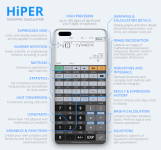
Scientific Calculator Pro | Technical Overview and Documentation
This professional-grade scientific calculator for Android 6.0+ offers a comprehensive environment for symbolic algebra and complex mathematical modeling. Engineered for the arm64 architecture with an efficient 8.0 MB footprint, the application facilitates natural E×ρréššion entry and high-fidelity rendering of both simplified symbolic E×ρréššions and precise numerical values.The interface is designed for versatility, featuring dedicated pocket, compact, and expanded layouts. The expanded configuration utilizes a multiline display to maintain a comprehensive calculation history and provide immediate access to previous results.
Technical Specifications and Capabilities
| Category | Features and Operations |
| Core Mathematics | Symbolic computation, derivatives, integrals, and complex numbers. |
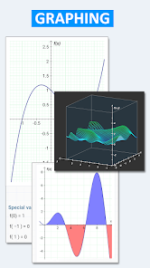
| Visualization | 2D and 3D graphing with integral area and limit visualization. |
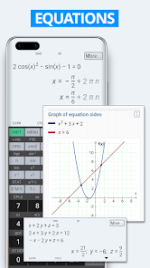
| Linear Algebra | Systems of linear equations, matrix operations, and vector calculus. |
| Data Analysis | Advanced statistics and regression analysis. |
| Computer Science | Binary, octal, and hexadecimal systems with logical bitwise operations. |
| Unit & Constants | Conversion for 250 units and 90 physical constants. |
| Advanced Logic | Support for Reverse Polish Notation (RPN), sums, and products of series. |
| Precision | Engine supports 100 digits of significand. |
Version 11.3.2 b265 Update Notes
New Functional Features- Enhanced E×ρréššion Management: Users may now select specific segments of an E×ρréššion for targeted editing.
- Context-Sensitive Menus: New action triggers based on cursor position or active selection.
- Localization: Added full support for the Japanese language.
- System Improvements: Included "Select All" functionality and expanded code documentation.
- Multiline Display: Optimized for tablet hardware to show complete calculation history.
- Brace Logic: Support for an unlimited number of nested braces.
- Premium Status: All professional features and extended computational tools are fully enabled.
- Architecture: Optimized for arm64-v8a devices.
Configuration and Environment
The application allows for granular configuration of display formats, including SI unit prefixes and engineering notation. This ensures the tool remains compliant with the rigorous standards required across various technical and scientific disciplines. Current builds are verified for Android versions 6.0 through the latest iterations, maintaining a lightweight profile without compromising on computational depth.Download