 PH
PH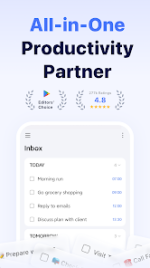
TickTick: To Do List, Calendar & Planner
TickTick is a sophisticated task management suite engineered for seamless personal organization and professional collaboration. Designed for Android 5.0 and higher, the application integrates a robust cross-platform synchronization engine compatible with Web, iOS, macOS, and Windows.The platform distinguishes itself by consolidating multiple productivity methodologies into a single, elegant interface. Through smart date parsing and natural language input, users can automate due dates and reminders via text or voice. Whether implementing the Get Things Done (GTD) workflow or utilizing the built-in Pomodoro timer, TickTick provides the tools necessary to maintain peak efficiency.
Technical Specifications
| Feature | Details |
| Version | 8.0.2.0 |
| Status | Pro / ρáíd Features Unlocked |
| Architecture | Universal (ARM, ARM64, x86, x64) |
| Compatibility | Android 5.0+ |
| Languages | Multi-language Support |
| Developer | TickTick Team |
| Mod Credits | HeroMods |
Key Features
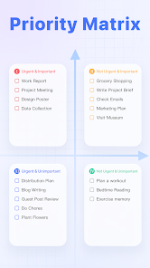
- Smart Organization: Multi-tier task management using folders, tags, and four-level priority sorting.
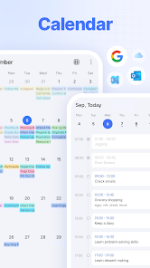
- Advanced Calendar: Integration with Google Calendar and Outlook, featuring a grid-view business calendar.
- Focus Tools: Integrated Pomodoro timer with white noise backgrounds to enhance concentration.
- Habit Tracking: Automated monitoring for scientific progress tracking and goal setting.
- Collaboration: List sharing capabilities supporting up to 29 members for team-based projects.
What’s New in Version 8.0
- Suggested Tasks: A new intelligence layer that helps you review unfinished tasks and prioritize your daily focus.
- Visual Personalization: Individual list backgrounds and refined styles for Habits and Countdowns.
- Yearly Heatmap: A comprehensive year-at-a-glance view to monitor your productivity trends.
- Flexible Month View: Pinch-to-zoom functionality allows for a granular look at specific time ranges.
- Modern Style UI: Refreshed design aesthetics for a cleaner, more contemporary user experience.
Modification Details
- Premium subscription features fully unlocked.
- Graphics and resources optimized for faster load times.
- Unnecessary files, debug code, and .source tags removed for a lean installation.
- Analytics and tracking services disabled for enhanced privacy.
Download