 PH
PH
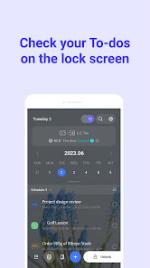
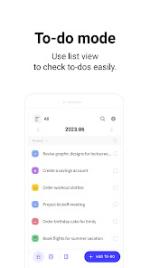
Application Overview: LockScreen Calendar
LockScreen Calendar is a sophisticated productivity suite engineered for Android 6.0 and higher. It bridges the gap between system accessibility and task management by integrating your schedule directly into the device interface. By offering a seamless dual-interface system—comprising both list and calendar views—it ensures that your daily commitments remain organized and immediately visible.The application is built for power users who require granular control. Key features include hierarchical task organization via customizable folders, full synchronization with Google Calendar, and advanced scheduling tools such as recurring alarms and daily summaries. For those who track personal growth or private thoughts, a passcode-protected diary feature is also included.
Collaborative features allow for the inclusion of participants from contact lists and the integration of location-based data, which provides real-time local weather updates for your events. The user experience is highly customizable, offering batch editing via long-press actions and adjustable UI elements including typography and background aesthetics.
Key Features
- Integrated Interface: Direct access to tasks and schedules via the lock screen.
- Data Synchronization: Seamless integration with Google Calendar accounts.
- Privacy & Security: Dedicated diary feature with secure passcode protection.
- Advanced Scheduling: Recurring alarms and automated daily summary notifications.
- Location Intelligence: Automatic weather updates based on event location data.
- Customization: Flexible UI settings for font sizes, backgrounds, and layout.
Technical Specifications & Permissions
- System Requirements: Android 6.0+
- Lock Screen Overlay: Utilizes
SYSTEM_ALERT_WINDOWfor persistent workflow access. - Location Services: Optional permission for weather-synced event planning.
- Contact Access: Optional permission for collaborative event sharing.
Version Updates
- Enhanced system stability and performance optimizations.
- Refined UI responsiveness for high-resolution displays.
Modification Details
- Pro Features: All premium functionalities unlocked.
- Supported Architectures: arm64-v8a, armeabi-v7a.
- Localization: Comprehensive English support (Global regions).
- Optimization: Debug information removed; optimized for speed and storage.
Download