PH
PH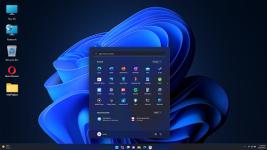
APP DESCRIPTION
Computer Launcher: Desktop Productivity for Android
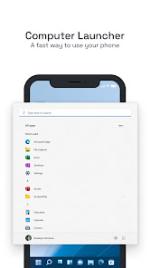
Transform your smartphone into a high-performance workstation with a Windows 11-style interface. This launcher brings the efficiency of a PC to your mobile device, featuring a sophisticated start menu and a fully functional taskbar for advanced multitasking.
Essential Features
Computer-style Start Menu and Taskbar for intuitive navigation.
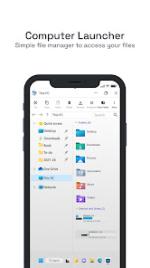
Full File Manager to access internal storage, SD cards, and drives.
Drag-and-drop desktop customization with app shortcuts and contacts.
Live wallpapers, custom icon packs, and diverse theme backgrounds.
Built-in widgets for weather, news, clock, and RAM monitoring.
Secure app locking and advanced folder management.
Optimized Interface
Experience a fluid, responsive UI designed for speed and aesthetics. Computer Launcher simplifies your workflow by allowing you to rename folders, set multiple home screens, and manage notifications through a centralized notifier. Whether you want a tablet-like aesthetic or a professional desktop environment, this launcher provides complete control over your mobile workspace.
Technical Details
Compatibility: Android 8.0 and up.
Lightweight and optimized for armeabi-v7a and arm64-v8a architectures.
Enhanced privacy controls and streamlined app management.
• Information not available More Info: Code: Select all
- Computer Launcher v2.1.0.3 [Premium]
- Set unlimited wallpapers, color styles, and icon packs.
- Premium features unlocked;
- All Debug Codes Removed;
- Modded By TRUMods
- Premium