 PH
PH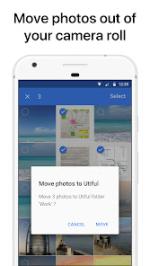
APP DESCRIPTION
Utiful: The Professional Photo Filing System
Utiful is the dedicated photo organizer designed to fix the limitations of standard gallery apps. While Google Photos only "links" images to albums, Utiful allows you to physically move photos out of the camera roll and into a structured filing system. This keeps your main gallery clutter-free while ensuring your important images are categorized and secure.
Key Features
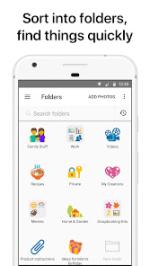
Move photos out of the camera roll and into distinct folders
Save utility images like receipts, documents, and IDs separately
Take photos directly into specific folders using the folder camera
Rearrange photos manually within folders for custom sequencing
Secure folders with passcode or fingerprint protection
Store data on internal storage or SD cards
Full support for RAW, GIF, and video formats with metadata preservation
Use Cases
Professionals: Keep work documentation separate from personal memories
Contractors: Organize before-and-after project photos efficiently
Hobbyists: Categorize inspiration, sketches, and references
Everyday Users: Manage screenshots and notes without cluttering the main gallery
Quick Start
Open Utiful, select photos from your camera roll, and tap Move
Or, use the Share menu from your gallery app and select Utiful
Utiful works offline, contains no ads, and ensures you retain full control of your files.
• + Improved data safety with automatic data restore after reinstall. + Storage Saver Mode now supports videos, with optional sound recording. + Improved photo quality in Storage Saver Mode, with up to 99% storage saving. + Camera sounds can now be enabled from camera settings. More Info: Code: Select all
- Utiful: Move & Organize Photos v9.0.0 build 1006 [Premium]
- The photos are removed from the camera roll but kept in your Utiful folders.
- Protect your Utiful folders with a passcode lock or fingerprint.
- Professionals & freelancers keeping work photos separate from personal ones
- Contractors & service providers managing before/after project pictures
- No ads: Enjoy undistracted productivity while organizing your photos.
- Pro / ρáíd Features Unlocked
- Debug code removed
- Removed default .source tags name of the corresponding java files
- Removed All Unnecessary Files
- Improved data safety with automatic data restore after reinstall.
- Improved photo quality in Storage Saver Mode, with up to 99% storage saving.
- Camera sounds can now be enabled from camera settings.
- Premium
