 PH
PHSawa ka na ba kakagawa ng Gmail para lang sa ElevenLabs?
Pwes! Eto na ang solution diyan.
Para sa mga content creators or nagsisimula pa lang sa YouTube ito na gamitin nyo.
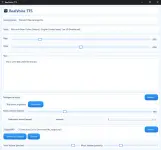
Yang TTS na gamit dyan is same as free MS Edge-TTS (edge-tts sa github) na dumaan sa Huggingface servers to be used by the app. Though Unity engine ang gamit na may SSML support, walang binanggit na supported yung SSML for E×ρréššion and emotions. Tried, didn't work sa aking portable version (2.0.0). Edge-TTS doesn't support SSML - removed ny MS Azure. Basic neural AI lang yung TTS nya (edge-tts, hindi ms-tts); malayo siya sa TTS ng ElevenLabs. Kaya siguro 90 pesos lang sa market. Angelo and Blessica yung Filipino voices - same as Edge TTS. Ang maganda lang dyan, may GUI with some basic addons. (Di ko gamit yung sa 1st post. Yung akin, wala yung extra feature to trim, adjust volume, atbp.)Latest Features
- Realistic voices – Uses Microsoft neural voices via secure HTTPS.
Instant preview – Hear changes to text, voice, rate, and pitch immediately.
Music mixing – Add a background track, set levels, and fade-out at the end.
Voice-only or mixed export – Save clean MP3s
No account required – Works locally; you control your files.
Modern UI – Light-blue theme, clear controls, and helpful defaults.
Resilient synthesis – Automatic retry + fallback voice if a network hiccup occurs.
Requirements
- Unity 2021.3 LTS or newer.
- Internet connection required for voice generation.
- No third-party subscriptions or API keys needed.
Usage & Limits
- Fast Queue: Up to 200,000 characters per month with low-latency generation.
- Slow Queue: Unlimited usage with standard processing speed.
- All limits reset monthly.
- No extra subscriptions required – included with your purchase.
What’s Included
- Full-featured Editor Window for voice generation and audio editing.
- Demo scenes showcasing all key features on all supported platforms.
- Detailed documentation for getting started quickly.
Sa English, medyo na-kokontrol yung emotion at E×ρréššion ng kaunti using special scripting. Yung Tagalog voices, kulang sa training pa to achieve acceptable results he he.1. Scripting for Pauses and Emphasis
Since direct tags are restricted, use the following "natural language" formatting tricks:
- For Breaks: Use ellipses (...) for longer pauses or periods (.) for shorter, distinct stops.
- For Accentuation: Use UPPERCASE letters or asterisks (word) to signal the AI to increase volume or change intonation.
- For Rhythm: Use hyphens (-) to draw out words or create a staccato effect.
Sample Script 1: Dramatic Narrative
"The discovery was... UNBELIEVABLE. We had searched for years, through the rain- and the cold... but there it was. Finally. It was right... in front of us."
Sample Script 2: Conversational/Helpful
"Um... let me check that for you. Ah! Found it. Your confirmation number is 4-2-9... 1-1. Is there... anything else I can help with today?"
Sample Script 3: Energetic/Excited
"Wait! Did you see that? It was HUGE! I've never seen anything like it... in my ENTIRE life!"
===================================================================
Walang limit ang words nyan.wala ba limit words neto TS?
Ano po alternative ng elevenlabs? Yung openai.fm kasi di na gumagana. Natigil tuloy ako sa content koIto yung ibang details nyan:
Yang TTS na gamit dyan is same as free MS Edge-TTS (edge-tts sa github) na dumaan sa Huggingface servers to be used by the app. Though Unity engine ang gamit na may SSML support, walang binanggit na supported yung SSML for E×ρréššion and emotions. Tried, didn't work sa aking portable version (2.0.0). Edge-TTS doesn't support SSML - removed ny MS Azure. Basic neural AI lang yung TTS nya (edge-tts, hindi ms-tts); malayo siya sa TTS ng ElevenLabs. Kaya siguro 90 pesos lang sa market. Angelo and Blessica yung Filipino voices - same as Edge TTS. Ang maganda lang dyan, may GUI with some basic addons. (Di ko gamit yung sa 1st post. Yung akin, wala yung extra feature to trim, adjust volume, atbp.)
Ito lang ang best option to add some form of E×ρréššion or emotion:
Sa English, medyo na-kokontrol yung emotion at E×ρréššion ng kaunti using special scripting. Yung Tagalog voices, kulang sa training pa to achieve acceptable results he he.
Test nyo dito: You do not have permission to view the full content of this post. Log in or register now. and compare or test na lang sa MS Edge browser - nandoon yan for free and unlimited use din. Audacity na lang yung kulang to achieve the same functionalities separately, and the rest for sourcing sa net!
walang limit yang TTS na yan.wala ba limit words neto TS?
OK, with respect to the previous free openai.fm, and alternative dyan ay yung ttsopenai.com. Sa Elevenlabs na free din ay via puter.js - na supported yung openai tts. Unlimited yan for developers pero syempre may rate limits din. Binanggit ko lang yan at baka Filipino voice ang hanap mo. Subukan mo rin gumawa ng bagong api key sa Google AI Studio or mag-test sa platform nila. Automatic naman yung TTS nila to convert Filipino text. Hanap ka na lang ng appropriatete voice sa dialogue mo with single to multiple speakers.Ano po alternative ng elevenlabs? Yung openai.fm kasi di na gumagana. Natigil tuloy ako sa content ko