 PH
PH
 HZ Flix
Your Ultimate Movie, TV Show, Anime & Entertainment Streaming ExperienceYou do not have permission to view the full content of this post. Log in or register now.
 About HZ Flix
HZ Flix is a powerful, all-in-one entertainment application that brings movies, TV shows, anime, music, and live content to your fingertips. Experience seamless streaming with a beautiful, modern interface designed for the ultimate viewing experience. Key Features
 Movies & TV Shows
- Extensive Library - Browse thousands of movies and TV shows
- High-Quality Streaming - Enjoy content in multiple quality options
- Smart Search - Find your favorite content quickly with voice search support
- Watchlist - Save and organize your favorite movies and shows
- View History - Never lose track of what you've watched
- Detailed Information - Get comprehensive details, cast info, and ratings
 Anime Streaming
- Anime Integration - Browse trending, popular, and top-rated anime
- Full Episode Lists - Access all episodes with organized viewing
- Dual Language Support - Watch with original subtitles or dubbed versions
- Anime Details - View characters, ratings, genres, and descriptions
- Seasonal Anime - Discover current season and upcoming anime
- Watch History - Track your anime viewing progress
- Seamless Navigation - Dedicated anime section with beautiful UI
 Music Streaming
- Music Integration - Stream millions of songs
- High-Quality Audio - Enjoy crystal clear sound
- Background Playback - Listen to music while using other apps
- Download Music - Save your favorite tracks for offline listening
- Beautiful Player - Modern music player with intuitive controls
 Live
Live
- Cricket Matches - Watch live cricket matches and tournaments
- Football Games - Stream football matches from around the world
- Live TV Channels - Access live TV channels in real-time
- Match Countdown - Get notified about upcoming matches
- Live Scores - Stay updated with match status and scores
 Download Manager
- Offline Viewing - Download movies, shows, and music for offline access
- Download Progress - Track your downloads with notifications
- Storage Management - Manage your downloaded content efficiently
 Security & Privacy
- Device Security Check - Protects content on secure devices only
- Screen Protection - Prevents screenshots and screen recording on sensitive content
- Safe Environment - Works only on non-rooted, safe devices
 User Experience
- Modern Dark Theme - Eye-friendly dark interface
- Smooth Animations - Beautiful transitions and effects
- Responsive Design - Optimized for all screen sizes
- Voice Search - Search content using your voice
- Auto-Update System - Get notified about new app versions
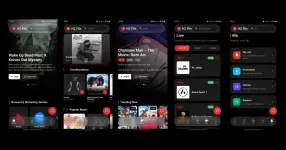
 App Screenshot
 Installation
Requirements
- Android Version: 5.0 (Lollipop) or higher
- Storage: At least 100 MB free space
- Internet: Active internet connection for streaming
- Device: Non-rooted device recommended for full functionality
Download & Install
- Download the APK
You do not have permission to view the full content of this post. Log in or register now.
- Download the latest version APK file
- Enable Unknown Sources(if needed)
- Go to Settings → Security → Enable Unknown Sources
- Or when prompted during installation, allow installation from this source
- Install the App
- Open the downloaded APK file
- Tap Install
- Wait for installation to complete
- Tap Open to launch HZ Flix
- Grant Permissions
- Allow required permissions when prompted:
- Storage: For downloading and caching content
- Microphone: For voice search (optional)
- Notifications: For download progress and updates
- Allow required permissions when prompted:
 Getting Started
First Launch
- Security Check: The app will verify your device security on first launch
- Update Check: App automatically checks for latest updates
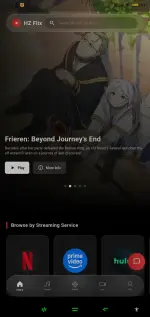
- Explore: Start browsing the home screen with trending content
Navigation
- Home
 - Discover trending movies, shows, and streaming services
 - Search
 - Find movies, shows, and music
 - Anime - Browse and watch anime content from AniList
- Music - Browse and stream music
- Live - Watch live sports, matches, and TV channels
- Downloads - Access your offline content
- Profile
 - Manage watchlist and view history
How to Use
Watching Movies/Shows
- Browse content on the Home screen or use Search
- Tap on any title to view details
- Select a streaming provider
- Choose quality and enjoy streaming
Watching Anime
- Navigate to the Anime tab
- Browse Trending, Popular, or Top Rated anime
- Tap on any anime to view details and episodes
- Select an episode from the Episodes tab
- Choose Original/Sub or Dubbed audio
- Start streaming instantly
Listening to Music
- Navigate to the Music tab
- Browse trending songs or search for your favorite
- Tap to play instantly
- Use the download icon to save for offline
Watching Live Content
- Go to the Live tab
- Select Cricket, Football, or Live TV
- Choose a match or channel
- Start streaming live
Downloading Content
- Find your desired content
- Tap the download icon
- Monitor progress in Downloads section
- Access anytime offline
 Tips & Tricks
- Voice Search: Use the microphone icon for quick voice searches
- Watchlist: Long-press on any content to add to your watchlist
- Quality Settings: Adjust streaming quality based on your connection
- Background Music: Music continues playing even when screen is off
- Auto-Update: Keep the app updated for best experience and new features
 Troubleshooting
App Won't Install
- Ensure you have enabled installation from unknown sources
- Check if you have enough storage space
- Try redownloading the APK file
Security Warning
- The app requires a non-rooted device for security reasons
- Ensure your device passes security checks
- Contact support if you believe this is an error
Streaming Issues
- Check your internet connection
- Try a different streaming provider
- Clear app cache in settings
- Restart the app
Download Not Working
- Grant storage permissions in app settings
- Check available storage space
- Ensure stable internet connection




 .
.


