 PH
PH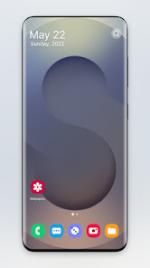
 App Description: Galaxy S25 Ultra Launcher v12.4 [Premium]
Transform your Android device with the sophisticated interface of the Galaxy S25 Ultra. This premium launcher provides a complete aesthetic overhaul, bringing modern design and high-performance functionality to any smartphone running Android 5.0 or higher.
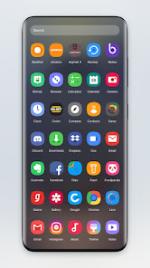
Paged and vertical app drawer options with high-speed navigation
Comprehensive gesture controls and swipe-to-open functionality
Advanced sidebar for instantaneous access to favorite tools
Full icon pack support and app hiding capabilities for total customization
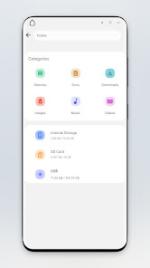
Integrated file manager with desktop-class file handling
Support for internal storage, SD cards, and USB drives via built-in explorer
Secure recycle bin and native ZIP compression/decompression
Desktop widgets and notification badges for enhanced productivity
Reliable backup and restore system for your personalized layout
Experience a seamless transition to the Galaxy ecosystem. This launcher optimizes your mobile workflow while providing the sleek, polished look of the latest flagship hardware.
Requirements: Android 5.0 and up. External storage permissions required for advanced file management on Android 11+.
 What's New: - Improved App Drawer animation
- Crash fixes
- Functionality Improvements
- Added new Themes
 MOD Features:
- Launcher
- File Management (Requires MANAGE_EXTERNAL_STORAGE permission on Android 11+ devices.)
- User-Initiated Application Package Installation
- Backup and Restore
- Paged Desktop
- Scrollable Background
- Paged App Drawer
- Vertical App Drawer
- Search Bar
- Supports Icon Packs
- Hide Apps
- Swipe to Open Drawer
- Gestures
- Sidebar for Quick Access
- Desktop Widgets
- Notification Badges
- Intuitive, Fast App Navigation.
- Galaxy Launcher works for all types of phones
- Galaxy S25 Launcher is completely free to use.
- Create shortcuts of the most used apps on the desktop.
- Built-in File Explorer supports Galaxy S25 Ultra Launcher
- Can be used to access, edit and manage files and folders outside of an app-specific storage.
- Supported file manager features include creating a folder, cut, copy, paste, share, etc.
- File Manager lists all your drives i.e. Internal Storage, SD Card & USB Drives.
- Recycle Bin feature of File Manager
- Built-in Compress/Decompress support
- Open Image, Audio, and Video files.
 Download Link:
Download
Download Link:
Download