 PH
PHsayonara880
Enthusiast
Crypto Signal Scanner Pro – Futures Liquidity Detection (Windows EXE)
You do not have permission to view the full content of this post. Log in or register now.
Scan the Binance Futures market automatically and get alerted when high‑probability liquidity grab trading signals occur — without staring at charts all day.
Crypto Signal Scanner Pro is a desktop trading utility built for serious futures traders who want objective, rule‑based signal detection, not Telegram hype.
Crypto Signal Scanner Pro continuously scans the Top 100 Binance Futures USDT pairs and detects institutional-style liquidity grab setups using:
Each signal must pass multiple strict filters:
You do not have permission to view the full content of this post. Log in or register now.
Scan the Binance Futures market automatically and get alerted when high‑probability liquidity grab trading signals occur — without staring at charts all day.
Crypto Signal Scanner Pro is a desktop trading utility built for serious futures traders who want objective, rule‑based signal detection, not Telegram hype.
 What This Tool Does
Crypto Signal Scanner Pro continuously scans the Top 100 Binance Futures USDT pairs and detects institutional-style liquidity grab setups using:- Price rejection at key swing highs/lows
- Volume expansion confirmation
- Order‑flow imbalance (delta + taker ratio)
- Funding‑rate filtering
- Anti‑manipulation cooldown logic
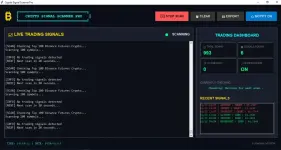
- Displays the signal in the terminal
- Logs it in the dashboard
- Sends a desktop notification with sound
 How Signals Are Detected
Each signal must pass multiple strict filters:- ✔ Liquidity sweep above resistance or below support
- ✔ Strong rejection wick (not just a single candle fakeout)
- ✔ Above‑average volume vs historical median
- ✔ Aggressive buyers/sellers confirmed via trade delta
- ✔ Healthy taker ratio (avoids spoofing)
- ✔ Funding rate within safe limits
- ✔ Cooldown enforced to avoid repeated signals on the same pair
 Key Features
- Automatic scanning every 20 seconds
- Top 100 Binance Futures pairs by real 24h volume
- LONG & SHORT signal detection
- Built‑in anti‑fake spike logic
- Price‑action validation (multi‑candle confirmation)
- Desktop notifications + sound alerts
- Recent signals panel + statistics dashboard
- Export signals to TXT for journaling
- Hardware‑locked license (anti‑piracy)
 User Interface Highlights
- Professional dark trading terminal design
- Live scan log (transparent decision process)
- Signal history with timestamp and price
- Dashboard showing:
- Total scans
- Signals found
- Active signals
- Notification status
 Screenshots
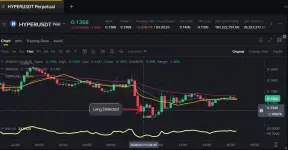
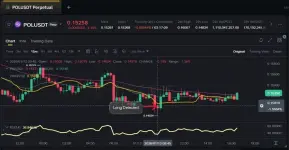
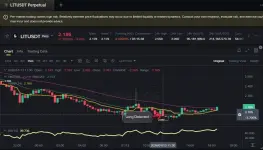
(All screenshots are from real scans, not mockups.)See real screenshots above showing:
- Live signal detection
- Dashboard statistics
- Example LONG and SHORT detections
- Corresponding Binance chart reactions