 PH
PH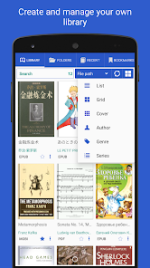
 App Description: Librera PRO - Book Reader v9.3.10 [ρáíd]
Librera PRO is a premium, highly configurable reading application designed for a seamless document experience. Supporting nearly every major format—including PDF, EPUB, MOBI, DjVu, and FB2—it combines a powerful feature set with an intuitive interface suitable for casual readers and professionals alike.
Key Features:
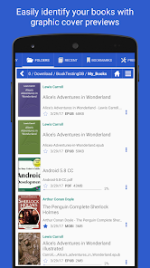
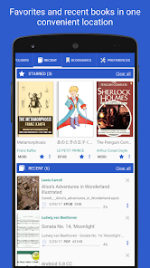
Advanced document discovery with auto-scan, file exploration, and recent activity tracking
Comprehensive support for bookmarks, annotations, and quick-jump navigation
Customizable Day and Night modes for comfortable reading in any lighting
Integrated support for popular translators and offline dictionaries
Hands-free Music Mode with adjustable auto-scrolling speeds
Text-to-Speech (TTS) engine for high-quality voice reading
Support for Right-to-Left (RTL) languages including Arabic, Hebrew, and Thai
OPDS catalog integration for searching and downloading online books
Flexible library management with grid and list views, sorting, and filtering
Robust text tools for reflowing, sharing, and online word searching
Librera PRO offers an ad-free environment and advanced functionality for users who demand a sophisticated mobile library. This professional edition ensures a distraction-free experience while supporting continued development of the platform.
 What's New: - Super fast reader
- Package Info:
- Languages: Full Multi Languages;
- CPUs: armeabi-v7a, arm64-v8a, x86, x86_x64;
- Screen DPIs: 160dpi, 240dpi, 320dpi, 480dpi, 640dpi;
- Untouched [ρáíd] apk with Original Hash Signature, no [Mod] or changes was applied;
- Certificate MD5 digest: ceac43253422f95d61cf46b518e1929b
 MOD Features:
- a unique auto-scrolling, hand-free music mode.
- PRO Librera Reader is an easy to use and
- Easy document discovery with optional and configurable lists:
- Auto-Scan (with user selected folders)
- Browse (with an in-app file explorer)
- Recent (with a progress percentage bar)
- Support for bookmarks, annotations, and quick-jump contents
- Individually configurable Day and Night modes
- Support for many popular translators and offline dictionaries
- Vertical scrolling lock
- Auto-centering of documents
- Single page view of dual paged documents
- Music mode with configurable scrolling speed
- Voice reading capability (via TTS Engine or "text to speech")
- Fast and easy document searching
- Word search in multiple documents
- Online document format conversion
- Opening of files directly from archives (.zip)
- Right to left language support (Thai, Hebrew, Arabic, etc.)
- Continue reading from where you left off
- But, the only way to truly appreciate PRO Librera Reader is to use PRO Librera Reader.
- Try the free, ad supported version first and decide for yourself; you won't be disappointed.
- When you are convinced, to help support further development, please purchase an ad free, PRO license.
 Download Link:
Download
Download Link:
Download