 PH
PHCarlos2026
Contributor

Spyware Process Detector Overview
Spyware Process Detector is an anti-spyware tool that will detect all processes running on the computer and display their threat rating based on the intelligent analysis of all hidden properties. Another specialty of the program is its ability to detect a process that contains and executes alien code of another process. Users will at a glance see the detailed information about any selected process and detect all hidden threats, including spyware, malware, *********s and Trojans. 17 methods of process detection are available.
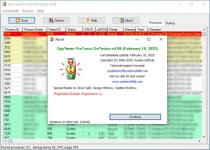
Unlike standard Windows Task Manager, Spyware Process Detector will detect even those processes and tasks, which are transparent to OS. The security rating is color-coded so that users can see the most dangerous processes at once. Red stands for the highest rating of danger, green for the lowest one, any color between red and green stands for varying levels of security threat. The program shows other details about each process, such as process ID, parent ID, security status, EXE filename, file path, description, etc. Startup Manager shows details information about processes that run on Windows startup. Once there is a process marked out as red or yellow, users have to choose whether to delete it or mark as safe. The current list of processes can be exported to the Excel format for further analysis.
Spyware Process Detector Changelog
Below is the list of changes made to the current version of Spyware Process Detector.
- Full support for Microsoft Windows 11 Update 24H2 and Windows Server 2025 Preview.
- Fixed crash bug on Windows 10/11 and Windows Server 2022.
How to use Spyware Process Detector?
Follow the below instructions to activate your version of Spyware Process Detector.
- Install software using given installer (in Setup folder)
- Close program if running (Even from system tray)
- Extract “Crack.zip” file and Copy its content to program’s installation folder
- That’s it, Enjoy!
Release Name: Spyware Process Detector v4.06
Size: 62.9 MB
You do not have permission to view the full content of this post. Log in or register now.
You do not have permission to view the full content of this post. Log in or register now.
You do not have permission to view the full content of this post. Log in or register now.
You do not have permission to view the full content of this post. Log in or register now.
You do not have permission to view the full content of this post. Log in or register now.
You do not have permission to view the full content of this post. Log in or register now.
You do not have permission to view the full content of this post. Log in or register now.
You do not have permission to view the full content of this post. Log in or register now.
You do not have permission to view the full content of this post. Log in or register now.