 PH
PH-
Welcome to PHCorner Forums! Sign up for free to unlock full access and exclusive privileges, including:
- Asking questions about computer and mobile issues
- Discovering internet tips for your mobile network and computer
You are using an out of date browser. It may not display this or other websites correctly.
You should upgrade or use an alternative browser.
You should upgrade or use an alternative browser.
Counter Strike Installer Offline
- Thread starter Laznicka
- Start date
Update ko lang sa mga retro fps seekers ng CS 1.6 yung links for latest nrws and changes sa game na ito:
You do not have permission to view the full content of this post. Log in or register now.
You do not have permission to view the full content of this post. Log in or register now.
You do not have permission to view the full content of this post. Log in or register now.
You do not have permission to view the full content of this post. Log in or register now.
You do not have permission to view the full content of this post. Log in or register now.
You do not have permission to view the full content of this post. Log in or register now.
I don't play this game, but only test/tweak for fun w/ bots - how to make the bots human-like, tweak bot settings to act properly base on map and mode of gameplay, balance team and weapon setup, mix bot AIs (YAPB. RegameDLL_CS, Realbot, Podbot_mm, etc.) sort-of bot war for variety. etc. Huwag lang sa zombie mode he he. Ginagawa ko lang ito sa standard release.
Maganda siguro lagyan ng LLM support yung AI chats for a change he he using Local AI - WIP.
For best new experience, test Hell-Strike mod! Ang daming pwedeng gawin compared sa standard gameplay ng ibang mods.
You do not have permission to view the full content of this post. Log in or register now.
You do not have permission to view the full content of this post. Log in or register now.
You do not have permission to view the full content of this post. Log in or register now.
You do not have permission to view the full content of this post. Log in or register now.
You do not have permission to view the full content of this post. Log in or register now.
You do not have permission to view the full content of this post. Log in or register now.
I don't play this game, but only test/tweak for fun w/ bots - how to make the bots human-like, tweak bot settings to act properly base on map and mode of gameplay, balance team and weapon setup, mix bot AIs (YAPB. RegameDLL_CS, Realbot, Podbot_mm, etc.) sort-of bot war for variety. etc. Huwag lang sa zombie mode he he. Ginagawa ko lang ito sa standard release.
Maganda siguro lagyan ng LLM support yung AI chats for a change he he using Local AI - WIP.
For best new experience, test Hell-Strike mod! Ang daming pwedeng gawin compared sa standard gameplay ng ibang mods.
Kahit sa mga posts na a ganito - Gaming CS - polidong polido mga response...Update ko lang sa mga retro fps seekers ng CS 1.6 yung links for latest nrws and changes sa game na ito:
You do not have permission to view the full content of this post. Log in or register now.
You do not have permission to view the full content of this post. Log in or register now.
You do not have permission to view the full content of this post. Log in or register now.
You do not have permission to view the full content of this post. Log in or register now.
You do not have permission to view the full content of this post. Log in or register now.
You do not have permission to view the full content of this post. Log in or register now.
I don't play this game, but only test/tweak for fun w/ bots - how to make the bots human-like, tweak bot settings to act properly base on map and mode of gameplay, balance team and weapon setup, mix bot AIs (YAPB. RegameDLL_CS, Realbot, Podbot_mm, etc.) sort-of bot war for variety. etc. Huwag lang sa zombie mode he he. Ginagawa ko lang ito sa standard release.
Maganda siguro lagyan ng LLM support yung AI chats for a change he he using Local AI - WIP.
For best new experience, test Hell-Strike mod! Ang daming pwedeng gawin compared sa standard gameplay ng ibang mods.
 Guilty Pleasure ko din po tong Counter Strike at mas na enjoy ko laruin yan against AI (la eh... talo parati pag mga ka barks na...)
You do not have permission to view the full content of this post. Log in or register now.
Kahit anong OS naman sakop ng Half-life (Goldsrc) mula Win98 and above depende sa compiles or version builds ng Half-life engine and mods. Yung CS naman ay mod lang nyan.Kahit sa mga posts na a ganito - Gaming CS - polidong polido mga response...
[Hidden content]
Most of the time yung mga latest releases is Win7 compatible. Ang dami na rin emulator nyan kaya walang problema sa platform, from Pre-Valve WON (Steamless), Valve (w/Steam), non-Steam, FWGS (Xash-3D) na more inclined sa android and mobile devices, atbp. Reverse-engineering helped!
Binabalikan ko para magkutingting at mag-adopt ng AI features dyan sa bots - hindi maglaro he he. Pinanonood ko lang sila hanggang makuha ko yung "human-like" behavior of playing (movement, choosing/buying/conserving cash on weapons and ammo, decision-making, accomplishing tasks per map mode of play, teamwork, etc.). Nakukuha naman yan sa built-in na tweakable parameters and configurations, or gagamitin ka ng custom plugins via AMXX para mapadali. Sa huli na yung LLM chat, TTS at real-time vision he he.
May AI tutor naman to assist and make it happen he he. No need to be a coder, at free open source Chinese AI lang ang katapat! Goodbye na sa'kin ang OpenAI, Claude, at Gemini - sobrang higpit na ngayon sa fingerprinting na parang mag-access ng free net w/out load with +70% chance of sim blocking, he he. Maasikasong gamitin via free unlimited access -t hough doable. BTW, nakita ko na yung lungga noong dev na nawala/banned sa github - bantayan ko na lang updates niya sa QuillbotU..., atbp. kung sakaling mawala na yung premium effects.
Paminsan minsan pag wala internet dito, gusto ko din balik laruin si CS... Yung 1.6 mismo talaga... yan yung OG sa akin _.. May kopya pa po kayo nung mod/tweak nyo na AI enhancement?Kahit anong OS naman sakop ng Half-life (Goldsrc) mula Win98 and above depende sa compiles or version builds ng Half-life engine and mods. Yung CS naman ay mod lang nyan.
Most of the time yung mga latest releases is Win7 compatible. Ang dami na rin emulator nyan kaya walang problema sa platform, from Pre-Valve WON (Steamless), Valve (w/Steam), non-Steam, FWGS (Xash-3D) na more inclined sa android and mobile devices, atbp. Reverse-engineering helped!
Binabalikan ko para magkutingting at mag-adopt ng AI features dyan sa bots - hindi maglaro he he. Pinanonood ko lang sila hanggang makuha ko yung "human-like" behavior of playing (movement, choosing/buying/conserving cash on weapons and ammo, decision-making, accomplishing tasks per map mode of play, teamwork, etc.). Nakukuha naman yan sa built-in na tweakable parameters and configurations, or gagamitin ka ng custom plugins via AMXX para mapadali. Sa huli na yung LLM chat, TTS at real-time vision he he.
May AI tutor naman to assist and make it happen he he. No need to be a coder, at free open source Chinese AI lang ang katapat! Goodbye na sa'kin ang OpenAI, Claude, at Gemini - sobrang higpit na ngayon sa fingerprinting na parang mag-access ng free net w/out load with +70% chance of sim blocking, he he. Maasikasong gamitin via free unlimited access -t hough doable. BTW, nakita ko na yung lungga noong dev na nawala/banned sa github - bantayan ko na lang updates niya sa QuillbotU..., atbp. kung sakaling mawala na yung premium effects.
Pabulong nalang po sa update nyo ,..BTW, nakita ko na yung lungga noong dev na nawala/banned sa github - bantayan ko na lang updates niya sa QuillbotU..., atbp. kung sakaling mawala na yung premium effects.

Solid yung Q-unlocker nya... Gusto ko rin i-explore yung ibang tools gawa nya...
Sa basic settings pa lang ako nagsimula kahapon lang. Yung sa AI (chat and/or TTS) ay source codes lang kaya work in progress pa. Papasadahan ko pa sa mataas na AI para sure na walang issues. Pag-aaralan ko ibang kailangan sa AMX mod X at medyo malalim yung integration nyan he he. Hanap ako ng CS na compatible sa ReAPI + AmxxEasyHttp + VoiceTranscoder (VTC) + other scripting requirements + ffmpeg + may python middleware pa para sa llama.cpp at edge-tts na auto-converted from mp3 to wav. Di ako coder at nangangapa lang ako to fix things. isa-isahin ko munang i-adopt hanggang mabuo lahat. Basta may guide, kaya ko. Kumpleto na yung codes nila, pero matatagalan pa kung sakaling gumana siya. Ang daming conditions dahil di naman pwedeng mag-chatter lahat ng bots habang naglalaro he he. Ang gulo noon. Secondary lang itong AI feature. Gusto ko sana voice command na lang ma parang sa Swat 4 para may gamit sa laro.
Bigyan kita ng samples pag natapos yung working beta, or baka gusto mo ng source codes lang. Meron din kasi akong kasabay na chess engine project upgrades sa mga lumang chess source codes on the side. Paminto para kumustahin ko kung buhay pa yung mga old devs ng chess engines na sinuportahan ko as tester for their rankings.
Meron naman sa github nitong AI chat for CS pero wala akong OpenAI api key. Baka pumayag using Custom OpenaAI api kung may possible tweak to add custom base url and key. Yung iba dito pwede sa Half-life CS.
You do not have permission to view the full content of this post. Log in or register now.
You do not have permission to view the full content of this post. Log in or register now.
You do not have permission to view the full content of this post. Log in or register now.
You do not have permission to view the full content of this post. Log in or register now.
Kaya ito lang muna yung tatapusin ko for RegameDLL_CS and/or YAPB via plugin:
a. Bot settings to play VIP mod, protecting the VIP at all times with at least 4 bots within range to guide the VIP to reach escape route - hindi yung iiwan siya at tumakbo kung saan-saan he he. VIP restricted to 200 and not 250 speed so that guard bots can follow VIP on foot (if its a bot) in due time. If VIP is human, speed remains at 250. Pinag-iisipan ko pa kung bigyan ko ng option yung VIP to get extra ammo from a teammate if he ran out of bullets.
b. Custom bot settings sa bomb and defuse, hostage rescue maps + acceptable bot universal settings sa ibang maps to simulate human players
(Custom bot settings sa human-like skills, decision-making, teamwork, cash management, specific weapons for standard 5-man team (for fragger, sniper, support, etc.), how to use radio commands effectively, etc. Alam ko, merong plugin na ganyan, pero di ko makita kung san ko nakita sa net at backup files. Use botprofile.db and skill settings to human-like behavior with bot setting varying depending on map.)
c. AI bot mixing sa teams like "Bot wars". Kaya naman kahit ilan using the reverse-engineered Zbot (RegameCLL_CS) or the latest YAPB combined. Pwede rin isalin-kit sa dalawa yung alin man dito: Podbot_mm, SYPB, E-bot, Realbot .... Basta yung RE-CS yung game engine (via liblist.gam) and the rest runs using metamod.
(Pwede naman na manu-mano sa client, pero maganda kung sa server.)
Ito yung directory structure ng project ko - but not the exact :
Yung dev, sa email ko lang natunton. Wala pang update yang QU he he.
Bigyan kita ng samples pag natapos yung working beta, or baka gusto mo ng source codes lang. Meron din kasi akong kasabay na chess engine project upgrades sa mga lumang chess source codes on the side. Paminto para kumustahin ko kung buhay pa yung mga old devs ng chess engines na sinuportahan ko as tester for their rankings.
Meron naman sa github nitong AI chat for CS pero wala akong OpenAI api key. Baka pumayag using Custom OpenaAI api kung may possible tweak to add custom base url and key. Yung iba dito pwede sa Half-life CS.
You do not have permission to view the full content of this post. Log in or register now.
You do not have permission to view the full content of this post. Log in or register now.
You do not have permission to view the full content of this post. Log in or register now.
You do not have permission to view the full content of this post. Log in or register now.
Kaya ito lang muna yung tatapusin ko for RegameDLL_CS and/or YAPB via plugin:
a. Bot settings to play VIP mod, protecting the VIP at all times with at least 4 bots within range to guide the VIP to reach escape route - hindi yung iiwan siya at tumakbo kung saan-saan he he. VIP restricted to 200 and not 250 speed so that guard bots can follow VIP on foot (if its a bot) in due time. If VIP is human, speed remains at 250. Pinag-iisipan ko pa kung bigyan ko ng option yung VIP to get extra ammo from a teammate if he ran out of bullets.
b. Custom bot settings sa bomb and defuse, hostage rescue maps + acceptable bot universal settings sa ibang maps to simulate human players
(Custom bot settings sa human-like skills, decision-making, teamwork, cash management, specific weapons for standard 5-man team (for fragger, sniper, support, etc.), how to use radio commands effectively, etc. Alam ko, merong plugin na ganyan, pero di ko makita kung san ko nakita sa net at backup files. Use botprofile.db and skill settings to human-like behavior with bot setting varying depending on map.)
c. AI bot mixing sa teams like "Bot wars". Kaya naman kahit ilan using the reverse-engineered Zbot (RegameCLL_CS) or the latest YAPB combined. Pwede rin isalin-kit sa dalawa yung alin man dito: Podbot_mm, SYPB, E-bot, Realbot .... Basta yung RE-CS yung game engine (via liblist.gam) and the rest runs using metamod.
(Pwede naman na manu-mano sa client, pero maganda kung sa server.)
Ito yung directory structure ng project ko - but not the exact :
Code:
cstrike/
├── liblist.gam                <-- (Modified to point to Metamod)
├── botprofile.db              <-- (Modified with HumanBase template & names)
├── server.cfg                 <-- (Added bot_quota 20, bot_defer_to_human 0)
│
├── addons/
│   ├── metamod/
│   │   ├── dlls/
│   │   │   └── metamod.dll    <-- (The core bridge)
│   │   └── plugins.ini        <-- (Lists amxmodx_mm.dll and your Bot DLL)
│   │
│   ├── amxmodx/
│   │   ├── configs/
│   │   │   ├── plugins.ini    <-- (Added human_bots_ultimate.amxx at the bottom)
│   │   │   └── modules.ini    <-- (Uncommented: fun, engine, cstrike)
│   │   ├── plugins/
│   │   │   └── human_bots_ultimate.amxx <-- (Your compiled role/panic script)
│   │   └── scripting/
│   │       └── human_bots_ultimate.sma  <-- (The source code for backup)
│   │
│   └── [your_bot_folder]/     <-- (yapb or podbot folder)
│       ├── dlls/
│       │   └── [bot]_mm.dll   <-- (The Bot DLL loaded by Metamod)
│       └── [bot].cfg          <-- (Disabled yb_botbuy or pb_buy_rifles)
│
└── maps/
    └── [mapname].nav          <-- (Navigation mesh for ZBot/YaPB)
    └── [mapname].pwf          <-- (Waypoints for PodBot)
Yung dev, sa email ko lang natunton. Wala pang update yang QU he he.
Yan sige po... aabangan ko po yanBigyan kita ng samples pag natapos yung working beta, or baka gusto mo ng source codes lang.
Sabit po tayo jan..Meron naman sa github nitong AI chat for CS pero wala akong OpenAI api key.
Nakakaaliw din po kasi kahit panoorin lang yung bakbakan ..."Bot wars".
Ganyan din ginagawa sa hilig kong RTS...
Ang dami pala kakalikutindirectory structure
 Aabangan ko yung project nyo ssob... Mauna po sana ako mag test nyan... Mukhang mapapasubo sa AI hap, ahaha...
Mukhang gumagana pa naman yung unlocker.. Solid..! Salamat po ulit dun ssob sa pagshare...Yung dev, sa email ko lang natunton. Wala pang update yang QU he he.
Dami pala minomodify jan boss Hahahaha yung botprofile.db lang nagalaw ko jan ehh, mas aggressive yung bot pero inalis ko yung 1 hit ka sa ulo kahit malayo pag expertSa basic settings pa lang ako nagsimula kahapon lang. Yung sa AI (chat and/or TTS) ay source codes lang kaya work in progress pa. Papasadahan ko pa sa mataas na AI para sure na walang issues. Pag-aaralan ko ibang kailangan sa AMX mod X at medyo malalim yung integration nyan he he. Hanap ako ng CS na compatible sa ReAPI + AmxxEasyHttp + VoiceTranscoder (VTC) + other scripting requirements + ffmpeg + may python middleware pa para sa llama.cpp at edge-tts na auto-converted from mp3 to wav. Di ako coder at nangangapa lang ako to fix things. isa-isahin ko munang i-adopt hanggang mabuo lahat. Basta may guide, kaya ko. Kumpleto na yung codes nila, pero matatagalan pa kung sakaling gumana siya. Ang daming conditions dahil di naman pwedeng mag-chatter lahat ng bots habang naglalaro he he. Ang gulo noon. Secondary lang itong AI feature. Gusto ko sana voice command na lang ma parang sa Swat 4 para may gamit sa laro.
Bigyan kita ng samples pag natapos yung working beta, or baka gusto mo ng source codes lang. Meron din kasi akong kasabay na chess engine project upgrades sa mga lumang chess source codes on the side. Paminto para kumustahin ko kung buhay pa yung mga old devs ng chess engines na sinuportahan ko as tester for their rankings.
Meron naman sa github nitong AI chat for CS pero wala akong OpenAI api key. Baka pumayag using Custom OpenaAI api kung may possible tweak to add custom base url and key. Yung iba dito pwede sa Half-life CS.
You do not have permission to view the full content of this post. Log in or register now.
You do not have permission to view the full content of this post. Log in or register now.
You do not have permission to view the full content of this post. Log in or register now.
You do not have permission to view the full content of this post. Log in or register now.
Kaya ito lang muna yung tatapusin ko for RegameDLL_CS and/or YAPB via plugin:
a. Bot settings to play VIP mod, protecting the VIP at all times with at least 4 bots within range to guide the VIP to reach escape route - hindi yung iiwan siya at tumakbo kung saan-saan he he. VIP restricted to 200 and not 250 speed so that guard bots can follow VIP on foot (if its a bot) in due time. If VIP is human, speed remains at 250. Pinag-iisipan ko pa kung bigyan ko ng option yung VIP to get extra ammo from a teammate if he ran out of bullets.
b. Custom bot settings sa bomb and defuse, hostage rescue maps + acceptable bot universal settings sa ibang maps to simulate human players
(Custom bot settings sa human-like skills, decision-making, teamwork, cash management, specific weapons for standard 5-man team (for fragger, sniper, support, etc.), how to use radio commands effectively, etc. Alam ko, merong plugin na ganyan, pero di ko makita kung san ko nakita sa net at backup files. Use botprofile.db and skill settings to human-like behavior with bot setting varying depending on map.)
c. AI bot mixing sa teams like "Bot wars". Kaya naman kahit ilan using the reverse-engineered Zbot (RegameCLL_CS) or the latest YAPB combined. Pwede rin isalin-kit sa dalawa yung alin man dito: Podbot_mm, SYPB, E-bot, Realbot .... Basta yung RE-CS yung game engine (via liblist.gam) and the rest runs using metamod.
(Pwede naman na manu-mano sa client, pero maganda kung sa server.)
Ito yung directory structure ng project ko - but not the exact :
Code:cstrike/ ├── liblist.gam <-- (Modified to point to Metamod) ├── botprofile.db <-- (Modified with HumanBase template & names) ├── server.cfg <-- (Added bot_quota 20, bot_defer_to_human 0) │ ├── addons/ │ ├── metamod/ │ │ ├── dlls/ │ │ │ └── metamod.dll <-- (The core bridge) │ │ └── plugins.ini <-- (Lists amxmodx_mm.dll and your Bot DLL) │ │ │ ├── amxmodx/ │ │ ├── configs/ │ │ │ ├── plugins.ini <-- (Added human_bots_ultimate.amxx at the bottom) │ │ │ └── modules.ini <-- (Uncommented: fun, engine, cstrike) │ │ ├── plugins/ │ │ │ └── human_bots_ultimate.amxx <-- (Your compiled role/panic script) │ │ └── scripting/ │ │ └── human_bots_ultimate.sma <-- (The source code for backup) │ │ │ └── [your_bot_folder]/ <-- (yapb or podbot folder) │ ├── dlls/ │ │ └── [bot]_mm.dll <-- (The Bot DLL loaded by Metamod) │ └── [bot].cfg <-- (Disabled yb_botbuy or pb_buy_rifles) │ └── maps/ └── [mapname].nav <-- (Navigation mesh for ZBot/YaPB) └── [mapname].pwf <-- (Waypoints for PodBot)
Yung dev, sa email ko lang natunton. Wala pang update yang QU he he.
Tama ka dyan. Sabi ko naman, pwede manu-mano kung saan mo gusto yung behavior and skill kung ZBot or the new RegameDLL_CS yung gagamitin. Pwedeng i-edit yung botprofile.db. Yan din ginagawa ko noon. Trial and error na lang kung saan mo ramdam na pwede na he he. Kung yan lang ang purpose, that will do the trick.Dami pala minomodify jan boss Hahahaha yung botprofile.db lang nagalaw ko jan ehh, mas aggressive yung bot pero inalis ko yung 1 hit ka sa ulo kahit malayo pag expert
Example only sa Human-like bot, na i-edit sa Normal skill for bot's "personality" and behavioral limit :
Code:
    Skill = 50              // may increase according to user preference
    Aggression = 50
    ReactionTime = 0.3
    AttackDelay = 0.1             // Added 0.1s to prevent instant firing on sight
    Teamwork = 75
    WeaponPreference = none
    Cost = 0
    Difficulty = NORMAL
    VoicePitch = 100
    Skin = 0
Code:
Ito yung breakdown ng parameter controls:
Skill (0–100): Determines the bot's overall accuracy and weapon control. A low value causes frequent misses and uncontrolled spraying, while a high value (like 100) results in near-perfect aim and instant targeting.
Aggression (0–100): Defines the bot's playstyle and "bravery".
Low (0): The bot is passive, likely to camp, or retreat when seeing enemies.
High (100): The bot is aggressive, prone to rushing, and taking the shortest routes to objectives.
ReactionTime (0.0–1.0): The delay (in seconds) between the bot seeing an enemy and reacting. A lower value makes the bot react faster.
AttackDelay (0.0–1.0): The additional delay (in seconds) after reacting before the bot actually begins firing its weapon.
Teamwork (0–100): Controls how well a bot cooperates and listens to radio commands.
Low (0): The bot may go "rogue," ignoring team goals or radio commands.
High (100): The bot will strictly stick with the team and follow orders.
WeaponPreference: A list of specific weapons the bot will prioritize buying if it has enough money (e.g., ak47, m4a1, awp). Setting it to none allows the bot to buy any weapon based on its internal default logic.
Cost: Primarily used in the Condition Zero Deleted Scenes or Deleted Missions campaign to determine how much "reputation" it costs to hire that specific bot for your squad.
Difficulty: Filters which game difficulty setting the bot is allowed to spawn in (e.g., EASY, NORMAL, HARD, EXPERT).
VoicePitch: Controls the frequency of the bot's radio command voice.
100: The standard default pitch.
Above 100: Results in a higher-pitched, squeakier voice.
Skin (0–3): Determines which of the four standard player models (skins) for that team the bot will use.Ang realistic preference ko ay ito:
Code:
Template HumanLike
    Skill = 75            // High enough to be a threat, but will still miss some shots
    Aggression = 60       // Plays somewhat active but won't just "rush" mindlessly
    ReactionTime = 0.22   // Matches the average [human visual reaction time]
    AttackDelay = 0.05    // 50ms "confirmation" delay before firing
    Teamwork = 80         // They will follow radio commands and stick together
    Cost = 0
    Difficulty = NORMAL+HARD
    VoicePitch = 100
EndYung project ko is plugin integrated using AMXX and metamod dahil din may ibang AI bots involved either done on Client or Server and other map & bot customization. AMXX will control/monitor/override everything for game and bots - not only the skill. Fun project lang ito para may bagong matutunan he he.
Server- side ako nag-test para panoorin yung iba't ibang bots (YAPB, ZBOT, SYPB, E-Bot, PodBot_mm, Realbot) na naglabu-labo sa server he he. Minsan lang sa client.
Check ko muna yung latest trends sa CS build versions (hindi yung mods) para makuha natin yung optimum parameters kung may nabago man simula noon.
Ito yung official links ng ng latest bot stable versions:
You do not have permission to view the full content of this post. Log in or register now.
You do not have permission to view the full content of this post. Log in or register now.
You do not have permission to view the full content of this post. Log in or register now.
You do not have permission to view the full content of this post. Log in or register now.
Sa old Zbot, hanapin nyo na lang sa MODDB. Usually, included na yan sa mga nagkalat na CS-mods.
Sa stable latest CS (client) na standalone, install nyo ito: You do not have permission to view the full content of this post. Log in or register now.
Sa client and server, ito naman: You do not have permission to view the full content of this post. Log in or register now.
Sa updates ng ReHLDS kung sakali, visit this site: You do not have permission to view the full content of this post. Log in or register now.
Sa CS cosmetics, punta na lang kayo sa Gamebanana.
Doon sa gusto ng specific guide to combine different bots in CS 1.6, sabihan nyo na lang ako dito sa thread at mahabang istorya yan he he, and may not be stable to some depending on the versions you use, your OS, etc. I can't guarantee the stability, but it worked on my end. May manual and automatic.
Sabi mo ikaw mauna, your wish is my command he he. Verified ko lang na working sa simulation, but not tested yet sa actual with the game. Binago ko yung coding sa opencode para gumamit ng custom OpenAI compatible api at openAI lang yung supported ng original:Yan sige po... aabangan ko po yan
Sabit po tayo jan..
Nakakaaliw din po kasi kahit panoorin lang yung bakbakan ...
Ganyan din ginagawa sa hilig kong RTS...
Ang dami pala kakalikutin
Mukhang gumagana pa naman yung unlocker.. Solid..! Salamat po ulit dun ssob sa pagshare...
You do not have permission to view the full content of this post. Log in or register now.
Basahin mo muna yung infos ng AI chat with CS. Binago ko rin ng kaunti for NextClient dahil cx.exe ang gamit hindi hl.exe.
Ito yung modified code:
Spoiler contents are visible only to Established Members.
Double-life ako't pagod na mag-alaga ng may Edward's Syndrome. Puro shortcut na lang ako sa AI para mapadali. Bukas ko na bababaran yan.
To test with a disposable api, try this:
1. Login ka dito: You do not have permission to view the full content of this post. Log in or register now.
2. Create an api key
3. API Base url is: You do not have permission to view the full content of this post. Log in or register now.
(if it doesn't work, use this: You do not have permission to view the full content of this post. Log in or register now.)
4. Use any model. Punta ka sa Playground para madaling i-copy yung model.
Pwede rin sa openrouter.ai kung ayaw mo dyan.
Input all necessary data in config.ini, them test using python chat.py.
Good luck.
PS. yung isang AI project ko using amxx pending pa at wala akong tiwala sa coding ng AI. Review ko pa ng matagal kaya ito na lang para madali. Ang dami kasing requirements.
Boss gawa ka thread para marami magtetest, kasama na rin ako HAHAHASabi mo ikaw mauna, your wish is my command he he. Verified ko lang na working sa simulation, but not tested yet sa actual with the game. Binago ko yung coding sa opencode para gumamit ng custom OpenAI compatible api at openAI lang yung supported ng original:
You do not have permission to view the full content of this post. Log in or register now.
Basahin mo muna yung infos ng AI chat with CS. Binago ko rin ng kaunti for NextClient dahil cx.exe ang gamit hindi hl.exe.
Ito yung modified code:
Ikaw na maghusga Kuya Sol he he. Sana, mag-test din na iba.
Double-life ako't pagod na mag-alaga ng may Edward's Syndrome. Puro shortcut na lang ako sa AI para mapadali. Bukas ko na bababaran yan.
To test with a disposable api, try this:
1. Login ka dito: You do not have permission to view the full content of this post. Log in or register now.
2. Create an api key
3. API Base url is: You do not have permission to view the full content of this post. Log in or register now.
(if it doesn't work, use this: You do not have permission to view the full content of this post. Log in or register now.)
4. Use any model. Punta ka sa Playground para madaling i-copy yung model.
Pwede rin sa openrouter.ai kung ayaw mo dyan.
Input all necessary data in config.ini, them test using python chat.py.
Good luck.
PS. yung isang AI project ko using amxx pending pa at wala akong tiwala sa coding ng AI. Review ko pa ng matagal kaya ito na lang para madali. Ang dami kasing requirements.
Dito na lang he he. Di naman relevant masyado at ok pa naman na established ako at related sa thread.
PS. Sa post#12 na upload ko, namali ako ng type sa line#20 ng conparser.py. Baguhin nyo yung cx.exe to cs.exe kung ginamit nyo yung Nextclient. Kung hl.exe yung launcher ok na!
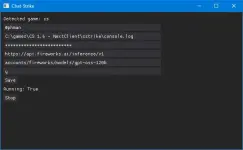
Working, but I'm not sure yet he he. Pinagana ko lang.
Ito yung mga umumbra na parameters sa config.ini kasama sa iba pa dyan using fireworkd ai:
The rest of the parameters sa config, kayo na bahala.
Nagka-problema python ko, di makita for some reason yung openai module:
Yung fix ay ito:
set PATH=C:\Users\<myusername>\AppData\Local\Programs\Python\Python312;%PATH%
tapos
python -X utf8 chat.py
(reason: use -X utf8 flag to avoid Windows encoding issues)
OK pero walang log yung chat kahit mag-type ako using Y key or U key, o radio chatter he he. May kulang pa. Di lang ako makatulog kaya sinubukan ko na. Sorry, Kuya Sol!
Kahit palitan ko ng You do not have permission to view the full content of this post. Log in or register now. at gpt-oss-120b na usual na ginagamit ko sa ibang apps, walang effect din he he. Baka sakaling may marunong dyan sa python na makatuklas ng remedy!
PS. Sa post#12 na upload ko, namali ako ng type sa line#20 ng conparser.py. Baguhin nyo yung cx.exe to cs.exe kung ginamit nyo yung Nextclient. Kung hl.exe yung launcher ok na!
Working, but I'm not sure yet he he. Pinagana ko lang.
Ito yung mga umumbra na parameters sa config.ini kasama sa iba pa dyan using fireworkd ai:
Code:
openaiapikey=fw_xxxxyyy
openaiapibase=https://api.fireworks.ai/inference/v1
openaiapimodel=accounts/fireworks/models/gpt-oss-120bNagka-problema python ko, di makita for some reason yung openai module:
Yung fix ay ito:
set PATH=C:\Users\<myusername>\AppData\Local\Programs\Python\Python312;%PATH%
tapos
python -X utf8 chat.py
(reason: use -X utf8 flag to avoid Windows encoding issues)
OK pero walang log yung chat kahit mag-type ako using Y key or U key, o radio chatter he he. May kulang pa. Di lang ako makatulog kaya sinubukan ko na. Sorry, Kuya Sol!
Kahit palitan ko ng You do not have permission to view the full content of this post. Log in or register now. at gpt-oss-120b na usual na ginagamit ko sa ibang apps, walang effect din he he. Baka sakaling may marunong dyan sa python na makatuklas ng remedy!
Sabi mo ikaw mauna, your wish is my command he he. Verified ko lang na working sa simulation, but not tested yet sa actual with the game. Binago ko yung coding sa opencode para gumamit ng custom OpenAI compatible api at openAI lang yung supported ng original:
You do not have permission to view the full content of this post. Log in or register now.
Basahin mo muna yung infos ng AI chat with CS. Binago ko rin ng kaunti for NextClient dahil cx.exe ang gamit hindi hl.exe.
Ito yung modified code:
Ikaw na maghusga Kuya Sol he he. Sana, mag-test din na iba.
Double-life ako't pagod na mag-alaga ng may Edward's Syndrome. Puro shortcut na lang ako sa AI para mapadali. Bukas ko na bababaran yan.
To test with a disposable api, try this:
1. Login ka dito: You do not have permission to view the full content of this post. Log in or register now.
2. Create an api key
3. API Base url is: You do not have permission to view the full content of this post. Log in or register now.
(if it doesn't work, use this: You do not have permission to view the full content of this post. Log in or register now.)
4. Use any model. Punta ka sa Playground para madaling i-copy yung model.
Pwede rin sa openrouter.ai kung ayaw mo dyan.
Input all necessary data in config.ini, them test using python chat.py.
Good luck.
PS. yung isang AI project ko using amxx pending pa at wala akong tiwala sa coding ng AI. Review ko pa ng matagal kaya ito na lang para madali. Ang dami kasing requirements.
Mukhang mapapasubo po ako nito... Wait lang po...Dito na lang he he. Di naman relevant masyado at ok pa naman na established ako at related sa thread.
PS. Sa post#12 na upload ko, namali ako ng type sa line#20 ng conparser.py. Baguhin nyo yung cx.exe to cs.exe kung ginamit nyo yung Nextclient. Kung hl.exe yung launcher ok na!
View attachment 4091189
Working, but I'm not sure yet he he. Pinagana ko lang.
Ito yung mga umumbra na parameters sa config.ini kasama sa iba pa dyan using fireworkd ai:
The rest of the parameters sa config, kayo na bahala.Code:openaiapikey=fw_xxxxyyy openaiapibase=https://api.fireworks.ai/inference/v1 openaiapimodel=accounts/fireworks/models/gpt-oss-120b
Nagka-problema python ko, di makita for some reason yung openai module:
Yung fix ay ito:
set PATH=C:\Users\<myusername>\AppData\Local\Programs\Python\Python312;%PATH%
tapos
python -X utf8 chat.py
(reason: use -X utf8 flag to avoid Windows encoding issues)
OK pero walang log yung chat kahit mag-type ako using Y key or U key, o radio chatter he he. May kulang pa. Di lang ako makatulog kaya sinubukan ko na. Sorry, Kuya Sol!
Kahit palitan ko ng You do not have permission to view the full content of this post. Log in or register now. at gpt-oss-120b na usual na ginagamit ko ibang apps, walang effect din he he. Baka sakaling may marunong dyan sa python na makatuklas ng remedy!
Kage Bunshin no Jutsu!!!

kaka excite laruin ulit ... haha...
Try ko po yan sa spare time ko...
Update po kita.
Sa pagkakatanda ko...yung riot shield sa CS 1.6... supposed to be defense tool pero pag naka armor ka, mas mataas yung damage take! Total liability sa comp. Wala na sa later versions. Na recall ko lang din ngayon
Thank you po Mastah alist!!!

AH, yung na-introduce ba sa CS 1.6 beta? Ang alam ko pwede yan ibalik kung gusto mo, even without ammx. Di ko alam yung details, pero sa ammx nasa Weapon Restrictions yan, setting Tactical Shield to disabled. Di ako master, addict ako sa CS since nagsimula yan noong 90's gamit ko yung 486 pc w/ Win98 sa cement plant. Naglalaro kami on-duty ng sikreto sa plant network from quarry to packhouse, hanggang accounting and admin dept. for more than a decade. Hawak ko sa leeg yung IT administrator at yung susi ng network hubs nya! Pati managers, naglalaro rin kaya may code of honor to keep it secret sa top levels, he he.Mukhang mapapasubo po ako nito... Wait lang po...
Kage Bunshin no Jutsu!!!
kaka excite laruin ulit ... haha...
Try ko po yan sa spare time ko...
Update po kita.
Sa pagkakatanda ko...yung riot shield sa CS 1.6... supposed to be defense tool pero pag naka armor ka, mas mataas yung damage take! Total liability sa comp. Wala na sa later versions. Na recall ko lang din ngayon
Thank you po Mastah alist!!!
Nag-iisip lang ako ng pwedeng baguhin sa standard play para maiba ng kaunti o challenging. Mas gusto ko yung ako magbubuo ng HL to CS at i-ρá†ch ko like the old days. Magandang gamitin din yung WON (Steamless) version hanggang sa CS 1.6 beta tapos amx or amxx plugins to keep up with the updates ng valve. May paaraan naman to make it compatible sa Win 10 or just switch to a specific version of FWGS Xash3d na stable + ρá†ch ng CS dll.
Madali na nga ngayon dahil sa AI, pero you need the correct coding app that can do anything you want using the proper prompt.
Sabihan mo ako ng gusto mong mangyari sa game, pag walang ready-made plugin dyan, gawa tayo ng original he he.
Yung AI chat mod pala di pa perfect, sorry. Di ako makatulog sa ka-iisip kung saan yung problema dahil tested/verfied ko na ok yung AI api settings ay successful - matagal lang sumagot. Kaya check ko mamaya yung issue ng communication sa CS.
Ako'y paantok na. Kung i-test mo, be sure hl.exe yung launcher tapos lagyan mo ng -condebug. Nalimutan ko yan noong nag-test ako. Baka yan yung problema ko kanina! Baka lang ha, he he.
Doon sa CS legacy lovers (not CS:Legacy by CSProMod), ito yung site na AIO to install them on your own from the old HL version (Pre-Steam) using WON (World Opponent Network):
You do not have permission to view the full content of this post. Log in or register now.
Type nyo na lang yung "half-life WON patches at MODDB" sa Google or any search engine to link you to the latest HL engine patches up to 1.1.1.2. Or just go here for the official patches if they are still alive: You do not have permission to view the full content of this post. Log in or register now. - (important for additional information before patching)
These patches are essential to keep the HL engine stable, especially the CS mods.
Yung short method, download this one - no need to ρá†ch (he he): You do not have permission to view the full content of this post. Log in or register now.
Then put your HL mods there!
I'm sure nabanggit ko rin yung ilang links sa thread posts.
For mods designed to recreate CS 1.6 experience using newer engines like HL2/Source, Source2 (like CSS/CSGO/CS2) ang hanapin nyo yung may tag na "Classic Offensive". Sa latest CS 1.6 you can transform it to 1.5, 1.3....with just changing configs or plugins.
You do not have permission to view the full content of this post. Log in or register now.
Type nyo na lang yung "half-life WON patches at MODDB" sa Google or any search engine to link you to the latest HL engine patches up to 1.1.1.2. Or just go here for the official patches if they are still alive: You do not have permission to view the full content of this post. Log in or register now. - (important for additional information before patching)
These patches are essential to keep the HL engine stable, especially the CS mods.
Yung short method, download this one - no need to ρá†ch (he he): You do not have permission to view the full content of this post. Log in or register now.
Then put your HL mods there!
I'm sure nabanggit ko rin yung ilang links sa thread posts.
For mods designed to recreate CS 1.6 experience using newer engines like HL2/Source, Source2 (like CSS/CSGO/CS2) ang hanapin nyo yung may tag na "Classic Offensive". Sa latest CS 1.6 you can transform it to 1.5, 1.3....with just changing configs or plugins.
On beta pa itong CS project at laging nasa windows repair ang pc ko habang nag-test ng "CS Realistic/Tactical Bot Control Gameplay with YAPB Bots" project. Di ko ma-automate sa client at mapili sa CS pack dahil karamihan ng bago ay encapsulated yung exe launcher, hindi standard hl.exe he he. Naghanap pa ako ng stable version sa net na compatible sa project. Working pag manu-mano, di pwede sa sequential launcher via bat. Baka malito si Kuya Sol he he. Inalis ko na yung usage ng metamod at amxmodx for simplicity, retain WASD movement keys, pero maiiba yung bind keys sa buy, autobuy, etc. dahil sa bot control bind keys, atbp. Di ko pa magawa yung full pack since maraming clutter files working folder at WIP pa sa ngayon (akala ko madali - my bad), pero ilsta ko yung mga options for early testers. I'll finish when it is stable to distribute. Ipakita ko kung paano ko ginawa para malinaw sa lahat.
To play sa client CS:
1. Download the portable version with client and server (the old hl/hlds): You do not have permission to view the full content of this post. Log in or register now. - scan nyo for virus para sigurado he he. Extract. The cstrike folder should be in the C:\games\CS1.6 path for this project
2. Download the latest YAPB: You do not have permission to view the full content of this post. Log in or register now., punta kayo sa release section and download the stable release or the development release - preferably the zip (not the extras zip). Put the "addons" folder" sa cstrike folder. Save another copy of your liblist.gam to liblist.gam.bak (for future use). Edit the liblis.gam at cstrike folder like this:
This is the guide that supports this: You do not have permission to view the full content of this post.
Log in or register now.
We are using yapb.dll as the game engine for bot control, the rest will be handled by mp.dll in the dlls folder.
By default, you can play CS 1.6 with YAPB bots using the game menu. But you need to use the bind key "=" to use the bots via "yapb menu". Go back to the documentation to add bots, control bots, etc. This is the easiest way to use YAPB in CS 1.6. Kayo na yung mag-set the number of bots, skill, etc. on your part.
3. For the customization project for Realistic Bot Control (optional) we'll use a modification using userconfig.cfg and clash.cfg for trial test. Para sigurado, save another copy of your config.cfg to config.cfg.bak para pwedeng balikan ulit if you want to use the original cs config, same as liblist.gam.
Ito yung trial userconfig.cfg placed at cstrike folder:
This will be your launcher script na gamit ko to test if my configs are working sa console display :
For clash.cfg, put this also in your cstrike folder:
Dito ako nahirapan dahil may yb command at yapb commands leche he he.
Nasali pa yung difficulty ng tamang timing ng execution ng mga userconfig atbp. cfg after map loading na hindi magawa sa client using one bat launcher.
Ito yung difference na related sa settings ng bot:
In the YaPB command structure, those numbers are "parameters" that tell the engine exactly what kind of bot to create.
The format is: yb add [team] [skill] [personality]
1. yb add 1 100 1 (The Terrorist)
2. yb add 2 100 2 (The Counter-Terrorist)
Ito yung sa yapb command:
In the older or specific versions of YaPB, the team numbering system follows the Engine Team IDs. This is why you see 2 and 3 instead of 1 and 2.
Here is the breakdown for yapb add [team] [skill] [personality]:
1. yapb add 2 100 2 (The Terrorist)
2. yapb add 3 100 2 (The Counter-Terrorist)
Why the numbers 2 and 3?
The Counter-Strike engine reserves Team IDs like this:
Comparison: yb vs yapb
For offline use, better get the full waypoint graphs here kung gagamit kayo ng custom maps na walang navigation files: You do not have permission to view the full content of this post. Log in or register now.
Pwede namanf mag-generate pero best is get the fixed one dyan sa link. Or file a request dyan sa github.
==================================================================
Ngayon, naka-load na kayo ng map na gusto ninyo, either go back to consol , type "exec clash.cfg" or just press "Home" key once, the bots will appear. Press it again id you want to restart.
==================================================================-
I only used this for testing purposes. Kung gusto nyo ng medyo automatic, just make sure nasa baba ng config.cfg file nyo yung "exec userconfig.cfg". Start the game normally using the standard CS launcher (exe or bat).
Naka-set na yan to use lan, but I'm not sure kung itong CS pack is lan enabled. Test nyo na lang. Naka-enable naman sa config. Kung sakaling umubra na meron maka-join sa lan, automatic na magamit nila yung bot control, hindi lang yung admin (via rcon).
Pinili ko yang YAPB dahil best bot siya with many additions, very customizable compared to the re-engineered Zbot (RegameDLL_CS). Di ko pa na-test sa gameplay kung realistic o controllable sila hands-on dahil limitadi kilos ko s a pc. At least working sila and stable to initialize in manual sequence.
Kabisaduhin nyo yung bind keys at iba yan using Zbots or derivatives. Saka ko na i-filter when I have time to test them. Pwede naman gamitin yung YAPB sa pack w/o the custom CFGs, just use the original config.cfg, but be sure you remove "exec userconfig.cfg" in the end para di mabago yung original settings. Basahing mabuti para di malito he he.
Sorry Kuya Sol kung complicated pa sa ngayon!
To play sa client CS:
1. Download the portable version with client and server (the old hl/hlds): You do not have permission to view the full content of this post. Log in or register now. - scan nyo for virus para sigurado he he. Extract. The cstrike folder should be in the C:\games\CS1.6 path for this project
2. Download the latest YAPB: You do not have permission to view the full content of this post. Log in or register now., punta kayo sa release section and download the stable release or the development release - preferably the zip (not the extras zip). Put the "addons" folder" sa cstrike folder. Save another copy of your liblist.gam to liblist.gam.bak (for future use). Edit the liblis.gam at cstrike folder like this:
Code:
game "Counter-Strike"
url_info "www.counter-strike.net"
url_dl ""
version "1.6"
size "184000000"
svonly "0"
secure "1"
type "multiplayer_only"
cldll "1"
hlversion "1111"
nomodels "1"
nohimodel "1"
mpentity "info_player_start"
//gamedll "dlls\mp.dll"
//gamedll "addons\metamod\dlls\metamod.dll"
gamedll "addons\yapb\bin\yapb.dll"
gamedll_linux "dlls/cs.so"
gamedll_osx "dlls/cs.dylib"
trainmap "tr_1"
edicts "1800"We are using yapb.dll as the game engine for bot control, the rest will be handled by mp.dll in the dlls folder.
By default, you can play CS 1.6 with YAPB bots using the game menu. But you need to use the bind key "=" to use the bots via "yapb menu". Go back to the documentation to add bots, control bots, etc. This is the easiest way to use YAPB in CS 1.6. Kayo na yung mag-set the number of bots, skill, etc. on your part.
3. For the customization project for Realistic Bot Control (optional) we'll use a modification using userconfig.cfg and clash.cfg for trial test. Para sigurado, save another copy of your config.cfg to config.cfg.bak para pwedeng balikan ulit if you want to use the original cs config, same as liblist.gam.
Ito yung trial userconfig.cfg placed at cstrike folder:
Code:
// --- Realistic AI Tuning ---
yb_difficulty 2              // Hard (Human-like reflexes, not aimbot)
yb_reaction_time_min 0.25    // Mimics human delay
yb_reaction_time_max 0.50
yb_think_fps 30              // Smoother bot "brain" processing
yb_view_cone_check 1         // Bots can't see behind them
yb_check_darkness 1          // Harder to see in shadows
yb_defer_to_human 0          // Bots will finish map goals if you die/wait

// --- Team & Command Control ---
mp_autoteambalance 0         // Stop game from moving bots
mp_limitteams 0              // Allow uneven teams
yb_communication_type 2      // 100% obedience to radio commands
yb_user_follow_percent 100   // Bots will follow you when asked
yb_chat 1                    // Enable "Human" chat
yb_chat_percent 60           // High frequency chat

// --- Keybinds for the Commander ---
bind "v" "followme"          // Lead your squad
bind "c" "holdpos"           // Tactical hold
// bind "p" "say /giveme"       // AMX Script Force bot to drop weapon (if amxmodx is enabled - future mod for review)
bind "HOME" "exec clash.cfg"    // Reset the 10-bot war
bind "=" "yb menu"


// --- Advanced Heybind Tactics ---
bind "z" "coverme"       // Nearby bots will move to your sides/back and look outward
bind "x" "regroup"       // Bots will abandon their current path and return to Spawn/Meet point
bind "b" "takingfire"    // Bots will prioritize your location and "Rush" to help you
bind "n" "fallback"      // Orders bots to stop pushing and retreat to a safe node
bind "m" "go"            // The "Go Go Go!" command - forces bots to sprint to the nearest Objective

// --- Interactive Commands ---
bind "h" "roger"         // Confirming a bot's report (makes them more likely to follow your next lead)
bind "j" "negative"      // Tells bots to ignore their current objective and find a new one

// --- Bot Management --- "Utility" Binds
bind "k" "yb kick t"     // Instantly kick one Terrorist (if you want to join that team)
bind "i" "yb kick ct"     // Instantly kick one Terrorist (if you want to join that team)
bind "l" "yb add 2 100 2" // Instantly add one CT (Careful/Sniper personality)
bind "o" "yb_stop 1"     // FREEZE ALL BOTS (Toggle to 0 to unfreeze) - great for screenshots/tactics

// ---Buy keys ---
bind "F1" "autobuy"
bind "F2" "rebuy"
bind "F3" "buy"

// --- Economic CVARS
yb_economics_rounds 0                 // Setting this to 0 tells bots to ignore "Save Rounds." They will spend every dollar they have, every single round.
yb_economics_disrespect_percent 100   // This forces bots to 100% ignore the team's bank and buy the best weapons they can afford individually.
mp_startmoney 16000                   // While this is a standard game command, setting it ensures every bot starts the "clash" fully geared.

// --- Additional game logic updates --- for review if not included in original config.cfg
// rate             "25000"
// cl_cmdrate         "101"
// cl_updaterate         "101"
// lightgamma         "2.5"
// texgamma         "2.0"
// developer        "0"
// fps_max         "101"

// Enable lan play
sv_lan 1               // Makes server visible on LAN
sv_allowdownload 1     // Allows friends to download maps from you
sv_maxspeed 320        // Standard CS movement speed


echo "                               .::Counter-Strike 1.6 for Kuya Sol Tutorials::."
echo "                                        .::phcorner.org::."
echo "                                  .::Tested for offline use with YAPB::."
echo "                                            .::ENJOY::."
echo " "

// Wait 100 frames to ensure the map and YaPB are fully initialized
// wait; wait; wait; wait;
// Set map for gameplay
// map de_dust2

// --- "Silent Map" Check
// _snd_mixahead "0.1"
// s_eax "0"
// s_reverb "0"

// This tells the engine to run clash every time a map starts
// alias "am_i_on_map" "exec clash.cfg"
// am_i_on_map


echo "                               .::Counter-Strike 1.6 for Kuya Sol Tutorials::."
echo "                                        .::phcorner.org::."
echo "                                  .::Tested for offline use with YAPB::."
echo "                                            .::ENJOY::."
echo " "

echo "                                          .::userconfig ok!!!::."
This will be your launcher script na gamit ko to test if my configs are working sa console display :
Code:
@echo off
set CS_PATH="C:\games\CS1.6"
cd /d %CS_PATH%

echo ---------------------------------------
echo Launching: LAN-Ready Bot Warfare
echo ---------------------------------------

:: +sv_lan 1: Essential for the network to broadcast to other PCs
:: -nomaster: Prevents the game from trying (and failing) to talk to Steam
:: +exec userconfig.cfg: Loads your binds and realism settings
start /high hl.exe -game cstrike -console -nojoy -nomousegrab -noforcemaccel -noforceparms +sv_lan 1 +exec userconfig.cfg

exit
For clash.cfg, put this also in your cstrike folder:
Code:
// Create a "Big Wait" command (adjusting for older engine timing)
alias "bigwait" "wait; wait; wait; wait; wait; wait; wait; wait; wait; wait"

// Phase 1: Clear the field
bigwait
yb kickall
bigwait
echo "[SYSTEM] Clearing old bots..."

// Phase 2: Add Terrorists (One by one with big pauses)
yb add 1 65 1; bigwait; echo "[SYSTEM] T-Bot 1 Joined"
yb add 1 65 1; bigwait; echo "[SYSTEM] T-Bot 2 Joined"
yb add 1 65 1; bigwait; echo "[SYSTEM] T-Bot 3 Joined"
yb add 1 65 1; bigwait; echo "[SYSTEM] T-Bot 4 Joined"
yb add 1 65 1; bigwait; echo "[SYSTEM] T-Bot 5 Joined"

// Phase 3: Add Counter-Terrorists
yb add 2 65 2; bigwait; echo "[SYSTEM] CT-Bot 1 Joined"
yb add 2 65 2; bigwait; echo "[SYSTEM] CT-Bot 2 Joined"
yb add 2 65 2; bigwait; echo "[SYSTEM] CT-Bot 3 Joined"
yb add 2 65 2; bigwait; echo "[SYSTEM] CT-Bot 4 Joined"
yb add 2 65 2; bigwait; echo "[SYSTEM] CT-Bot 5 Joined"

bigwait
echo "--- BOT WAR INITIALIZED ---"Nasali pa yung difficulty ng tamang timing ng execution ng mga userconfig atbp. cfg after map loading na hindi magawa sa client using one bat launcher.
Ito yung difference na related sa settings ng bot:
In the YaPB command structure, those numbers are "parameters" that tell the engine exactly what kind of bot to create.
The format is: yb add [team] [skill] [personality]
1. yb add 1 100 1 (The Terrorist)
- 1 (Team): Forces the bot to join the Terrorists.
- 100 (Skill): Sets the bot's skill to 100 (maximum accuracy/reflexes).
- 1 (Personality): Sets the personality to Normal (a balanced team player).
2. yb add 2 100 2 (The Counter-Terrorist)
- 2 (Team): Forces the bot to join the Counter-Terrorists.
- 100 (Skill): Sets the bot's skill to 100.
- 2 (Personality): Sets the personality to Careful (prefers sniping, camping, and defensive play).
- 60–70 (Casual Player): Makes mistakes, misses some shots, slower reaction.
- 75–85 (Skilled Player): Good aim, uses bursts, reacts like a human (200-300ms).
- 90–100 (Pro/Aimbot): Rarely misses, "flicks" to heads instantly.
Ito yung sa yapb command:
In the older or specific versions of YaPB, the team numbering system follows the Engine Team IDs. This is why you see 2 and 3 instead of 1 and 2.
Here is the breakdown for yapb add [team] [skill] [personality]:
1. yapb add 2 100 2 (The Terrorist)
- 2 (Team): In the CS engine, Team 2 is the Terrorist (T) team.
- 100 (Skill): Maximum individual bot skill (0-100 scale).
- 2 (Personality): Careful personality (prefers defensive play/sniping).
2. yapb add 3 100 2 (The Counter-Terrorist)
- 3 (Team): In the CS engine, Team 3 is the Counter-Terrorist (CT) team.
- 100 (Skill): Maximum individual bot skill.
- 2 (Personality): Careful personality.
Why the numbers 2 and 3?
The Counter-Strike engine reserves Team IDs like this:
- 0: Unassigned
- 1: Spectator
- 2: Terrorist (T)
- 3: Counter-Terrorist (CT)
Comparison: yb vs yapb
- If you use the yb shortcut command, it usually simplifies it to 1 (T) and 2 (CT).
- If you use the full yapb command, it often requires the exact Engine IDs (2 and 3).
For offline use, better get the full waypoint graphs here kung gagamit kayo ng custom maps na walang navigation files: You do not have permission to view the full content of this post. Log in or register now.
Pwede namanf mag-generate pero best is get the fixed one dyan sa link. Or file a request dyan sa github.
==================================================================
Ngayon, naka-load na kayo ng map na gusto ninyo, either go back to consol , type "exec clash.cfg" or just press "Home" key once, the bots will appear. Press it again id you want to restart.
==================================================================-
I only used this for testing purposes. Kung gusto nyo ng medyo automatic, just make sure nasa baba ng config.cfg file nyo yung "exec userconfig.cfg". Start the game normally using the standard CS launcher (exe or bat).
Naka-set na yan to use lan, but I'm not sure kung itong CS pack is lan enabled. Test nyo na lang. Naka-enable naman sa config. Kung sakaling umubra na meron maka-join sa lan, automatic na magamit nila yung bot control, hindi lang yung admin (via rcon).
Pinili ko yang YAPB dahil best bot siya with many additions, very customizable compared to the re-engineered Zbot (RegameDLL_CS). Di ko pa na-test sa gameplay kung realistic o controllable sila hands-on dahil limitadi kilos ko s a pc. At least working sila and stable to initialize in manual sequence.
Kabisaduhin nyo yung bind keys at iba yan using Zbots or derivatives. Saka ko na i-filter when I have time to test them. Pwede naman gamitin yung YAPB sa pack w/o the custom CFGs, just use the original config.cfg, but be sure you remove "exec userconfig.cfg" in the end para di mabago yung original settings. Basahing mabuti para di malito he he.
Sorry Kuya Sol kung complicated pa sa ngayon!
Nag-shortcut na ako dahil naghihingalo na pc ko he he. This is the best I could think of for ease of use para kay Kuya Sol he he. Binago ko na lang yung yapb.cfg for realistic play para standard na after setting number of bots sa menu and loading the maps. Yung sinabi ko sa last post will just be a simple guide sa cstrike wannabee modders. Take it or leave it.
For this pack, I'm not sure if setting easy to expert mode will affect or be used since YAPB is the bot control engine(yapb.dll) not mp.dll. St nyo na lang yung number of bots at map selection. Automatic na mag-fill yung client ng bots at settings sa yapb.cfg. Ito na yung pack. Check nyo yung configurations ng config.cfg at yapb.cfg. Nasa yapb conf folder yan. Kayo na mag-aral ng bot commands sa documentation link. Compare nyo rin yung original at modified yapb.cfg.
Enjoy and Good Luck!
For this pack, I'm not sure if setting easy to expert mode will affect or be used since YAPB is the bot control engine(yapb.dll) not mp.dll. St nyo na lang yung number of bots at map selection. Automatic na mag-fill yung client ng bots at settings sa yapb.cfg. Ito na yung pack. Check nyo yung configurations ng config.cfg at yapb.cfg. Nasa yapb conf folder yan. Kayo na mag-aral ng bot commands sa documentation link. Compare nyo rin yung original at modified yapb.cfg.
Spoiler contents are visible only to Established Members.
Note: Inaayos ko pa yung pack (WIP), kaya for stability, just put "0" sa number of bots sa game. Wala yang yb_quota settings sa yapb.cfg, but w/o it, default will be yb_quota "9" - so 9 yapb bots ang lalabas. Pag above 0, ang dinadagdag sa 9 bots ay yung zbot or regamedll_cs bots na dapat ay hindi mangyari since yapb.dll should be the bot control not mp.dll. May conflict, so may tendency na mag-crash. (Just use the yb commands.) Ito yung nabasa kong problema for yapb w/o metamod using the game menu, and it recommends use of metamod and amxmodx for the fix. Sorry!
Ito yung commands sa ngayon na magagamit:
Common YaPB Console Commands
OR
Ganito yung lalabas sa console pag nag-type kayo ng yb list. It means the bots are YAPB.
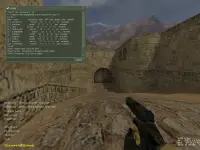
Pwede rin itype ay status, which look like this on the right.
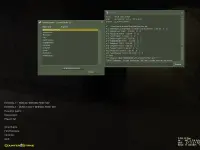
(Kung sakaling hindi kumagat yung bot_quota "0", ilagay nyo yan sa autoexe.cfg. Panigurado lang!
Di ko gusto yung nakatagong settings ng CSLauncher.exe (delete it) from that site kaya replace the Counter-Strike.bat with this one:
Be sure tama yung path ng hl.exe.
Lipat na lang ako sa CS for dummies thread ko to continue with this. I'll just re-link the posts sa mga interested.
Pasensya na lang po sa iba at ganito talaga akong mag-post at naksanayan ko ito sa ibanf forums like bots-united, alliedmodders or even github.
Note: Ginagawan ko lang ng workaround. Ang basic na gamit ng YAPB is starting with 0 bots, then use yapb menu by pressing "=" keybind. The rest ay masa yapb menu na to control the bot quantity skill, etc. Yung akin is by using cfg, bat or exec commands. Designed kasi yung game menu sa Zbot/RegameDLL_CS parameters, so we need to edit the resource file (.res) and communication with the dlls. The pack works fine assuming you follow the instructions. Sinabihan na ako ng YAPB expert na yung ginawa ko is the least I could do w/o using metamod. I-finalize ko na lang yung pack. Stable naman noong ginamit ko w/ my added settings.
Hanggang dito lang yung inabot ko:
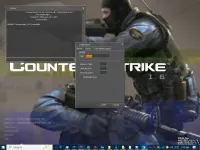
Pero walang effect, cosmetics lang he he.
Ito yung commands sa ngayon na magagamit:
Common YaPB Console Commands
- yb add: Adds a single bot to the game. Skill /personality will be the same as the rest c/o yapb.cfg.
- You can specify a team and difficulty, for example: yb add 2 5 (where 2 is CT and 5 is a specific difficulty).
- yb kill: Kills all bots or a specific team instantly.
- This is often used to quickly end a round if bots are stuck.
- yb kick: Removes a random bot or a specified bot from the current game.
- Use yb kick t to remove a Terrorist bot or yb kick ct for a Counter-Terrorist bot.
- yb fill: Automatically fills the server with bots based on specified parameters.
- yb removebots (or yb kickall): Instantly kicks every bot from the server.
- yb menu: Opens the main graphical bot menu (typically bound to the = key by default) for easier access to these functions.
- yb list: Displays a list of all bots currently playing on the server.
OR
Code:
1. make sure 0 number of bot ang selection
2. add these at the top of yapb.cfg:  yb_quota "0"

// Force YaPB to be the only bot system
yb_quota "0"            // Sets your desired number of bots
yb_quota_mode "fill"     // Fills up to 20 total players
bot_quota "0"            // Disables built-in ReGameDLL/ZBots

3. Pag-open ng map with your team selection, type this sa console:

yb_quota "10" / or yb_quota 10Pwede rin itype ay status, which look like this on the right.
(Kung sakaling hindi kumagat yung bot_quota "0", ilagay nyo yan sa autoexe.cfg. Panigurado lang!
Di ko gusto yung nakatagong settings ng CSLauncher.exe (delete it) from that site kaya replace the Counter-Strike.bat with this one:
Code:
@echo off
set CS_PATH="C:\games\CS1.6"
cd /d %CS_PATH%

echo ---------------------------------------
echo Launching: Realistic Bot War (High Priority)
echo ---------------------------------------

:: /high: Gives priority over background apps
:: -nomousegrab: Stops the game from "locking" your mouse incorrectly
:: -noforcemaccel: Disables Windows Mouse Acceleration
:: -noforcemparms: Uses desktop mouse settings
start /high hl.exe -game cstrike -console -nojoy -nomousegrab -noforcemaccel -noforcemparms

exitLipat na lang ako sa CS for dummies thread ko to continue with this. I'll just re-link the posts sa mga interested.
Pasensya na lang po sa iba at ganito talaga akong mag-post at naksanayan ko ito sa ibanf forums like bots-united, alliedmodders or even github.
Note: Ginagawan ko lang ng workaround. Ang basic na gamit ng YAPB is starting with 0 bots, then use yapb menu by pressing "=" keybind. The rest ay masa yapb menu na to control the bot quantity skill, etc. Yung akin is by using cfg, bat or exec commands. Designed kasi yung game menu sa Zbot/RegameDLL_CS parameters, so we need to edit the resource file (.res) and communication with the dlls. The pack works fine assuming you follow the instructions. Sinabihan na ako ng YAPB expert na yung ginawa ko is the least I could do w/o using metamod. I-finalize ko na lang yung pack. Stable naman noong ginamit ko w/ my added settings.
Hanggang dito lang yung inabot ko:
Pero walang effect, cosmetics lang he he.
Similar threads
-
-
🎮 Browser Games Play Half Life and Counter Strike in Browser
- Started by KumaKuma
- Replies: 0
-
-
💡 Trivia Counter-Strike was initially a custom mod you could play in Half-Life
- Started by Beatriz9
- Replies: 1
-
🆓 Free Game Counter Strike Global Offensive OFFLINE without Steam
- Started by jouue
- Replies: 32
About this Thread
-
19Replies
-
2KViews
-
4Participants
Last reply from:
alist1986
alist1986
New Topics
-
LF GTA V steam account
- Started by Chi_1718
- Replies: 1
- ❓ Gaming Discussion & Support
-
Coc Clan Giveaway up to 3000 Gcash
- Started by WhatDaDuck
- Replies: 12
- ❓ Gaming Discussion & Support
-
BF6 players pa ba dito ?
- Started by _wOOf-fOOw_
- Replies: 0
- ❓ Gaming Discussion & Support
-
Mobile Legends skin script
- Started by Sero-
- Replies: 1
- ❓ Gaming Discussion & Support
-
Jailbroken Plash Speed 5 can now run AI
- Started by xypruss
- Replies: 0
- ❓ Gaming Discussion & Support
-
In Real Life, Nolan Sorrento WON.
- Started by GreedyGrid
- Replies: 0
- ❓ Gaming Discussion & Support
-
AnyPS5 - Progress
- Started by mikehacker182
- Replies: 6
- ❓ Gaming Discussion & Support
-
Hello mga old online player ng cabal online ph
- Started by Xian420
- Replies: 0
- ❓ Gaming Discussion & Support
-
Ano ba latest tsismis sa gta VI sa xbox series?
- Started by jamgunz
- Replies: 0
- ❓ Gaming Discussion & Support
Trending Topics
Online now
- Members online
- 1,242
- Guests online
- 9,854
- Total visitors
- 11,096