PH
PHMake your Browser Ultra Fast by Blocking all Ads From Apps To Browser
Pasagot sana ng Poll para Malaman ang Feedback ng iba
++++For Rooted(ung Non Rooted ay ung nasa Baba)
Adaway
Toggle search sufficiently secure
sufficiently secure
AdAway
DownloadFAQ / Report BugsContribute Code / Translations
AdAway is not available on Google Play! It was removed by Google due to Violation of section 4.4 of the Developer Distribution Agreement. Please install it from F-Droid.
AdAway
AdAway is an open source ad blocker for Android using the hosts file. It needs Android >= 2.1 and ROOT access.
Features
-AdAway is Open Source and Free Software (GPLv3+)
-AdAway lets you select your own sources of hosts files
-You can add exceptions to your Whitelist if an app is not working when specific hosts are blocked
-You can define extra hostnames in your own Blacklist
-You can add your own (hostname, IP)-pairs in the Redirection List
Requirements
Android version: 2.1 Above
ROOT required
Read/Write access on system-Partition
Problems can occur on some HTC devices when system-Partition is not writable!
INSTRUCTIONS
1st Download The apk Adaway.apk Nasa Baba po ang Adway.apk
2nd Grant Acces Superuser
3rd Install and Click Download Files and Apply adblocking and Wait until it finish Downloading.
4th Reboot.. DONE No Advertisment
tanong po is kung maboblock din ni AdAway ang mga ads sa apps ang sagot po ay YES
Tap the option sa Upper right side ng AdAway
Tap Scan For Adware
Tap Start Scanning and Uninstall the app and Uninstall again the Apps that has been Found To have an Ads.
++++For Non Rooted
WebGuard
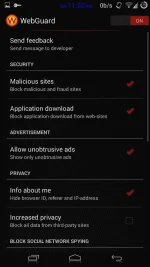
Protecting your mobile device from advertising, malicious sites, web-tracking and viruses while using any browser. New technology - ROOT not required!
Features:
- Block sites distributing malicious content
- Block fraudulent sites
- Blocking the APK loading from web-sites
- Be informed about visiting premium (ρáíd) sites (with premium tarification)
- Block out all advertising in web
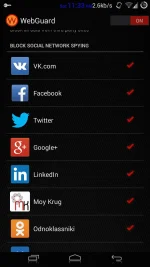
- Protect from spying and surveillance (banners, tracking, social networks, etc)
- Hide the user identifying information (User-Agent, IP with additional headers (may not work everywhere))
- Enhanced privacy mode (block anything on the web-page from another domains)
- As a result - speeding up the Internet
Special Features:
- ROOT not needed!
- Application monitors your network traffic locally with VPN connection to embedded VPN server. The remote VPN server is not used.
- Supports more than 130 browsers
Restrictions:
- Incomplete browser support with data compression enabled (Opera mini, UC Browser, etc).
- The application may not work in some LTE networks (some 4G networks).
- The application may not work on some Android versions 4.0.x and 4.4.x (KitKat) due to bugs in the Android VPN.
INSTRUCTIONS
1st Download Webguard.apk (Nasa Baba po ang Webguard111.apk)
2nd Install Webguard
3rd Open Webguard and Turn it on wait for it there will be a notification if it is ready
You do not have permission to view the full content of this post. Log in or register now.
You do not have permission to view the full content of this post. Log in or register now.
Pasagot sana ng Poll para Malaman ang Feedback ng iba
++++For Rooted(ung Non Rooted ay ung nasa Baba)
Adaway
Toggle search sufficiently secure
sufficiently secure
AdAway
DownloadFAQ / Report BugsContribute Code / Translations
AdAway is not available on Google Play! It was removed by Google due to Violation of section 4.4 of the Developer Distribution Agreement. Please install it from F-Droid.
AdAway
AdAway is an open source ad blocker for Android using the hosts file. It needs Android >= 2.1 and ROOT access.
Features
-AdAway is Open Source and Free Software (GPLv3+)
-AdAway lets you select your own sources of hosts files
-You can add exceptions to your Whitelist if an app is not working when specific hosts are blocked
-You can define extra hostnames in your own Blacklist
-You can add your own (hostname, IP)-pairs in the Redirection List
Requirements
Android version: 2.1 Above
ROOT required
Read/Write access on system-Partition
Problems can occur on some HTC devices when system-Partition is not writable!
INSTRUCTIONS
1st Download The apk Adaway.apk Nasa Baba po ang Adway.apk
2nd Grant Acces Superuser
3rd Install and Click Download Files and Apply adblocking and Wait until it finish Downloading.
4th Reboot.. DONE No Advertisment
tanong po is kung maboblock din ni AdAway ang mga ads sa apps ang sagot po ay YES
Tap the option sa Upper right side ng AdAway
Tap Scan For Adware
Tap Start Scanning and Uninstall the app and Uninstall again the Apps that has been Found To have an Ads.
++++For Non Rooted
WebGuard
Protecting your mobile device from advertising, malicious sites, web-tracking and viruses while using any browser. New technology - ROOT not required!
Features:
- Block sites distributing malicious content
- Block fraudulent sites
- Blocking the APK loading from web-sites
- Be informed about visiting premium (ρáíd) sites (with premium tarification)
- Block out all advertising in web
- Protect from spying and surveillance (banners, tracking, social networks, etc)
- Hide the user identifying information (User-Agent, IP with additional headers (may not work everywhere))
- Enhanced privacy mode (block anything on the web-page from another domains)
- As a result - speeding up the Internet
Special Features:
- ROOT not needed!
- Application monitors your network traffic locally with VPN connection to embedded VPN server. The remote VPN server is not used.
- Supports more than 130 browsers
Restrictions:
- Incomplete browser support with data compression enabled (Opera mini, UC Browser, etc).
- The application may not work in some LTE networks (some 4G networks).
- The application may not work on some Android versions 4.0.x and 4.4.x (KitKat) due to bugs in the Android VPN.
INSTRUCTIONS
1st Download Webguard.apk (Nasa Baba po ang Webguard111.apk)
2nd Install Webguard
3rd Open Webguard and Turn it on wait for it there will be a notification if it is ready
You do not have permission to view the full content of this post. Log in or register now.
You do not have permission to view the full content of this post. Log in or register now.