PH
PHIf you use a Samsung Galaxy smart phone you might have had this issue. This is a common problem and several Samsung Galaxy phones seem to have USB connection problems. Sometimes the USB connection stops working and even rebooting the phone does not solve the problem. It is not a driver problem on the PC, nor some dust on the USB connector but really a software/configuration problem on the Android phone itself.
Before you try re-install the driver by installing Kies, try this simple method.
Unplug the USB cable
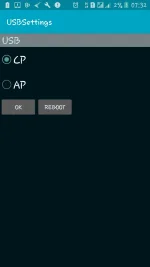
On the cell phone, dial the following number: *#0808# Once the last # is hit, the PhoneUtil application is launched.
Choose USB -> Modem quit once. Then again dial *#0808# and then USB -> PDA mode.
Now connect the USB cable for mass storage mode
You should have the USB Mass Storage option came back.
Before you try re-install the driver by installing Kies, try this simple method.
Unplug the USB cable
On the cell phone, dial the following number: *#0808# Once the last # is hit, the PhoneUtil application is launched.
Choose USB -> Modem quit once. Then again dial *#0808# and then USB -> PDA mode.
Now connect the USB cable for mass storage mode
You should have the USB Mass Storage option came back.