 PH
PH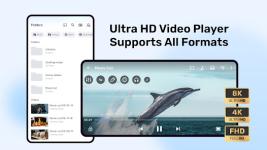
 App Description:
  MX Player: The Ultimate Cinematic Experience on Android
 Elevate your media viewing with the world’s most powerful video and music player, now featuring full AC3 and DTS audio support!
 Elite Performance: Experience seamless playback with HW+ hardware acceleration and pioneering Multi-Core Decoding—proven to be up to 70% faster than standard players.
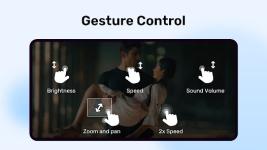
 Precision Control: Effortlessly Pinch to Zoom, Pan, and Swipe for a perfectly framed view every time.
 Privacy Folder: Keep your sensitive content secure! Hide "eyes-only" videos in a protected, private folder.
 Kids Lock: Keep the little ones entertained without worrying about accidental calls or app switching.
 Subtitle Mastery: Total gesture control over text size, timing, and positioning. Supports all major formats (SRT, ASS, SMI, VTT, and more).
 Crystal Clear Audio: Optimized AV sync for Bluetooth headsets and full support for high-fidelity codecs.
 Offline Ready: Enjoy your entire library anytime, anywhere, with no internet required.
Experience the gold standard of mobile entertainment. Download MX Player today!
Would you like me to create a shorter, "App Store" style tagline for your social media promotion?
 What's New: Experience a smoother, faster, and more reliable application with our latest update. We've squashed bugs and optimized performance to ensure you have the best possible experience.
 MOD Features:
 - ✰ Offline mod.
- ✰ Silver Pack Unlocked (for local ρáíd features)
- ✰ Annoying codec selection dialog removed.
- ✰ Mx Player Pro account icon is imported to this mod.
- ✰ User account section is disabled.
- ✰ Themes options in players settings is enabled.
- ✰ Layouts and options related to online features are removed and size reduced by 1/3.
- ✰ Bottom bar and navbar is black in dark mode instead of dark grey.
- ✰ Subtitle settings details are expanded by default
- ✰ Prompt disabled for warning about volume exceeding 100%
- ✰ No watermark on online videos
- ✰ No need to login to watch series's last episode.
- ✰ A new dialog is added for mod options. Click on "Configure Extra Options" under my account section.
- ✰ Switch the bottom bar on/off.
- ✰ Switch Topbar shortcuts on/off.
- ✰ Switch to hide Speed playing overlay.
- ✰ Switch for Smart Enhance starting animation.
- ✰ Switch for enabling Smart Enhance permanently for every video.
- ✰ Option to choose different intensity for smart enhancement (25%, 50%, 75% and 100%)
- ✰ When exporting/importing settings, these custom settings are also included.
- ✰ Three new options for speed playing overlay
- ✰✰ Min - Will show a minimal overlay
- ✰✰ Anim - Will animate the overlay
- ✰✰ BG - Enables the rectangular semi-translucent background
- ✰✰ If Min is disabled, overlay will be hidden completely.
- ✰ New option "Slide" added for Speed playing overlay, if disabled, speed doesn't change when sliding left or right.
- ✰ Prompt disabled for warning about volume exceeding 100%.
- • Shareduserid removed so should install along with any other Mx Pro mod (if not using mine).
-
 Mod is using one of NP's hook, so either ignore those virus total alerts because they are due to that or simply don't use this mod but don't report them here as I am aware about them and I can't do anything about them.
 Download Link:
Download
Download Link:
Download