PH
PHPHC- Naksu
Elite
OUT OF SUPPORT NA PERO NAGRERE;EASE P RIN NG UPDATE MGA LODS?
......................................................................................................................
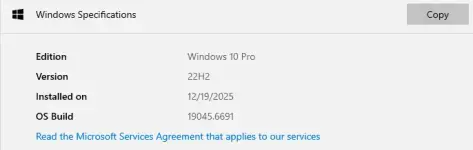
December 9, 2025—KB5071546 (OS Builds 19045.6691 and 19044.6691)
Applies ToRelease Date:
12/9/2025
Version:
OS Builds 19045.6691 and 19044.6691
Windows Secure Boot certificate expiration
Important: Secure Boot certificates used by most Windows devices are set to expire starting in June 2026. This might affect the ability of certain personal and business devices to boot securely if not updated in time. To avoid disruption, we recommend reviewing the guidance and taking action to update certificates in advance. For details and preparation steps, see You do not have permission to view the full content of this post. Log in or register now.
Summary
This article lists the security issues and quality improvements included in this security update.Windows 10, version 22H2Windows 10, version 21H2
Applies to: Windows 10 ESU
Important: Use EKB You do not have permission to view the full content of this post. Log in or register now. to update to Windows 10, version 22H2.
This security update includes fixes and quality improvements that are part of the following updates:
- You do not have permission to view the full content of this post. Log in or register now.
- You do not have permission to view the full content of this post. Log in or register now.
- [PowerShell 5.1] The You do not have permission to view the full content of this post. Log in or register now. command now includes a confirmation prompt with a security warning of a script execution risk. You can choose to continue or cancel the request. For additional details, see You do not have permission to view the full content of this post. Log in or register now. and You do not have permission to view the full content of this post. Log in or register now..
For more information about security vulnerabilities, please refer to the new You do not have permission to view the full content of this post. Log in or register now. website and the You do not have permission to view the full content of this post. Log in or register now..
For information about Windows update terminology, see the article about the You do not have permission to view the full content of this post. Log in or register now. and the You do not have permission to view the full content of this post. Log in or register now.. For an overview of Windows 10, version 22H2, see its You do not have permission to view the full content of this post. Log in or register now..
Note Follow You do not have permission to view the full content of this post. Log in or register now. to find out when new content is published to the Windows release health dashboard.
Known issues in this update
Windows 10 servicing stack update (KB068780) - versions 19045.6575 and 19044.6575
Microsoft now combines the latest servicing stack update (SSU) for your operating system with the latest cumulative update (LCU). SSUs improve the reliability of the update process to mitigate potential issues while installing updates.This update makes quality improvements to the servicing stack, which is the component that installs Windows updates. To learn more about SSUs, see You do not have permission to view the full content of this post. Log in or register now. and You do not have permission to view the full content of this post. Log in or register now..
- This servicing stack update (SSU) includes enhanced logic to verify whether a device is hosted on Azure, leveraging an updated certificate chain for validation.
To ensure seamless installation of future updates on Azure-hosted devices, it is strongly recommended to install this latest SSU prior to applying any additional updates.
Additionally, please ensure that the device can access the required certificate update domains to successfully download and install certificate updates. For more information, refer to:- You do not have permission to view the full content of this post. Log in or register now.
- You do not have permission to view the full content of this post. Log in or register now.
How to get this update
Before you install this updateImportant You must have the latest servicing stack update (SSU) installed. Not installing the latest SSU before applying Windows updates might result in the Windows update not being offered until the latest SSU is installed.
Based on your installation scenario, choose one of the following:
- For offline OS image servicing:
If your image does not have the July 25, 2023 (You do not have permission to view the full content of this post. Log in or register now.) or later LCU, you must install the special standalone October 13, 2023 SSU (You do not have permission to view the full content of this post. Log in or register now.) before installing this update. - For Windows Server Update Services (WSUS) deployment or when installing the standalone package from Microsoft Update Catalog:
If your devices do not have the May 11, 2021 (You do not have permission to view the full content of this post. Log in or register now.) or later LCU, you must install the special standalone August 10, 2021 SSU (You do not have permission to view the full content of this post. Log in or register now.) before installing this update.
Download ISO Here:
25-Dec Windows 10 22H2 New Released Build
Use this key to activate habang may mak counts pa
new win 10 pro mak key 11/15/2025