 PH
PH-
Welcome to PHCorner Forums! Sign up for free to unlock full access and exclusive privileges, including:
- Asking questions about computer and mobile issues
- Discovering internet tips for your mobile network and computer
You are using an out of date browser. It may not display this or other websites correctly.
You should upgrade or use an alternative browser.
You should upgrade or use an alternative browser.
LM Studio users, what are your current local LLM models?
- Thread starter Draft
- Start date
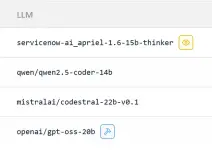
26k po, dito ko nabili online last October:sana all sir naka eGPU is RTX 5060 Ti 16 GB nasa magkano po yan?
You do not have permission to view the full content of this post. Log in or register now.
29k na ngayon

yay tumaas na aray mo hahaha26k po, dito ko nabili online last October:
You do not have permission to view the full content of this post. Log in or register now.
29k na ngayon
Skia Monarch
Elite
Smooth na yan sir Draft. Pwede din Llama. Di ko sure kung ilang parameters yung Gemini and Kimi K2. Nagandahan ako so far kay Gemini 3.0 Pro through Perplexity. Wala pa ako beast na PC para mag store ng local LLM.
Meta/llama right?Pwede din Llama
Thanks.
Skia Monarch
Elite
Yes Meta/Llama 4. You're welcome!Meta/llama right?
Thanks.

Salamat saan?salamat po sr draft
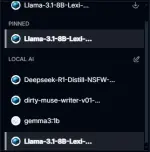
Ito sana medyo mura for 16 GB VRAM:
You do not have permission to view the full content of this post. Log in or register now.
Kaso wala akong mahanap na online seller sa Pinas.
You do not have permission to view the full content of this post. Log in or register now.
Kaso wala akong mahanap na online seller sa Pinas.
maganda din sana 3090 24gb good for inference. May nakita ako sa local marketplace ko dito for 25k kaso kinapos pa sa budget ngayon naging 30k na hahaIto sana medyo mura for 16 GB VRAM:
You do not have permission to view the full content of this post. Log in or register now.
Kaso wala akong mahanap na online seller sa Pinas.
Tapos 25-30K, goods na goods po yan.3090 24gb
Skia Monarch
Elite
thoughts on NVIDIA A1000 sir draft?Ito sana medyo mura for 16 GB VRAM:
You do not have permission to view the full content of this post. Log in or register now.
Kaso wala akong mahanap na online seller sa Pinas.
No experience ako dyan, pero masyadong limited ang 8GB VRAM.thoughts on NVIDIA A1000 sir draft?
Skia Monarch
Elite
oh okay kaya mas solid if kay Intel Arc kana ma invest.No experience ako dyan, pero masyadong limited ang 8GB VRAM.
Buti ka pa pakner, naka-setup na with a decent GPU he he. Sa iba napunta yung pang-hobby ko.
Ako, sa local AI, Llama.cpp, Ollama.....sa cpu mode pa rin dahil sa hardware limitations kaya limited sa <10B parameters sa LLM na 4-8bit, GGUF. Nag-install (using Windows installer) sa'kin yung LMStudio pero di stable siya sa'kin dahil hanggang AVX lang yung akin. AVX2 kasi ang requirement ng LMStudio kaya siguro nagkaganoon. Mas ok sa'kin yung Llama.cpp. Ang maganda sa LMStudio, meron na siyang matinong UI, pwede mong lagyan ng MCP server (local or galing sa HF, etc.) or as mcp client, may ibat' ibang user mode (user, power user, developer)....Mas madaling basahin yung docs via github: You do not have permission to view the full content of this post. Log in or register now.
Sa many ways of using it, go here: You do not have permission to view the full content of this post. Log in or register now.
Sa cli-mode, ok siya noong una kong gamitin.
Hindi ko na ginalugad yung ibang features, pero assuming you have the right hardware and knowhow, it works as stated. Meron ka ng LLM api server at the least for your other apps like sa browser, other OpenAI API compatible interfaces (open-webui, SillyTavern...), etc.
Sa'kin, naglalaro ako sa compatible na Gemma, Llama or Deepseek. Meron namang online/offline calculator to verify if your existing hardware can run the models you want. Sapilitan na lang ang local AI kung nasa remote area ako tulad ng probinsiya he he. Basta dala ko yung USB drive, any compatible pc will do.
Mas maganda talaga pag RTX cards ang gamit dahil widely supported yan ng AI program, and be sure >16GB man lang to run them smoothly. Yung Intel Arc graphics is still a good choice since nakahabol na sila sa AI requirements. Kahit nga Intel Core processor with NPU can benefit, but you need to find the app that supports it.
Sa setup mo, yang GPT-OSS-20B is the best choice. Kita naman sa LLM leaderboard yung benchmark niya. Sa pagpili, madali na basta alam mo yung full details ng model card niya.
PS. Kung expire na warranty ng mini-pc mo, taasan mo yung RAM kahit hanggang 64GB or higher. Ito yung nabasa ko to support this claim for LM studio use:
Ako, sa local AI, Llama.cpp, Ollama.....sa cpu mode pa rin dahil sa hardware limitations kaya limited sa <10B parameters sa LLM na 4-8bit, GGUF. Nag-install (using Windows installer) sa'kin yung LMStudio pero di stable siya sa'kin dahil hanggang AVX lang yung akin. AVX2 kasi ang requirement ng LMStudio kaya siguro nagkaganoon. Mas ok sa'kin yung Llama.cpp. Ang maganda sa LMStudio, meron na siyang matinong UI, pwede mong lagyan ng MCP server (local or galing sa HF, etc.) or as mcp client, may ibat' ibang user mode (user, power user, developer)....Mas madaling basahin yung docs via github: You do not have permission to view the full content of this post. Log in or register now.
Sa many ways of using it, go here: You do not have permission to view the full content of this post. Log in or register now.
Sa cli-mode, ok siya noong una kong gamitin.
Hindi ko na ginalugad yung ibang features, pero assuming you have the right hardware and knowhow, it works as stated. Meron ka ng LLM api server at the least for your other apps like sa browser, other OpenAI API compatible interfaces (open-webui, SillyTavern...), etc.
Sa'kin, naglalaro ako sa compatible na Gemma, Llama or Deepseek. Meron namang online/offline calculator to verify if your existing hardware can run the models you want. Sapilitan na lang ang local AI kung nasa remote area ako tulad ng probinsiya he he. Basta dala ko yung USB drive, any compatible pc will do.
Mas maganda talaga pag RTX cards ang gamit dahil widely supported yan ng AI program, and be sure >16GB man lang to run them smoothly. Yung Intel Arc graphics is still a good choice since nakahabol na sila sa AI requirements. Kahit nga Intel Core processor with NPU can benefit, but you need to find the app that supports it.
Sa setup mo, yang GPT-OSS-20B is the best choice. Kita naman sa LLM leaderboard yung benchmark niya. Sa pagpili, madali na basta alam mo yung full details ng model card niya.
PS. Kung expire na warranty ng mini-pc mo, taasan mo yung RAM kahit hanggang 64GB or higher. Ito yung nabasa ko to support this claim for LM studio use:
Yan yung ibig kong sabihin!Top Tools for Hybrid CPU/GPU Workloads
- You do not have permission to view the full content of this post. Log in or register now.: A popular desktop interface that includes a "GPU Offload" slider. It allows you to specify exactly how many layers of an LLM should run on the GPU; any remaining layers automatically run on the CPU. In late 2025 versions, it added advanced settings to specifically offload "expert weights" for Mixture of Experts (MoE) models to the CPU while keeping core tasks on the GPU.
Skia Monarch
Elite
Draft You do not have permission to view the full content of this post.
Log in or register now.
2.5 million setupDraft You do not have permission to view the full content of this post. Log in or register now.

Doon sa mga LMStudio users na may decent hardware like high-end GPUs/high VRAM, high system RAM, Pinokio is the easiest to integrate/manage your local AI servers like LLMs, diffusion models, VLAs, VLMs, and other specialized types.
Iwas sakit ng ulo at clutter kung mahilig kang mag-test ng local AIKey Benefits:
- Simplified Access: No more dealing with changing port numbers for LM Studio.
- Automated Setup: Pinokio handles dependencies for other tools, making it easier to build AI pipelines.
- Unified Control: Access LM Studio and other AI apps through a central Pinokio interface.
About this Thread
-
36Replies
-
1KViews
-
7Participants
Last reply from:
X_Space_X
X_Space_X
New Topics
-
Pasabit po TGT for job hunting.
- Started by Lalalisaa
- Replies: 0
- 🧠 Artificial Intelligence
-
Elevenlabs - Story Generator - For Content - Yt/Fb
- Started by Meow Meng
- Replies: 4
- 🧠 Artificial Intelligence
-
Ano kaya AI pang Generate ng videos yung mga fb/tktk ai stories
- Started by Slime-
- Replies: 4
- 🧠 Artificial Intelligence
-
ᑕᕼᗩTGᑭT or Nano Banana?
- Started by StevenRogers
- Replies: 0
- 🧠 Artificial Intelligence
-
Change Pose with Prompt
- Started by StevenRogers
- Replies: 1
- 🧠 Artificial Intelligence
-
USING AI AS CONTENT IN OF
- Started by juls91
- Replies: 0
- 🧠 Artificial Intelligence
-
200+ FREE TGT ACCOUNTS!
- Started by menyou
- Replies: 1
- 🧠 Artificial Intelligence
-
Gemini 4 Argon FREE right now
- Started by sff
- Replies: 5
- 🧠 Artificial Intelligence
-
Gemini 4 Argon Is Here: What You Need to Know
- Started by Diego Mendoza
- Replies: 4
- 🧠 Artificial Intelligence
Trending Topics
Online now
- Members online
- 1,112
- Guests online
- 8,161
- Total visitors
- 9,273