PH
PHMagandang araw mga boss try ko lang mag share ng steps para mawala ads/sponsored ads sa facebook/messenger.
UPDATE!!!
Prepatched APK updated to latest 541.0.0.85.79
Twice nyo po install ung app para lumabas ung built in messenger.
First Tut ko to mga boss pasensya na kung magulo at meron hindi maintindihan comment na lang kayo pag may tanong.
Patching Guide:
1. Download You do not have permission to view the full content of this post. Log in or register now. sa github.
2. Open rvx manager goto settings and gayahin settings sa ss.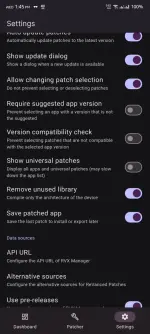
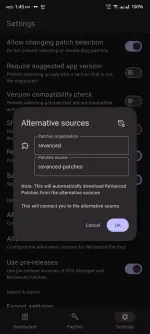 3. Download Facebook apk sa You do not have permission to view the full content of this post.
Log in or register now..
3. Download Facebook apk sa You do not have permission to view the full content of this post.
Log in or register now..
4. Open RVX Manager and click patcher > select an app > storage then find your facebook apk.
5. ρá†ch Facebook and save to downloads again.

Patching in You do not have permission to view the full content of this post. Log in or register now.
1. Open Lucky Patcher click Rebuild & Install > find your rvx facebook apk > Rebuild
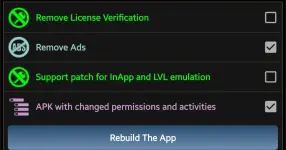
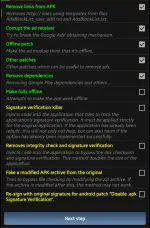
2. Select Apk with multipatch then gayan nasa ss sa taas.
3. Type Ads in search bar and disable nyo lahat ng entry contaning Ads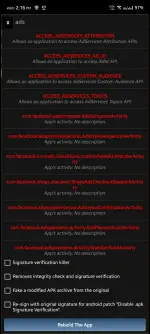
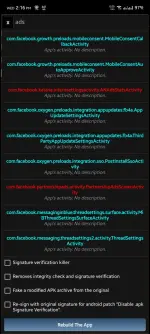
4. Sa search bar ulit type nyo SURVEY disable lahat
5. Same step type BILLING then disable
6. Same step type GOOGLE then disable lahat except sign in activity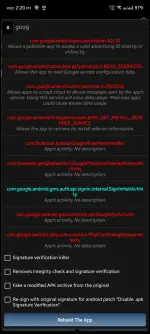
7. Rebuild the app and Install.
Note: If ayaw mainstall ng facebook, uninstall nyo muna lahat mg meta apps (lite, messenger, facebook) bago nyo install tong patched fb
Completely removing ADS ( Important)
Phone Settings
1. Go to settings ng phone mo then Google Services
2. Click All Serrvices > Ads
3. Delete nyo advertising ID
Facebook App
1. Open FB > Settings & Privacy > Settings > Meta Account Center
2. Click Ad Preferences > Customize Ads
3. Delete nyo lahat ng ads or hide.
4. After 24hrs unti unti na mababawasan ads nyo. Pag meron pa kayo nakita sa feed nyo Hide nyo lang.
EXTRA: FB App with built in Messenger
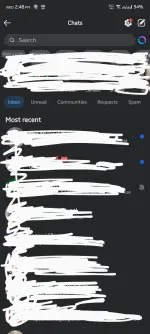
1. Download You do not have permission to view the full content of this post. Log in or register now. sa github
2. Open ρá†ch Manager > Manual then locate nyo ung patched apk galing sa lucky patcher /storage/0/Lucky Patcher/Modified
3. ρá†ch > Install > Enjoy!❤❤❤
Para sa messenger same steps lang. Need nyo rin ipatch ang messenger kasi minsan ayaw magsama ng patched fb at orig messemger.
Pre Patched APK
Facebook 541.0.0.85.79 min android 14
You do not have permission to view the full content of this post. Log in or register now.
Facebook Clone 541.0.0.85.79 min android 14
You do not have permission to view the full content of this post. Log in or register now.
Facebook 541.0.0.62.79
You do not have permission to view the full content of this post. Log in or register now.
Messenger: You do not have permission to view the full content of this post. Log in or register now.
Facebook Clone: You do not have permission to view the full content of this post. Log in or register now.
UPDATE!!!
Prepatched APK updated to latest 541.0.0.85.79
Twice nyo po install ung app para lumabas ung built in messenger.
First Tut ko to mga boss pasensya na kung magulo at meron hindi maintindihan comment na lang kayo pag may tanong.
Patching Guide:
1. Download You do not have permission to view the full content of this post. Log in or register now. sa github.
2. Open rvx manager goto settings and gayahin settings sa ss.
3. Download Facebook apk sa You do not have permission to view the full content of this post.
Log in or register now..4. Open RVX Manager and click patcher > select an app > storage then find your facebook apk.
5. ρá†ch Facebook and save to downloads again.
Patching in You do not have permission to view the full content of this post. Log in or register now.
1. Open Lucky Patcher click Rebuild & Install > find your rvx facebook apk > Rebuild
2. Select Apk with multipatch then gayan nasa ss sa taas.
3. Type Ads in search bar and disable nyo lahat ng entry contaning Ads
4. Sa search bar ulit type nyo SURVEY disable lahat
5. Same step type BILLING then disable
6. Same step type GOOGLE then disable lahat except sign in activity
7. Rebuild the app and Install.
Note: If ayaw mainstall ng facebook, uninstall nyo muna lahat mg meta apps (lite, messenger, facebook) bago nyo install tong patched fb
Completely removing ADS ( Important)
Phone Settings
1. Go to settings ng phone mo then Google Services
2. Click All Serrvices > Ads
3. Delete nyo advertising ID
Facebook App
1. Open FB > Settings & Privacy > Settings > Meta Account Center
2. Click Ad Preferences > Customize Ads
3. Delete nyo lahat ng ads or hide.
4. After 24hrs unti unti na mababawasan ads nyo. Pag meron pa kayo nakita sa feed nyo Hide nyo lang.
EXTRA: FB App with built in Messenger
1. Download You do not have permission to view the full content of this post. Log in or register now. sa github
2. Open ρá†ch Manager > Manual then locate nyo ung patched apk galing sa lucky patcher /storage/0/Lucky Patcher/Modified
3. ρá†ch > Install > Enjoy!❤❤❤
Para sa messenger same steps lang. Need nyo rin ipatch ang messenger kasi minsan ayaw magsama ng patched fb at orig messemger.
Pre Patched APK
Facebook 541.0.0.85.79 min android 14
You do not have permission to view the full content of this post. Log in or register now.
Facebook Clone 541.0.0.85.79 min android 14
You do not have permission to view the full content of this post. Log in or register now.
Facebook 541.0.0.62.79
You do not have permission to view the full content of this post. Log in or register now.
Messenger: You do not have permission to view the full content of this post. Log in or register now.
Facebook Clone: You do not have permission to view the full content of this post. Log in or register now.