 PH
PH
 App Description:
  MobiPDF: PDF Editor & Scanner – Premium Edition
 Your All-in-One Mobile PDF Solution | v11.11.270105 | Mod Extra | Android 7.0+
---
 Transform Your Phone into a Full-Featured PDF Office
 MobiPDF is your ultimate mobile toolkit for viewing, editing, scanning, and securing PDFs—anytime, anywhere. Trusted by professionals and recognized by the PDF Association, MobiPDF delivers desktop-level power in the palm of your hand.
---
 Why Choose MobiPDF?
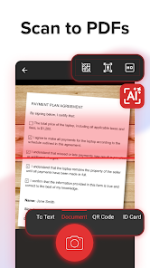
- AI-Powered Document Scanning
Scan receipts, contracts, IDs, and more with intelligent edge detection. Turn paper into crisp, editable PDFs in seconds.
- Smart OCR Technology
Extract text from images and scans, then share or save with ease—perfect for notes, reports, and certificates.
- Advanced PDF Editing
Edit text, images, signatures, comments, and drawings. Create, insert, or modify content effortlessly—no desktop needed.
- Fill & Sign Forms On the Go
Complete and sign PDFs instantly. Draw, save, or reuse your signature for fast, secure document processing.
- Seamless File Conversion
Convert PDFs to Word, Excel, PowerPoint, ePub, or images—preserving layout and formatting. Reverse conversions included.
- Military-Grade Security
Password-protect, encrypt, and restrict access to sensitive files. Validate authenticity with digital certificates.
- Cloud Backup & Storage
Get 5GB free cloud storage with MobiDrive. Upgrade to Premium for 50GB and never lose a document again.
- Enhanced Viewing & Annotation
Switch page modes, highlight, comment, draw, stamp, or attach files—customize your reading and editing experience.
- Full PDF Organization
Rearrange, insert, delete, extract, duplicate, rotate, or merge pages for perfectly structured documents.
---
 Print Wirelessly
 Send PDFs straight to your printer from your phone—no cables, no hassle.
---
 Premium Features Unlocked
 Unlock the most powerful mobile PDF scanner and editor with in-app purchases.
All subscriptions managed securely via Google Play.
---
 Cross-Platform Power
 Love MobiPDF on mobile? Try our free desktop version for Windows and keep your workflow seamless.
---
 Need Help?
 Visit our Help Center for support.
Privacy Policy | Terms of Use
---
 MobiPDF: Where Professional PDF Power Meets Mobile Convenience.
 Download now and take control of your documents—anytime, anywhere.
 What's New: • New Home Bottom Navigation: Tap the new “+” button at the bottom navigation bar to quickly open a file, create a new PDF, or start a scan - everything you need is just a tap away.
• Improvements & Fixes: Enjoy a smoother, more stable MobiPDF with every update.
Enjoying MobiPDF? Leave us a review - it helps us improve!
 MOD Features:
 - Premium / ρáíd features unlocked;
- Disabled / Removed unwanted Permissions + Receivers + Providers + Services;
- Optimized and zipaligned graphics and cleaned resources for fast load;
- Ads Permissions / Services / Providers removed from AndroidManifest;
- Ads links removed and invokes methods nullified;
- Google Play Store install package check disabled;
- Debug code removed;
- Remove default .source tags name of the corresponding java files;
- Facebook ads bundled SDK removed completely;
- Languages: Full Multi Languages;
- CPUs: armeabi-v7a, arm64-v8a, x86, x86_x64;
- Screen DPIs: 120dpi, 160dpi, 240dpi, 320dpi, 480dpi, 640dpi;
- Original package signature changed;
- Release by Balatan.
- Select all
 Download Link:
Download
Download Link:
Download