 PH
PH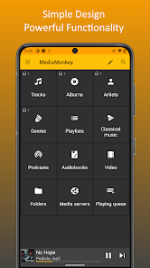
 App Description:
  MediaMonkey Pro v2.1.1.1290 [Mod Extra] – Your Ultimate Music Library Manager
 Requirements: Android 8.0+
 Experience Powerful Music Management Like Never Before!
- Master Your Music Library: Effortlessly organize and navigate massive collections of music, podcasts, audiobooks, and videos. Manage over 100,000 audio and video files with ease.
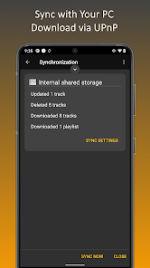
- Smart Sync Across Devices: Seamlessly sync your library, playlists, and metadata across Android, Windows, Apple devices, and DLNA/UPnP media players.
- Advanced Tagging & Auto-Organization: Automatically tag tracks, find missing album art, clean duplicates, and rename files for a perfectly curated collection.
- High-Quality Playback: Enjoy support for all popular audio formats including MP3, AAC, FLAC, WAV, and more, with volume leveling (ReplayGain) and customizable equalizer settings.
- Custom Playlists & Auto DJ: Create nested playlists, use Auto DJ for continuous playback, and personalize your listening experience.
- Pro Features Unlocked: Access unlimited USB syncing, live mode for preset playlists, and ad-free, uninterrupted music enjoyment.
- Extras for Audiophiles & DJs: CD ripping, file conversion, bookmarking for podcasts/audiobooks, sleep timer, party mode, and customizable skins.
Elevate your music experience with a professional-grade media manager trusted by music lovers and DJs worldwide. Download MediaMonkey Pro now and transform how you manage, sync, and enjoy your digital media!


 What's New: 1290
Sync
-Connection via VPN
-Autoplaylists incomplete
-Playlist hierarchy not updated
-Fails in some cases
-Error handling
Misc
-Artwork lookup
-Stability
 MOD Features:
 - ❖ Sync (wirelessly ) with MediaMonkey for Windows. Keeps playlists, tracks and videos including file info, ratings, lyrics, play history, etc. in sync. [*] ❖ Manage Music, Classical music, Audiobooks, Podcasts, Video. [*] ❖ Navigate by Artist, Album, Composer, Genre, Playlist, etc.) with support for multiple attributes (e.g. Genre=Rock;Alternative) [*] ❖ Navigate by Folder *
- ❖ Play any content supported by your device (using system codecs), with replay gain (volume leveling) and an equalizer
- ❖ Sleep timer
- ▶ NEW: Cast to Google chrome cast or UPnP/DLNA devices ** †
- ❖ Bookmark large files (e.g. Audiobooks, videos)
- ❖ Access and download media from UPnP/DLNA servers **
- ❖ Player widgets for home screen or lock screen
- ❖ Edit properties of single/multiple files
- ❖ Manage single/multiple files (e.g. play, queue, playlist management, delete, use as ringtone, share)
- ❖ Playlist management with hierarchy
- ❖ Now Playing views: Album Art / Tracklist
- ❖ Compatible with with third-party scrobblers (Simple Last.fm, Scrobble Droid, Last.fm)
- ❖ Full-library search
- ❖ etc...
- * USB Sync is unrestricted. Wi-Fi sync is a time-limited trial.
- ** Time limited trial.
- † Only supported on Android 4+
- ❱ Wi-Fi Sync addon: Unlocks unlimited wireless synchronization. Available as an in-app purchase.
- ❱ UPnP/DLNA addon: Unlocks unlimited UPnP/DLNA usage. Available as an in-app purchase.
- ❱ Advanced Media Management addon: Unlocks home screen customization, folder browser. Available as an in-app purchase.
- ❱ MediaMonkey Pro: Unlocks all trial functionality, and provides all of the addon features described above in one bundle. Available in the App Store.
- In-app purchases - to purchase addons
- Device & app history (retrieve running apps) - to show/hide the tray icon
- Identity (find accounts on the device) - to allow purchases of addons
- Photos/Media/Files (Read, modify, delete, or test access to the contents of your USB storage) - to sync/download content via UPnP
- Wi-Fi and Other network connection information (view Wi-Fi connections, full network access, connect and disconnect from Wi-Fi, allow Wi-Fi Multicast reception, view network connections) - for Wi-Fi sync / UPnP
- Other
- prevent device from sleeping) - for video playback
- modify system settings - to change Wi-Fi settings
- change your audio settings - for audio/video playback
- pair with Bluetooth devices - for bluetooth playback
- install shortcuts - to add playlist shortcuts
- read phone status and identity - to hide the Lock Screen Player (only on system OS versions < 4.2) during a phone call
- disable your screen lock - to allow for a Lock Screen Player on system OS versions < 4.2
- Pro + Addons / ρáíd features unlocked - no additional key required;
- Disabled / Removed unwanted Permissions + Receivers + Providers + Services;
- Optimized and zipaligned graphics and cleaned resources for fast load;
- Google Play Store install package check disabled;
- Debug code removed;
- Remove default .source tags name of the corresponding java files;
- Analytics / Crashlytics disabled;
- AOSP compatible mode;
- Languages: Full Multi Languages;
- CPUs: armeabi-v7a, arm64-v8a, x86, x86_64;
- Screen DPIs: 120dpi, 160dpi, 213dpi, 240dpi, 320dpi, 480dpi, 640dpi;
- Original package signature changed;
- Release by Balatan.
- Select all
 Download Link:
Download
Download Link:
Download