 PH
PH
1. Download the modified Spotify version 9.0.88.1405 or 9.0.90.1229 (huwag muna i-install).
You do not have permission to view the full content of this post. Log in or register now.
You do not have permission to view the full content of this post. Log in or register now.
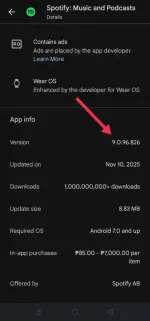
2. Open Play Store then check the latest version of Spotify (sa ngayon, 9.0.96.826 ang latest).
3. Now, open MT Manager app.
You do not have permission to view the full content of this post. Log in or register now.
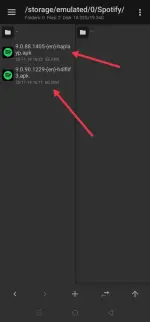
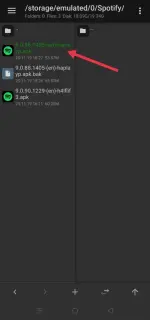
4. Locate and tap the modified 9.0.88.1405 or 9.0.90.1229.
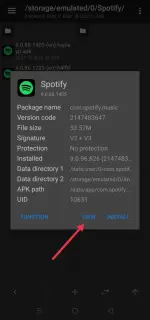
5. Select VIEW button.
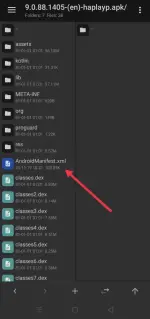
6. Tap AndroidManifest.xml.
7. Select Decompile.
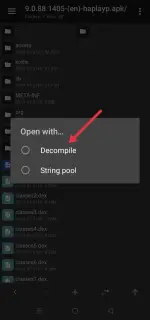
8. Replace the 9.0.88.1405 or 9.0.90.1229 to 9.0.96.826.
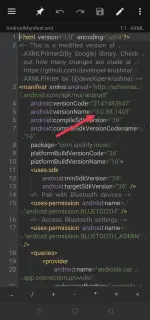
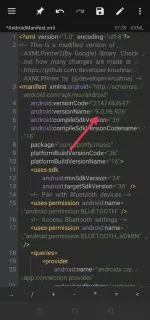
9. Press back then select SAVE AND EXIT.
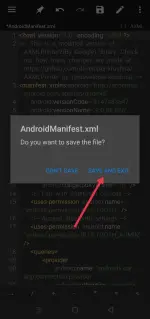
10. Mark check AUTO SIGN and tap OK.
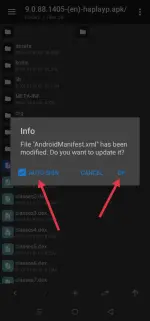
11. Then, install the re-mod Spotify.
Note: To fix an empty playlist or songs skipping after an update, log out, clear the cache and data, then log in again with your email and password. Enjoy!

