 PH
PH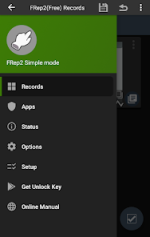
That content is a mixture of an app description, a "What's New" section, and details about a modified (MOD) version.
Here is the content organized into clear, readable sections:
 App Description & Core Features
FRep2 (Finger Record/Replay App 2) records and replays your touches on a running app, offering an easy way to build RPA (Robotic Process Automation) on an Android device.
- Easy Automation: Record routine touch operations and replay them with a single trigger. You can easily create an automatic clicker by recording finger movements.
- Floating Console: Easily record and replay touches using the button of the floating console.
- Contextual Console: The console automatically shows/hides depending on playable records for the current running app.
- Advanced Macro Building: Adjusting prepared items extends the recording into a macro capable of recognizing images. This allows the app to handle various situations like flexible network load or multiple scenes.
- Image Recognition: The timing and/or content of touches can be branched by image matching.
- Unlock Key: With the FRep2 Unlock Key, an unlimited number of records and a Tasker plugin are available.
 Usage Examples
- Recording analog Tap/Swipe/Flick operations for automatic process/scroll/gesture.
- Preloading delayed or continuous pushing to compensate for processing delays (e.g., CPU load or network communication).
- Avoiding a blind area or blurring caused by your finger and/or its shadow.
- Combination with automation apps through the FRep2 replay shortcut or Tasker plugin.
- Demonstrating your app on an actual device.
 Important Notice
- Accessibility Service: This app uses the Accessibility Service ($ACCESSIBILITY\_SERVICE$) to replay touch operations, show the replay process, and detect the current app for responsive switching of the floating console.
- Network Access: The $INTERNET$ permission is used only for advertising (before being unlocked) and localhost communication (within the device) with the setup process for precision mode.
- Data Security: Do not record operations that include personal information and/or passwords.
- Replay Consistency: The replay result may differ based on the load of your device/app. For better reproducibility, the developer recommends:
- Taking a longer delay for processing wait.
- Stopping the touch at the end point for dragging/flick.
- Editing the sequence to add controls to wait for the timing to replay.
== DISCLAIMER ==
THIS SOFTWARE AND THE ACCOMPANYING FILES ARE DISTRIBUTED and SOLD "AS IS" AND WITHOUT WARRANTIES AS TO PERFORMANCE OR MERCHANTABILITY OR ANY OTHER WARRANTIES WHETHER E×ρréššED OR IMPLIED. LICENSEE USES THE SOFTWARE AT HIS/HER OWN RISK. NO LIABILITY FOR CONSEQUENTIAL DAMAGES.
 What's New (Version 2.8)
- Added subtypes of Swipe / Drag* in Touch Screen control, to hold touches at the start and/or end point.
- Added Long-Tap Duration setting in Touch Screen control, including the touch hold time mentioned above.
- Fixed the interruption problem after Drag by Touch Screen control.
- This app has no advertisements.
 MOD Features
- VIP / Pro Unlocked
 Download Link:
Download
Download Link:
Download