PH
PHHere's a friendly and clear way to invite your friend to join Yupp AI, along with the PayPal bank linking tutorial:
Hey [Friend's Name]!
I wanted to share something really cool with you—Yupp AI! It’s a great platform where you can earn and cash out easily. If you want to join, just use my referral link: You do not have permission to view the full content of this post. Log in or register now.. It’s super simple to get started!
Also, if you plan to cash out through PayPal and need help linking your bank account or card, here’s a quick step-by-step guide:

If you want, I can also send you some pictures to help guide you through the process.
Hope this helps, and I’d love to see you on Yupp AI soon!
Feel free to personalize it with your friend’s name or any extra tips!
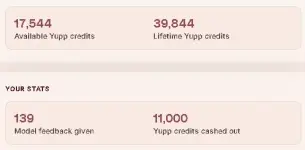
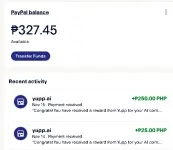
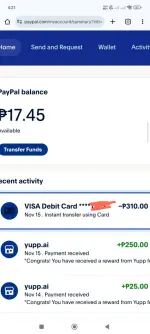
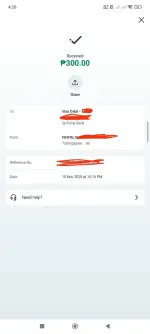
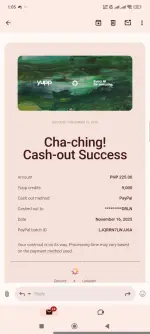
Proof of 1st withdrawal
Hey [Friend's Name]!
I wanted to share something really cool with you—Yupp AI! It’s a great platform where you can earn and cash out easily. If you want to join, just use my referral link: You do not have permission to view the full content of this post. Log in or register now.. It’s super simple to get started!
Also, if you plan to cash out through PayPal and need help linking your bank account or card, here’s a quick step-by-step guide:
- Log in to your PayPal account on the website. If you’re on mobile, open it in your browser and switch to Desktop View for full options.
- Go to Pay or Get ρáíd, then select Banks and Cards.
- Click Link a Credit Card and add your card details.
- After linking, you’ll see an option to Confirm Your Card. Click on your card and select Confirm Your Card again.
- PayPal will show a sample card statement with a 4-digit code.
- Click Get Code, then check your credit card statement or activity for that code.
- Enter the 4-digit code on PayPal to verify your card.
If you want, I can also send you some pictures to help guide you through the process.
Hope this helps, and I’d love to see you on Yupp AI soon!
Feel free to personalize it with your friend’s name or any extra tips!
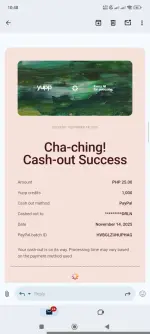
Proof of 1st withdrawal