PH
PHRequirements :
[ Domain Hosting site ] - in my case Cloudflare domains (others: Hostinger , godaddy, namecheap , z.com, etc...)
Pag nakakuha kana ng domain mo, then proceed below
SPECS:
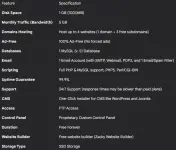
note: ingat lang, kase since free siya hindi siya unlimited bandwidth , pag naubos mo yung 5GB/MONTH baka next month mo na uli ma access website mo.
Mga dapat iwasan
LET'S START
You do not have permission to view the full content of this post. Log in or register now.
STEP 1 : go to You do not have permission to view the full content of this post. Log in or register now. ng awardspace
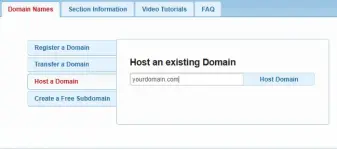
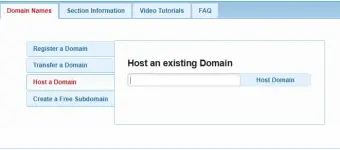
STEP 2: HOST A DOMAIN (input yung binili mo or nakuha mong free na domain)
note: most of all na libreng domain binoblock ni ISP
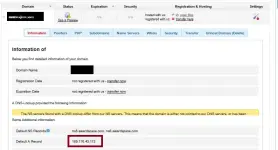
STEP 3 : Kuhain ang A Record ng Domain ( nasa setttings ng domain )
STEP 4 : I open DNS Record ng Domain Hosting mo ( In my case Cloudflare )
note: for Subdomain may tutorial ako sa baba

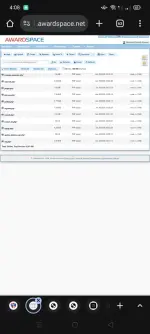
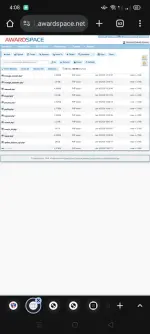
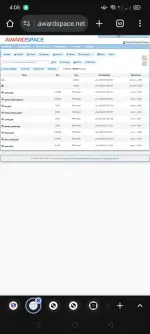
STEP 5: Upload mo na PHP Files mo sa file manager then you can access your website na
FOR SUBDOMAIN:
Gawin mo muna uli yung SAME PROCESS STEP 1 at 3
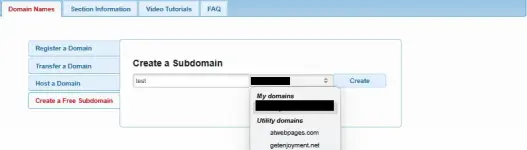
Then Balik ka sa STEP 2 Instead of Host a Domain ( Pick mo Create a free subdomain)
Then makikita mo yung Domain na niregister mo kanina, gawan mo lang ng subdomain name
THEN BALIK SA STEP 4 Instead na @ gagamitin mo yung subdomain name yung ilalagay mo

THEN BALIK SA STEP 5 : Upload mo yung Files dun sa folder nung subdomain mo, then you can access your website na
NOTE:
" RECOMMENDED FOR SMALL PHP PROJECTS LANG " na need ideploy sa school or pang demo
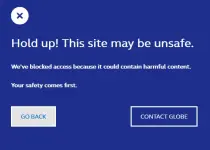
eto Lumabas sakin pag free domain lang gamit q
Maraming salamat po , mga ka-PHC
- Original Domain or Any ρáíd/Free Domains na hindi blocked ng isp mo
( kung bibili suggest ko cloudflare 600+ lang compared sa iba na umaabot ng 800-1000+ PHP ) - Account:
[ Domain Hosting site ] - in my case Cloudflare domains (others: Hostinger , godaddy, namecheap , z.com, etc...)
Pag nakakuha kana ng domain mo, then proceed below
SPECS:
note: ingat lang, kase since free siya hindi siya unlimited bandwidth , pag naubos mo yung 5GB/MONTH baka next month mo na uli ma access website mo.
Mga dapat iwasan
- Uploading or downloading large images, videos, or audio files sa mismong website mo
- Putting LARGE file sized media (images, videos, audio) sa mismong website mo
- High website traffic or frequent visitor activity
LET'S START
You do not have permission to view the full content of this post. Log in or register now.
STEP 1 : go to You do not have permission to view the full content of this post. Log in or register now. ng awardspace
STEP 2: HOST A DOMAIN (input yung binili mo or nakuha mong free na domain)
note: most of all na libreng domain binoblock ni ISP
STEP 3 : Kuhain ang A Record ng Domain ( nasa setttings ng domain )
STEP 4 : I open DNS Record ng Domain Hosting mo ( In my case Cloudflare )
note: for Subdomain may tutorial ako sa baba
STEP 5: Upload mo na PHP Files mo sa file manager then you can access your website na
FOR SUBDOMAIN:
Gawin mo muna uli yung SAME PROCESS STEP 1 at 3
Then Balik ka sa STEP 2 Instead of Host a Domain ( Pick mo Create a free subdomain)
Then makikita mo yung Domain na niregister mo kanina, gawan mo lang ng subdomain name
THEN BALIK SA STEP 4 Instead na @ gagamitin mo yung subdomain name yung ilalagay mo
THEN BALIK SA STEP 5 : Upload mo yung Files dun sa folder nung subdomain mo, then you can access your website na
NOTE:
" RECOMMENDED FOR SMALL PHP PROJECTS LANG " na need ideploy sa school or pang demo
eto Lumabas sakin pag free domain lang gamit q
Maraming salamat po , mga ka-PHC