 PH
PHLightning_50
Established
To check the true capacity of your usb storage. 
THE ULTIMATE GUIDE FOR CHECKING THE TRUE STORAGE CAPACITY
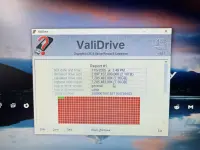
THE ULTIMATE GUIDE FOR CHECKING THE TRUE STORAGE CAPACITY
- Download: Go to the official GRC (Gibson Research Corporation) website and download the free You do not have permission to view the full content of this post. Log in or register now. utility.
- Plug in Drive: Insert the USB drive you want to test into your computer.
- Run the Tool: Double-click the ValiDrive.exe file to run it (no installation is needed).
- Select Drive: The program will show a list of available drives. Click on the USB drive you want to validate.
- Start Test: The tool will automatically begin a quick validation test, reading and writing small amounts of data across the entire drive to ensure every part of it can actually store data.
- Review Results:In a few moments, the tool will show you a map of the drive.
- Good (Valid): A fully green bar indicates the drive is legitimate and has the capacity it claims.
- Bad (Fake): You will see red or other colors, indicating the drive's true capacity and how much of its claimed space is fraudulent.