PH
PHLito Sapinoso
Leecher
As many of us know, Globe/TM use proprietary ip addresses for VPN connections. Many say 10.xx ip works fine with them. For me I would recommend 100.112+ for more reliable connectivity. Never failed.
As to how to set your wan ip address (WIFI ip address) the first thing you have to know is how to disconnect/connect your wifi data signal and where to find that wan ip address information. For the latter, usually it is found in the settings>system>device information page (in almost all, if not all, huawei wifi modems and pocket wifi). With the data off/on switch, you can just dig through the menus and submenus. Wan ip address changes each and every time you turn off your data signal. So if you even succeed in finding the right ip address now, you will lose it once the modem/pocket wifi is turned off or the data signal gets inadvertently cut. The method of turning the data signal off and on varies with the model and brand of the wifi device.
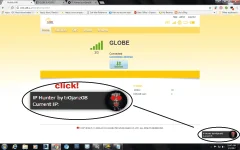
There are some programmers who were able to create program scripts to automate the CDC process, one notably is tr0janz08 who created an ip hunter for huawei devices. It uses an extension for the chrome browser which is Tampermonkey.
There maybe others, but this one works for me quite well.
As to how to set your wan ip address (WIFI ip address) the first thing you have to know is how to disconnect/connect your wifi data signal and where to find that wan ip address information. For the latter, usually it is found in the settings>system>device information page (in almost all, if not all, huawei wifi modems and pocket wifi). With the data off/on switch, you can just dig through the menus and submenus. Wan ip address changes each and every time you turn off your data signal. So if you even succeed in finding the right ip address now, you will lose it once the modem/pocket wifi is turned off or the data signal gets inadvertently cut. The method of turning the data signal off and on varies with the model and brand of the wifi device.
There are some programmers who were able to create program scripts to automate the CDC process, one notably is tr0janz08 who created an ip hunter for huawei devices. It uses an extension for the chrome browser which is Tampermonkey.
Spoiler contents are visible only to Established Members.
There maybe others, but this one works for me quite well.