 PH
PHtombog3772
Eternal Poster
Para sa mga MPD Testers
Streamlink is a Python program that allows you to pipe (play the livestream in e.g., VLC) Livestreams from different services
Optionally, you can also archive the stream or not use piped streams
By default, this includes the requested video quality and the first audio stream
Because FFMPEG only accepts MPEG-CENC encryption, some streams that use other types of encryption will fail with this method
1. Download and install Python 3.9+ and Git
You do not have permission to view the full content of this post. Log in or register now.
You do not have permission to view the full content of this post. Log in or register now.
2. Download and install FFMPEG to your system
You do not have permission to view the full content of this post. Log in or register now.
(it is recommended to download ffmpeg-n6.x-latest-XXXX-gpl-6.x.zip)
Extract the entire contents of the bin folder to C:\Windows\System32
3. Open a CMD or PowerShell as administrator, type the following: Next
pip install git+You do not have permission to view the full content of this post. Log in or register now.
4. Verify that the streamlink and ffmpeg commands work by typing in the following comm
and in the terminal:
ffmpeg -version
streamlink --version (it should output 0.0.0+unknown)
If for some reason using "streamlink" doesn't work, you can replace it with "python -m streamlink", for example:
python -m streamlink --version
5. To use Streamlink, this is the syntax (what you'll enter in the terminal with its data):
streamlink "<LINK MPD>" best --ffmpeg_dkey "KEY"
NOTE: Only enter the KEY, not the entire KID:KEY, or it won't work
By default, this will open VLC with the stream.
5.1. To record from Streamlink to a file
Without VLC open:
streamlink -o "filename.ts" "<LINK MPD>" best --ffmpeg_dkey "KEY"
With VLC open:
streamlink -r "filename.ts" "<LINK MPD>" best --ffmpeg_dkey "KEY"
5.2. Advanced Example
Some MPDs require a user agent and a referer to work; in this case, use the --http-header option.
streamlink "<LINK MPD>" best --http-header "Referer=<LINK REFERER>" --http-header "User-Agent=<YOUR AGENT>" --ffmpeg_dkey "KEY"
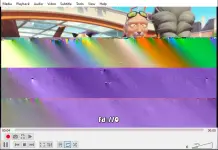
!! Minsan nag eencode issue siya kagaya ng glitched ang bottom part !!
Streamlink is a Python program that allows you to pipe (play the livestream in e.g., VLC) Livestreams from different services
Optionally, you can also archive the stream or not use piped streams
By default, this includes the requested video quality and the first audio stream
Because FFMPEG only accepts MPEG-CENC encryption, some streams that use other types of encryption will fail with this method
1. Download and install Python 3.9+ and Git
You do not have permission to view the full content of this post. Log in or register now.
You do not have permission to view the full content of this post. Log in or register now.
2. Download and install FFMPEG to your system
You do not have permission to view the full content of this post. Log in or register now.
(it is recommended to download ffmpeg-n6.x-latest-XXXX-gpl-6.x.zip)
Extract the entire contents of the bin folder to C:\Windows\System32
3. Open a CMD or PowerShell as administrator, type the following: Next
pip install git+You do not have permission to view the full content of this post. Log in or register now.
4. Verify that the streamlink and ffmpeg commands work by typing in the following comm
and in the terminal:
ffmpeg -version
streamlink --version (it should output 0.0.0+unknown)
If for some reason using "streamlink" doesn't work, you can replace it with "python -m streamlink", for example:
python -m streamlink --version
5. To use Streamlink, this is the syntax (what you'll enter in the terminal with its data):
streamlink "<LINK MPD>" best --ffmpeg_dkey "KEY"
NOTE: Only enter the KEY, not the entire KID:KEY, or it won't work
By default, this will open VLC with the stream.
5.1. To record from Streamlink to a file
Without VLC open:
streamlink -o "filename.ts" "<LINK MPD>" best --ffmpeg_dkey "KEY"
With VLC open:
streamlink -r "filename.ts" "<LINK MPD>" best --ffmpeg_dkey "KEY"
5.2. Advanced Example
Some MPDs require a user agent and a referer to work; in this case, use the --http-header option.
streamlink "<LINK MPD>" best --http-header "Referer=<LINK REFERER>" --http-header "User-Agent=<YOUR AGENT>" --ffmpeg_dkey "KEY"
!! Minsan nag eencode issue siya kagaya ng glitched ang bottom part !!