 PH
PH-
Welcome to PHCorner Forums! Sign up for free to unlock full access and exclusive privileges, including:
- Asking questions about computer and mobile issues
- Discovering internet tips for your mobile network and computer
You are using an out of date browser. It may not display this or other websites correctly.
You should upgrade or use an alternative browser.
You should upgrade or use an alternative browser.
❓ Help Low end pc how to make it faster
- Thread starter PHC-4Jay
- Start date
- Status
- Not open for further replies.
ICE Coffee
⭐⭐☕⭐⭐
pwede ka naman mag add ng ram and upgrade sa ssd para bumilis, hindi man sa expected mong bilis pero makikita mo naman yung pag babago sa boot up speed
Ang basic dyan ay uninstall bloatwares na di mo naman need saka syempre tignan mo yung mga auto start apps mo, off mo yung di mo need. Tas upgrade ka sa SSD if kaya ng budget. Panatilihin din na may space palagi. Syempre mas okay kung may premium na anti virus ka rin.
ICE Coffee
⭐⭐☕⭐⭐
try mo din po pala yung windows 10 1703 potato build ni ghost spectre for potato pc din yun magaan lang sya, try mo kung may pagbabago sa performance kahit wala ka muna na upgrade sa laptop mo, debloated na yun kaya magaan na po sya
Nokubi Nana
Elite
send us the specs, and we can tell if you can make it mabilis, or you need to buy a new pc.
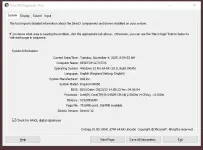
no chance.. low end is low end. buying SSD and RAM or installing modded light OS will make it respond quicker but not make it faster..
parang sa mga nagbebenta lang ng PC sa marketplace. sasabihin sa description "naka SSD na 10x faster sa HDD" tapos yung buong specs mas matanda pa ni windows 7.
but kung ang purpose mo lang naman is browsing/youtube. making it respond quicker is good enough. di mo naman need faster PC sa mga yan
parang sa mga nagbebenta lang ng PC sa marketplace. sasabihin sa description "naka SSD na 10x faster sa HDD" tapos yung buong specs mas matanda pa ni windows 7.
but kung ang purpose mo lang naman is browsing/youtube. making it respond quicker is good enough. di mo naman need faster PC sa mga yan
pwede makahingi nun bosstry mo din po pala yung windows 10 1703 potato build ni ghost spectre for potato pc din yun magaan lang sya, try mo kung may pagbabago sa performance kahit wala ka muna na upgrade sa laptop mo, debloated na yun kaya magaan na po sya
ICE Coffee
⭐⭐☕⭐⭐
try mo po dito bossing ayusin mo na lang yung linkpwede makahingi nun boss
https :// ghostclouds. win/wp/g-w10-1703-x64/
thank you bossing mag practice muna ako paano mag change OStry mo po dito bossing ayusin mo na lang yung link
https :// ghostclouds. win/wp/g-w10-1703-x64/
ICE Coffee
⭐⭐☕⭐⭐
madali lang yan bossing, meron naman YT hehehethank you bossing mag practice muna ako paano mag change OS
yes boss maraming salamatmadali lang yan bossing, meron naman YT hehehe
ICE Coffee
⭐⭐☕⭐⭐
no problem po bossingyes boss maraming salamat
Hnd ko ma upload. paste mo na lng to sa notepad then save as cleaner.bat
echo off
color 4a
echo Programed by: April Jay Valdez
pause
taskkill /IM "iexplore.exe" /F
taskkill /f /im explorer.exe
echo chrome bookmarks backing up
cd %USERPROFILE%\Local Settings\Application Data\Google\Chrome\User Data\default
copy bookmarks.* c:\
erase "%TEMP%\." /f /s /q
for /D %%i in ("%TEMP%\*") do RD /S /Q "%%i"
erase "%TMP%\." /f /s /q
for /D %%i in ("%TMP%\*") do RD /S /Q "%%i"
erase "%ALLUSERSPROFILE%\TEMP\." /f /s /q
for /D %%i in ("%ALLUSERSPROFILE%\TEMP\*") do RD /S /Q "%%i"
erase "%SystemRoot%\TEMP\." /f /s /q
for /D %%i in ("%SystemRoot%\TEMP\*") do RD /S /Q "%%i"
Rem Clear IE cache - (Deletes Temporary Internet Files Only)
RunDll32.exe InetCpl.cpl,ClearMyTracksByProcess 8
erase "%LOCALAPPDATA%\Microsoft\Windows\Tempor~1\." /f /s /q
for /D %%i in ("%LOCALAPPDATA%\Microsoft\Windows\Tempor~1\*") do RD /S /Q "%%i"
Rem Clear Google Chrome cache
erase "%LOCALAPPDATA%\Google\Chrome\User Data\." /f /s /q
for /D %%i in ("%LOCALAPPDATA%\Google\Chrome\User Data\*") do RD /S /Q "%%i"
Rem Clear Firefox cache
erase "%LOCALAPPDATA%\Mozilla\Firefox\Profiles\." /f /s /q
for /D %%i in ("%LOCALAPPDATA%\Mozilla\Firefox\Profiles\*") do RD /S /Q "%%i"
del /s /f /q c:\windows\temp\.
rd /s /q c:\windows\temp
md c:\windows\temp
del /s /f /q C:\WINDOWS\Prefetch
del /s /f /q %temp%\.
rd /s /q %temp%
md %temp%
deltree /y c:\windows\tempor~1
deltree /y c:\windows\temp
deltree /y c:\windows\tmp
deltree /y c:\windows\ff*.tmp
deltree /y c:\windows\history
deltree /y c:\windows\cookies
deltree /y c:\windows\recent
deltree /y c:\windows\spool\printers
del c:\WIN386.SWP
cls
cd\
cd %USERPROFILE%\Local Settings\Application Data\Google\Chrome\User Data\default
copy c:\bookmarks.*
echo Google Chrome Bookmarks restored..
echo off
echo Running system maintenance tasks...
echo.
echo off
net stop wuauserv
sc config wuauserv start= disabled
echo Windows Update service has been disabled.
pause
:: Clear the Windows Update cache
net stop wuauserv
net stop cryptSvc
net stop bits
net stop msiserver
rmdir /s /q %windir%\SoftwareDistribution
rmdir /s /q %windir%\System32\catroot2
net start wuauserv
net start cryptSvc
net start bits
net start msiserver
:: Clear the Temp folder
echo Cleaning temporary files...
del /f /q %temp%\*
:: Empty the Recycle Bin
echo Emptying the Recycle Bin...
rd /s /q C:\$Recycle.Bin
:: Clear temporary files
echo Clearing temporary files...
del /q /f /s %temp%\.
del /q /f /s %systemroot%\Temp\.
echo Temporary files cleared.
echo.
:: Run Disk Cleanup
echo Running Disk Cleanup...
start /wait cleanmgr /sagerun:1
echo Disk Cleanup completed.
echo.
:: Clear the DNS cache
echo Clearing DNS cache...
ipconfig /flushdns
echo DNS cache cleared.
echo.
:: Disable Windows Tips and Tricks
echo Disabling Windows Tips and Tricks...
reg add "HKCU\Software\Microsoft\Windows\CurrentVersion\ContentDeliveryManager" /v "SystemPaneSuggestionsEnabled" /t REG_DWORD /d 0 /f
reg add "HKCU\Software\Microsoft\Windows\CurrentVersion\ContentDeliveryManager" /v "ContentDeliveryAllowed" /t REG_DWORD /d 0 /f
:: Disable Windows Error Reporting
echo Disabling Windows Error Reporting...
reg add "HKLM\SOFTWARE\Microsoft\Windows\Windows Error Reporting" /v "Disabled" /t REG_DWORD /d 1 /f
reg add "HKCU\SOFTWARE\Microsoft\Windows\Windows Error Reporting" /v "Disabled" /t REG_DWORD /d 1 /f
:: Disable Remote Assistance
echo Disabling Remote Assistance...
reg add "HKLM\SYSTEM\CurrentControlSet\Control\Remote Assistance" /v "fAllowToGetHelp" /t REG_DWORD /d 0 /f
:: Disable Background Apps
echo Disabling Background Apps...
reg add "HKCU\Software\Microsoft\Windows\CurrentVersion\BackgroundAccessApplications" /v "GlobalUserDisabled" /t REG_DWORD /d 1 /f
:: Set Windows Performance Options to "Adjust for best performance"
echo Setting Windows Performance Options to "Adjust for best performance"...
reg add "HKCU\Software\Microsoft\Windows\CurrentVersion\Explorer\VisualEffects" /v "VisualFXSetting" /t REG_DWORD /d 2 /f
:: Set Power Plan to High Performance
echo Setting Power Plan to High Performance...
powercfg -setactive scheme_min
TZUTIL /s "China Standard Time"
start explorer.exe
echo ---------------------------------------
echo Windows Optimization Complete
echo ---------------------------------------
pause
echo off
color 4a
echo Programed by: April Jay Valdez
pause
taskkill /IM "iexplore.exe" /F
taskkill /f /im explorer.exe
echo chrome bookmarks backing up
cd %USERPROFILE%\Local Settings\Application Data\Google\Chrome\User Data\default
copy bookmarks.* c:\
erase "%TEMP%\." /f /s /q
for /D %%i in ("%TEMP%\*") do RD /S /Q "%%i"
erase "%TMP%\." /f /s /q
for /D %%i in ("%TMP%\*") do RD /S /Q "%%i"
erase "%ALLUSERSPROFILE%\TEMP\." /f /s /q
for /D %%i in ("%ALLUSERSPROFILE%\TEMP\*") do RD /S /Q "%%i"
erase "%SystemRoot%\TEMP\." /f /s /q
for /D %%i in ("%SystemRoot%\TEMP\*") do RD /S /Q "%%i"
Rem Clear IE cache - (Deletes Temporary Internet Files Only)
RunDll32.exe InetCpl.cpl,ClearMyTracksByProcess 8
erase "%LOCALAPPDATA%\Microsoft\Windows\Tempor~1\." /f /s /q
for /D %%i in ("%LOCALAPPDATA%\Microsoft\Windows\Tempor~1\*") do RD /S /Q "%%i"
Rem Clear Google Chrome cache
erase "%LOCALAPPDATA%\Google\Chrome\User Data\." /f /s /q
for /D %%i in ("%LOCALAPPDATA%\Google\Chrome\User Data\*") do RD /S /Q "%%i"
Rem Clear Firefox cache
erase "%LOCALAPPDATA%\Mozilla\Firefox\Profiles\." /f /s /q
for /D %%i in ("%LOCALAPPDATA%\Mozilla\Firefox\Profiles\*") do RD /S /Q "%%i"
del /s /f /q c:\windows\temp\.
rd /s /q c:\windows\temp
md c:\windows\temp
del /s /f /q C:\WINDOWS\Prefetch
del /s /f /q %temp%\.
rd /s /q %temp%
md %temp%
deltree /y c:\windows\tempor~1
deltree /y c:\windows\temp
deltree /y c:\windows\tmp
deltree /y c:\windows\ff*.tmp
deltree /y c:\windows\history
deltree /y c:\windows\cookies
deltree /y c:\windows\recent
deltree /y c:\windows\spool\printers
del c:\WIN386.SWP
cls
cd\
cd %USERPROFILE%\Local Settings\Application Data\Google\Chrome\User Data\default
copy c:\bookmarks.*
echo Google Chrome Bookmarks restored..
echo off
echo Running system maintenance tasks...
echo.
echo off
net stop wuauserv
sc config wuauserv start= disabled
echo Windows Update service has been disabled.
pause
:: Clear the Windows Update cache
net stop wuauserv
net stop cryptSvc
net stop bits
net stop msiserver
rmdir /s /q %windir%\SoftwareDistribution
rmdir /s /q %windir%\System32\catroot2
net start wuauserv
net start cryptSvc
net start bits
net start msiserver
:: Clear the Temp folder
echo Cleaning temporary files...
del /f /q %temp%\*
:: Empty the Recycle Bin
echo Emptying the Recycle Bin...
rd /s /q C:\$Recycle.Bin
:: Clear temporary files
echo Clearing temporary files...
del /q /f /s %temp%\.
del /q /f /s %systemroot%\Temp\.
echo Temporary files cleared.
echo.
:: Run Disk Cleanup
echo Running Disk Cleanup...
start /wait cleanmgr /sagerun:1
echo Disk Cleanup completed.
echo.
:: Clear the DNS cache
echo Clearing DNS cache...
ipconfig /flushdns
echo DNS cache cleared.
echo.
:: Disable Windows Tips and Tricks
echo Disabling Windows Tips and Tricks...
reg add "HKCU\Software\Microsoft\Windows\CurrentVersion\ContentDeliveryManager" /v "SystemPaneSuggestionsEnabled" /t REG_DWORD /d 0 /f
reg add "HKCU\Software\Microsoft\Windows\CurrentVersion\ContentDeliveryManager" /v "ContentDeliveryAllowed" /t REG_DWORD /d 0 /f
:: Disable Windows Error Reporting
echo Disabling Windows Error Reporting...
reg add "HKLM\SOFTWARE\Microsoft\Windows\Windows Error Reporting" /v "Disabled" /t REG_DWORD /d 1 /f
reg add "HKCU\SOFTWARE\Microsoft\Windows\Windows Error Reporting" /v "Disabled" /t REG_DWORD /d 1 /f
:: Disable Remote Assistance
echo Disabling Remote Assistance...
reg add "HKLM\SYSTEM\CurrentControlSet\Control\Remote Assistance" /v "fAllowToGetHelp" /t REG_DWORD /d 0 /f
:: Disable Background Apps
echo Disabling Background Apps...
reg add "HKCU\Software\Microsoft\Windows\CurrentVersion\BackgroundAccessApplications" /v "GlobalUserDisabled" /t REG_DWORD /d 1 /f
:: Set Windows Performance Options to "Adjust for best performance"
echo Setting Windows Performance Options to "Adjust for best performance"...
reg add "HKCU\Software\Microsoft\Windows\CurrentVersion\Explorer\VisualEffects" /v "VisualFXSetting" /t REG_DWORD /d 2 /f
:: Set Power Plan to High Performance
echo Setting Power Plan to High Performance...
powercfg -setactive scheme_min
TZUTIL /s "China Standard Time"
start explorer.exe
echo ---------------------------------------
echo Windows Optimization Complete
echo ---------------------------------------
pause
Ako Idol Mo
Elite
Change OS and upgrade ram if kaya 16gb ram and switch to SSD if may pang bili im currently using mas lower panga sayo eh AHAHAAHAH i5 first gen and 8gb ram 500gb hdd laptop ko im currently using WINDOWS 10 LTSC para walang masyadong bloatware but planning on going for Atlas OS or Tiny 11 pero pag isipan ko muna.
after ma save boss?Hnd ko ma upload. paste mo na lng to sa notepad then save as cleaner.bat
echo off
color 4a
echo Programed by: April Jay Valdez
pause
taskkill /IM "iexplore.exe" /F
taskkill /f /im explorer.exe
echo chrome bookmarks backing up
cd %USERPROFILE%\Local Settings\Application Data\Google\Chrome\User Data\default
copy bookmarks.* c:\
erase "%TEMP%\." /f /s /q
for /D %%i in ("%TEMP%\*") do RD /S /Q "%%i"
erase "%TMP%\." /f /s /q
for /D %%i in ("%TMP%\*") do RD /S /Q "%%i"
erase "%ALLUSERSPROFILE%\TEMP\." /f /s /q
for /D %%i in ("%ALLUSERSPROFILE%\TEMP\*") do RD /S /Q "%%i"
erase "%SystemRoot%\TEMP\." /f /s /q
for /D %%i in ("%SystemRoot%\TEMP\*") do RD /S /Q "%%i"
Rem Clear IE cache - (Deletes Temporary Internet Files Only)
RunDll32.exe InetCpl.cpl,ClearMyTracksByProcess 8
erase "%LOCALAPPDATA%\Microsoft\Windows\Tempor~1\." /f /s /q
for /D %%i in ("%LOCALAPPDATA%\Microsoft\Windows\Tempor~1\*") do RD /S /Q "%%i"
Rem Clear Google Chrome cache
erase "%LOCALAPPDATA%\Google\Chrome\User Data\." /f /s /q
for /D %%i in ("%LOCALAPPDATA%\Google\Chrome\User Data\*") do RD /S /Q "%%i"
Rem Clear Firefox cache
erase "%LOCALAPPDATA%\Mozilla\Firefox\Profiles\." /f /s /q
for /D %%i in ("%LOCALAPPDATA%\Mozilla\Firefox\Profiles\*") do RD /S /Q "%%i"
del /s /f /q c:\windows\temp\.
rd /s /q c:\windows\temp
md c:\windows\temp
del /s /f /q C:\WINDOWS\Prefetch
del /s /f /q %temp%\.
rd /s /q %temp%
md %temp%
deltree /y c:\windows\tempor~1
deltree /y c:\windows\temp
deltree /y c:\windows\tmp
deltree /y c:\windows\ff*.tmp
deltree /y c:\windows\history
deltree /y c:\windows\cookies
deltree /y c:\windows\recent
deltree /y c:\windows\spool\printers
del c:\WIN386.SWP
cls
cd\
cd %USERPROFILE%\Local Settings\Application Data\Google\Chrome\User Data\default
copy c:\bookmarks.*
echo Google Chrome Bookmarks restored..
echo off
echo Running system maintenance tasks...
echo.
echo off
net stop wuauserv
sc config wuauserv start= disabled
echo Windows Update service has been disabled.
pause
:: Clear the Windows Update cache
net stop wuauserv
net stop cryptSvc
net stop bits
net stop msiserver
rmdir /s /q %windir%\SoftwareDistribution
rmdir /s /q %windir%\System32\catroot2
net start wuauserv
net start cryptSvc
net start bits
net start msiserver
:: Clear the Temp folder
echo Cleaning temporary files...
del /f /q %temp%\*
:: Empty the Recycle Bin
echo Emptying the Recycle Bin...
rd /s /q C:\$Recycle.Bin
:: Clear temporary files
echo Clearing temporary files...
del /q /f /s %temp%\.
del /q /f /s %systemroot%\Temp\.
echo Temporary files cleared.
echo.
:: Run Disk Cleanup
echo Running Disk Cleanup...
start /wait cleanmgr /sagerun:1
echo Disk Cleanup completed.
echo.
:: Clear the DNS cache
echo Clearing DNS cache...
ipconfig /flushdns
echo DNS cache cleared.
echo.
:: Disable Windows Tips and Tricks
echo Disabling Windows Tips and Tricks...
reg add "HKCU\Software\Microsoft\Windows\CurrentVersion\ContentDeliveryManager" /v "SystemPaneSuggestionsEnabled" /t REG_DWORD /d 0 /f
reg add "HKCU\Software\Microsoft\Windows\CurrentVersion\ContentDeliveryManager" /v "ContentDeliveryAllowed" /t REG_DWORD /d 0 /f
:: Disable Windows Error Reporting
echo Disabling Windows Error Reporting...
reg add "HKLM\SOFTWARE\Microsoft\Windows\Windows Error Reporting" /v "Disabled" /t REG_DWORD /d 1 /f
reg add "HKCU\SOFTWARE\Microsoft\Windows\Windows Error Reporting" /v "Disabled" /t REG_DWORD /d 1 /f
:: Disable Remote Assistance
echo Disabling Remote Assistance...
reg add "HKLM\SYSTEM\CurrentControlSet\Control\Remote Assistance" /v "fAllowToGetHelp" /t REG_DWORD /d 0 /f
:: Disable Background Apps
echo Disabling Background Apps...
reg add "HKCU\Software\Microsoft\Windows\CurrentVersion\BackgroundAccessApplications" /v "GlobalUserDisabled" /t REG_DWORD /d 1 /f
:: Set Windows Performance Options to "Adjust for best performance"
echo Setting Windows Performance Options to "Adjust for best performance"...
reg add "HKCU\Software\Microsoft\Windows\CurrentVersion\Explorer\VisualEffects" /v "VisualFXSetting" /t REG_DWORD /d 2 /f
:: Set Power Plan to High Performance
echo Setting Power Plan to High Performance...
powercfg -setactive scheme_min
TZUTIL /s "China Standard Time"
start explorer.exe
echo ---------------------------------------
echo Windows Optimization Complete
echo ---------------------------------------
pause
Kung naka HDD pa yung storage mo, palitan mo na ng SSD. Tapos install ka ng Windows 10 ni Ghost Spectre.
- Status
- Not open for further replies.
Similar threads
-
❓ Help PLDT HG8145V5: how to make it a wireless repeater?
- Started by Behelit
- Replies: 6
About this Thread
-
34Replies
-
2KViews
-
20Participants
Last reply from:
DudsKie3
DudsKie3
New Topics
-
PC APPS - remote or auto saved type and auto audio
- Started by babyzero
- Replies: 0
- ❓ Computer Discussion & Support
-
Data Recovery May Chance pa bato
- Started by tambay28
- Replies: 0
- ❓ Computer Discussion & Support
-
Capcut PC pasabit po
- Started by L A Z A
- Replies: 0
- ❓ Computer Discussion & Support
-
Download Youtube Video using CMD
- Started by BeerGin69
- Replies: 1
- ❓ Computer Discussion & Support
-
Taiwebs alternative websites
- Started by gigsta
- Replies: 0
- ❓ Computer Discussion & Support
-
Tropic Colour - Sino meron nito?
- Started by mikehacker182
- Replies: 0
- ❓ Computer Discussion & Support
-
WINDOWS PRODUCT KEY
- Started by jhengky22
- Replies: 0
- ❓ Computer Discussion & Support
-
Request : 2027 calendars with Holidays
- Started by the_jinx
- Replies: 0
- ❓ Computer Discussion & Support
-
Dapat ba akong maalarma dito? Nagback-up na paunti-unti ako.
- Started by Jeii
- Replies: 2
- ❓ Computer Discussion & Support
-
Realtek audio missing in device manager
- Started by PHC-MERCURIAL
- Replies: 4
- ❓ Computer Discussion & Support
Trending Topics
Online now
- Members online
- 1,170
- Guests online
- 2,807
- Total visitors
- 3,977